


backup camera


Senior Member
Joined: Jan 2007
Posts: 177
Likes: 0
From: Grovetown, GA
Ive got it. I figured out how to make it work with the help of Tasca Auto Parts.
You will need 3 Things, 12v Switched, Ground and a one RCA cut in half.
12v+/0: needs to be connected to Pin 1 (White/Lt. Blue - 18ga)
Ground: to Pin 6 (White - 18ga)
RCA Center Pin: Pin 4 (Red/Yellow - 18ga)
RCA Outside Pin: Pin 5 (Black/Yellow - 18ga)
You will need 3 Things, 12v Switched, Ground and a one RCA cut in half.
12v+/0: needs to be connected to Pin 1 (White/Lt. Blue - 18ga)
Ground: to Pin 6 (White - 18ga)
RCA Center Pin: Pin 4 (Red/Yellow - 18ga)
RCA Outside Pin: Pin 5 (Black/Yellow - 18ga)

Senior Member
Joined: Jun 2007
Posts: 225
Likes: 0
From: SCPA
OK, Low and jrb, I got the handle, can't find any other camera to fit the hole without mods. I guess I will get the factory cam. I don't have the mirror nor do I want it. I have the D3. I understand converting to rca and such but as far as the switching on, what do I have to do? Could the cam always be giving the signal to the D3 but not showing unless I tell it to or do I have to put a "switch" to the hot? What would the hot have to be connected (tapped) into? Any thoughts or ideas? Thanks!

Senior Member
Joined: Feb 2004
Posts: 163
Likes: 0
From: South TX
OK, Low and jrb, I got the handle, can't find any other camera to fit the hole without mods. I guess I will get the factory cam. I don't have the mirror nor do I want it. I have the D3. I understand converting to rca and such but as far as the switching on, what do I have to do? Could the cam always be giving the signal to the D3 but not showing unless I tell it to or do I have to put a "switch" to the hot? What would the hot have to be connected (tapped) into? Any thoughts or ideas? Thanks!
https://www.f150online.com/forums/sh...80#post3204780
Thanks again to Low_e_red for posting the wiring info. The way the OEM camera is powered, it is always on when the ignition is on. You would need to send a switched 12v signal to the tailgate for the camera. Im not sure if there is a good source in the rear, or if you will need to send a switched power wire back there. Then just wire up an RCA using Low_e's info, and your good!
On the D3, the reverse cam has its own input that is only able to be viewed when reverse signal is present. To be able to view the cam at anytime, I split the RCA cable with a Y splitter from radio shack. I plugged one Y into the reverse input, and the other into the AV1 input. Wired this way I am able to view the cam at anytime by selecting the AV1 source.
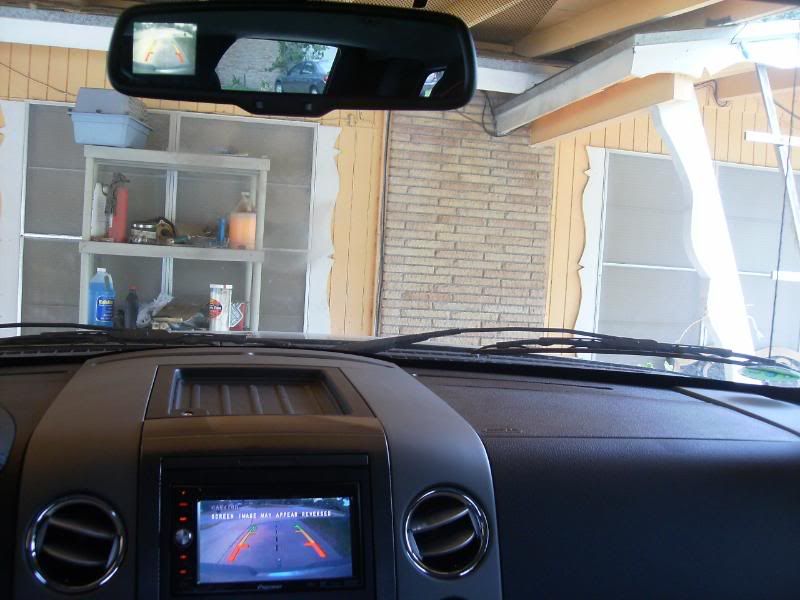
Here is a pic of the backup cam and mirror running while Im in reverse, works great!

Senior Member
Joined: Apr 2007
Posts: 4,494
Likes: 0
From: Slidell, LA
I just posted a new thread with all the info I have learned about the OEM camera system.
https://www.f150online.com/forums/sh...80#post3204780
Thanks again to Low_e_red for posting the wiring info. The way the OEM camera is powered, it is always on when the ignition is on. You would need to send a switched 12v signal to the tailgate for the camera. Im not sure if there is a good source in the rear, or if you will need to send a switched power wire back there. Then just wire up an RCA using Low_e's info, and your good!
On the D3, the reverse cam has its own input that is only able to be viewed when reverse signal is present. To be able to view the cam at anytime, I split the RCA cable with a Y splitter from radio shack. I plugged one Y into the reverse input, and the other into the AV1 input. Wired this way I am able to view the cam at anytime by selecting the AV1 source.
Here is a pic of the backup cam and mirror running while Im in reverse, works great!
https://www.f150online.com/forums/sh...80#post3204780
Thanks again to Low_e_red for posting the wiring info. The way the OEM camera is powered, it is always on when the ignition is on. You would need to send a switched 12v signal to the tailgate for the camera. Im not sure if there is a good source in the rear, or if you will need to send a switched power wire back there. Then just wire up an RCA using Low_e's info, and your good!
On the D3, the reverse cam has its own input that is only able to be viewed when reverse signal is present. To be able to view the cam at anytime, I split the RCA cable with a Y splitter from radio shack. I plugged one Y into the reverse input, and the other into the AV1 input. Wired this way I am able to view the cam at anytime by selecting the AV1 source.
Here is a pic of the backup cam and mirror running while Im in reverse, works great!
Senior Member
Joined: Feb 2004
Posts: 163
Likes: 0
From: South TX
I wasn't sure if it was the camera or the mirror that put those lines there until I did this mod. It has to be the camera since I tapped into the camera's video feed and the lines show on the D3 as well.
Senior Member
Joined: Apr 2007
Posts: 4,494
Likes: 0
From: Slidell, LA
OK, Low and jrb, I got the handle, can't find any other camera to fit the hole without mods. I guess I will get the factory cam. I don't have the mirror nor do I want it. I have the D3. I understand converting to rca and such but as far as the switching on, what do I have to do? Could the cam always be giving the signal to the D3 but not showing unless I tell it to or do I have to put a "switch" to the hot? What would the hot have to be connected (tapped) into? Any thoughts or ideas? Thanks!
Senior Member
Joined: Jan 2007
Posts: 177
Likes: 0
From: Grovetown, GA
Gentlemen,
Ive already have all the wiring done to use a backup camera that I have right now but I would like to get the stock camera and handle, my question is is how can I add a AV plug to the OEM camera so that I can plug it into my head unit.
Ive already have all the wiring done to use a backup camera that I have right now but I would like to get the stock camera and handle, my question is is how can I add a AV plug to the OEM camera so that I can plug it into my head unit.
Last edited by aflores61; May 13, 2008 at 10:41 PM.
Senior Member
Joined: Feb 2004
Posts: 163
Likes: 0
From: South TX
You will connect the two video wires from the cam to a RCA type video cable. You can buy a regular RCA cable and cut one end off, then strip back the wires and solder. Or you can do what I did, I found a special cable at radio shack, it was a RCA cable with one end already cut and stripped, ready to connect. You will wire the RCA cable to the cam as follows:
RCA center pin - Cam pin 4 (red/yellow)
RCA outside pin - Cam pin 5 (black/yellow)
RCA center pin - Cam pin 4 (red/yellow)
RCA outside pin - Cam pin 5 (black/yellow)
Senior Member
Joined: Jan 2007
Posts: 177
Likes: 0
From: Grovetown, GA
You will connect the two video wires from the cam to a RCA type video cable. You can buy a regular RCA cable and cut one end off, then strip back the wires and solder. Or you can do what I did, I found a special cable at radio shack, it was a RCA cable with one end already cut and stripped, ready to connect. You will wire the RCA cable to the cam as follows:
RCA center pin - Cam pin 4 (red/yellow)
RCA outside pin - Cam pin 5 (black/yellow)
RCA center pin - Cam pin 4 (red/yellow)
RCA outside pin - Cam pin 5 (black/yellow)

Senior Member
Joined: Feb 2004
Posts: 163
Likes: 0
From: South TX
I dont think thats the OEM camera. I have this pic, someone in another thread bought the camera and handle but did not know how the camera mounted to the handle. I snapped this pic of the cam on the handle. Here is the thread, it may help you some.
https://www.f150online.com/forums/sh...d.php?t=327860

https://www.f150online.com/forums/sh...d.php?t=327860


Senior Member
Joined: Jan 2008
Posts: 275
Likes: 0
From: Vancouver, Canada
F150partsguy,
Do you have the Lariat handle and wiring harness? The part numbers below don't work on your site.
8L3Z-9943400-AC HANDLE $61.56
8L3Z-14A411-A TAILGATE HARNESS $20.89
Do you have the Lariat handle and wiring harness? The part numbers below don't work on your site.
8L3Z-9943400-AC HANDLE $61.56
8L3Z-14A411-A TAILGATE HARNESS $20.89

Former Sponsor
Joined: Mar 2008
Posts: 160
Likes: 0
From: Seattle
They are there now!

Ed