



2005 F150 Nav Install Help: Pioneer Z1


Senior Member
Joined: Aug 2005
Posts: 145
Likes: 0
Originally Posted by steve293
Lol just make sure your shop knows what the crap they are doing. After a free installation...they snipped a wrong wire (hence the yellow twisty cap), installed the iPod, BT, and rear camera incorrectly...oh yea and they "lost" my P.I.E. adapter.

Senior Member
Joined: Mar 2006
Posts: 130
Likes: 0
Yea..considering how pissed I was..I would call that an understatement :P
Duke..it's fairly simple..just screw in the side brackets and the front trim and screw in to the dash. If you still have problems let me know
Duke..it's fairly simple..just screw in the side brackets and the front trim and screw in to the dash. If you still have problems let me know

Thread Starter
|
Senior Member
Joined: Apr 2005
Posts: 3,009
Likes: 0
From: In a van down by the river
Originally Posted by steve293
You have two? It would really help if you could take a picture for me. Is it Light blue? I'm not meaning to insult your intelligence..it's just I can't tell right off the bat. Does it look anything like this...

Do you have the metra 95-5812 dash kit? It's really hard to put together and I don't think I'm liking it very much.
Duke
Senior Member
Joined: Mar 2006
Posts: 130
Likes: 0
Originally Posted by F150 Duke
Well I went back and used the blue/red wire that is next to the red wire. Like it is in your picture.
Do you have the metra 95-5812 dash kit? It's really hard to put together and I don't think I'm liking it very much.
Duke
Do you have the metra 95-5812 dash kit? It's really hard to put together and I don't think I'm liking it very much.
Duke

That's weird..i don't see that dash kit on the metra site. Is it new? I know that the standard kit for the f150s are the metra 99-5807. Are these the instructions you got?
http://www.metraonline.com/downloads...NST99-5807.pdf
If so all you gotta do is slide the side brackets over the mounting holes of the faceplate. Then slide the H/U in from behind and screw it in. On the instruction manual, page 6 describes it.
EDIT: I'm letting you know that the bypass that Ducatiboy made works great. So glad that he took the time to share this with us fellow Z1 users.
Last edited by steve293; May 26, 2006 at 12:30 AM.
Thread Starter
|
Senior Member
Joined: Apr 2005
Posts: 3,009
Likes: 0
From: In a van down by the river
So I need help. Apparently the bypass isn't working.
If I flash the headlights on boot up it will go into the unlocked mode though.
Since it's night, if I have my headlights on it dims the screen and in the settings, it says illumination "on".
However, if the headlights are off it says illumination "off".
What the heck could I have done wrong? I'm going to take it back off and take a picture of my connections. I have to be tied into the illumination wire correctly or I wouldn't be able to say illumination "on" right?
I mean, the bypass doesn't mean you have to flash your headlights every time, right?
Duke
If I flash the headlights on boot up it will go into the unlocked mode though.
Since it's night, if I have my headlights on it dims the screen and in the settings, it says illumination "on".
However, if the headlights are off it says illumination "off".
What the heck could I have done wrong? I'm going to take it back off and take a picture of my connections. I have to be tied into the illumination wire correctly or I wouldn't be able to say illumination "on" right?
I mean, the bypass doesn't mean you have to flash your headlights every time, right?
Duke
Last edited by F150 Duke; May 26, 2006 at 01:33 AM.
Senior Member
Joined: Mar 2006
Posts: 130
Likes: 0
WHOA HOLD ON THERE don't do anything. It's supposed to say ON if the headlights are on. Everything you did worked. Something is wrong ONLY if it says OFF even though your headlights are actually on. It will say OFF if your headlights are turned off. The fact that your H/U is dimming is the sign of success. If you didn't connect it right it wouldn't be doing anything even though it was night time and the lights were on. Also did you actually receive the Bypass Circuit from Ducatiboy yet? If so you don't have to manually flash them..the circuit will pulse the 12v by itself without actually flashing your headlights thus saving your HIDs.
This is directly from the NAV posting i made about the ILL wire...i noticed you posted over there with questions so I'll just merge them.
You will know if the dimmer wire is not properly connected if it says "off" for Illumination even though the headlights are turned on. A correctly working unit wil say "on" when the headlights are on and "off" when they are off.

Success! The sky turns dark at night and the unit dims (only for looks) but the best thing of all...the bypass works. Flick the lights on/off once during the black boot screen and you're good to go! (NOTE: Only switch the lights on/off manually IF you do not have ducatiboy's circuit unit installed...if you have it installed the unit will do it by itself)

This is directly from the NAV posting i made about the ILL wire...i noticed you posted over there with questions so I'll just merge them.
You will know if the dimmer wire is not properly connected if it says "off" for Illumination even though the headlights are turned on. A correctly working unit wil say "on" when the headlights are on and "off" when they are off.
Success! The sky turns dark at night and the unit dims (only for looks) but the best thing of all...the bypass works. Flick the lights on/off once during the black boot screen and you're good to go! (NOTE: Only switch the lights on/off manually IF you do not have ducatiboy's circuit unit installed...if you have it installed the unit will do it by itself)
Last edited by steve293; May 26, 2006 at 01:42 AM.
Thread Starter
|
Senior Member
Joined: Apr 2005
Posts: 3,009
Likes: 0
From: In a van down by the river
So to start of:
I have the orange ILL wire from the Z1 harness tied into the blue and red wire on the actual truck harness.
Then I have the white wire from the bypass going to the connection which has the Orange ILL wire tied to the blue and red wire from the truck.
I have the orange ILL wire from the Z1 harness tied into the blue and red wire on the actual truck harness.
Then I have the white wire from the bypass going to the connection which has the Orange ILL wire tied to the blue and red wire from the truck.
Thread Starter
|
Senior Member
Joined: Apr 2005
Posts: 3,009
Likes: 0
From: In a van down by the river
OHHH. Post #83 I think shows my problem. I wired the bypass right, but I also had the wires tied together from the initial install. Thus doing both. Does that sound like it's my problem?
Duke
Duke
Senior Member
Joined: Mar 2006
Posts: 130
Likes: 0
I think that may be the problem. The Orange ILL wire from the Z1 goes to the Orange wire coming out of the bypass circuit unit. The orange ILL wire from the Z1 will not touch the Blue/Red line. The Blue/Red Line actually connects with the WHITE line coming out of the bypass circuit unit.
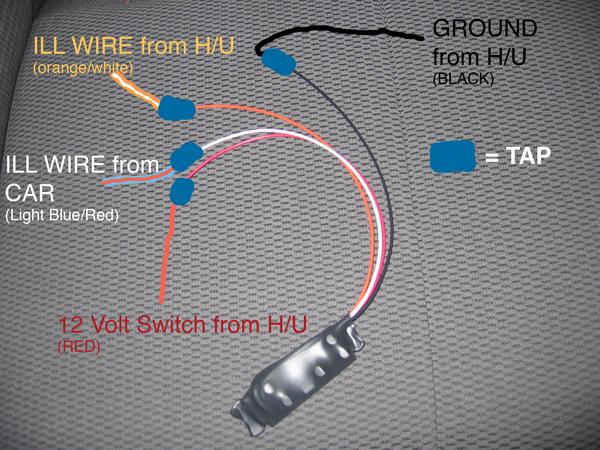
Last edited by steve293; May 26, 2006 at 02:21 AM.
Thread Starter
|
Senior Member
Joined: Apr 2005
Posts: 3,009
Likes: 0
From: In a van down by the river
Yeah I'm feeling like a really big retard right now.
I went ahead and cut the bypass out and all the crap I put around it. Then I put the harness back to how it should be with normal connections.
NOW I'm following ducati's directions and they're making sense. Give me like 10 minutes and I'll have it back in the dash.
Duke
I went ahead and cut the bypass out and all the crap I put around it. Then I put the harness back to how it should be with normal connections.
NOW I'm following ducati's directions and they're making sense. Give me like 10 minutes and I'll have it back in the dash.
Duke
Thread Starter
|
Senior Member
Joined: Apr 2005
Posts: 3,009
Likes: 0
From: In a van down by the river
Does the passenger's air bag thing need to be plugged in for me to turn on the truck without a CEL or the thing going off?
Well I'll plug it in just in case. Time for a test drive.
Duke
Well I'll plug it in just in case. Time for a test drive.
Duke
Last edited by F150 Duke; May 26, 2006 at 02:41 AM.

Thread Starter
|
Senior Member
Joined: Apr 2005
Posts: 3,009
Likes: 0
From: In a van down by the river
Yup. I'm back and .....IT WORKS! Haha, I went to drive off and for some reason it wouldn't even turn on. Turns out the two harnesses CC and Stock got loose and weren't together all the way.
Now with the bypass wired correctly, it works perfectly.
Now I just need to run to Radio shack and get a resistor to stop the sub thumb every time the truck turns on.
Then I need to pack and put the dash back together in time to leave at 2 for Grand Marias. That'll be a great nav test.
Duke
Now with the bypass wired correctly, it works perfectly.
Now I just need to run to Radio shack and get a resistor to stop the sub thumb every time the truck turns on.
Then I need to pack and put the dash back together in time to leave at 2 for Grand Marias. That'll be a great nav test.
Duke

Senior Member
Joined: Jan 2005
Posts: 121
Likes: 0
From: Charlotte, NC
Congratulations!!! Holy cow, what an experience. Your trial run will hopefully make my install MUCH easier. Thanks for working step by step through it all on the forum.
Have a safe trip, and give us a full download when your back. Looking forward to hearing all about it.
Have a safe trip, and give us a full download when your back. Looking forward to hearing all about it.