



2005 F150 Nav Install Help: Pioneer Z1


Senior Member
Joined: Oct 2004
Posts: 2,597
Likes: 0
I may not be following you, but on any head unit install the harness adaptor you buy will have the red, yellow, speed sensor, lighting already to fasten to your harness. You don’t cut those wires, you plug the adaptor (schosche premium one, 7 bucks at WalMart is the best I’ve used.) into the harness plug that is already there. This you solder to the wire harness that plugs into the back of the stereo unit.
This is all done on the bench before you yank your old radio. Then you just plug it in.
Chris
This is all done on the bench before you yank your old radio. Then you just plug it in.
Chris

Thread Starter
|
Senior Member
Joined: Apr 2005
Posts: 3,009
Likes: 0
From: In a van down by the river
I just found this:
https://www.f150online.com/forums/sh...hlight=install
So far it's been a life saver. I'm going through step by step and wiring this on my bed and marking with sticky notes what wire needs to connected where and then I'll go take apart the stock radio.
Duke
https://www.f150online.com/forums/sh...hlight=install
So far it's been a life saver. I'm going through step by step and wiring this on my bed and marking with sticky notes what wire needs to connected where and then I'll go take apart the stock radio.
Duke
Thread Starter
|
Senior Member
Joined: Apr 2005
Posts: 3,009
Likes: 0
From: In a van down by the river
Here is what CC said I would need to connect the stock harness to the Z1. I think the big black grey part plugs into my stock harness. But where does the black part plug into? I don't see where that fits in the back of the Z1?

Here is a pick of the back of the Z1.

Here is a pick of the back of the Z1.

Thread Starter
|
Senior Member
Joined: Apr 2005
Posts: 3,009
Likes: 0
From: In a van down by the river
Just got off the phone with another CC. They said that part they sold me with the black end won't work (obviously my problem here) and that I'll need to hard wire all that stuff.
Duke
Duke

Senior Member

Joined: Jan 2005
Posts: 6,494
Likes: 1
From: Northern CA
Originally Posted by F150 Duke

I understand the black, but where do I go with the others?
Duke

Senior Member
Joined: Aug 2003
Posts: 998
Likes: 0
From: Southern Cali
Originally Posted by F150 Duke
Here is what CC said I would need to connect the stock harness to the Z1. I think the big black grey part plugs into my stock harness. But where does the black part plug into? I don't see where that fits in the back of the Z1?
Here is a pick of the back of the Z1.
Here is a pick of the back of the Z1.

Senior Member
Joined: Mar 2006
Posts: 130
Likes: 0
Duke, did you get the bypass yet? If you purchased it around the same time I did you should be getting it any day now. If so, just hold on to that ILL wire and just install it straight to the bypass circuit. Josiah pretty much answered your questions about the wire there. I was also wondering like Teck if that black plug didn't fit in the lower left corner.
I have to open up my Dash to install this bypass right now so I'll look around and take some pics of what goes where. Hopefully it should help you if you are still working on it.
I have to open up my Dash to install this bypass right now so I'll look around and take some pics of what goes where. Hopefully it should help you if you are still working on it.
Thread Starter
|
Senior Member
Joined: Apr 2005
Posts: 3,009
Likes: 0
From: In a van down by the river
Originally Posted by TeckBargins
Does the black end not fit into the bottom left of the back of the headunit, or is it the wrong size?
I'm going to put the XM and Nav transmitters in the wiper cowl. Can anyone tell me how to take the wiper cowl off the right way so that I can put it back on without anything braking? PLEASE?
Duke
Thread Starter
|
Senior Member
Joined: Apr 2005
Posts: 3,009
Likes: 0
From: In a van down by the river
Originally Posted by steve293
Duke, did you get the bypass yet? If you purchased it around the same time I did you should be getting it any day now. If so, just hold on to that ILL wire and just install it straight to the bypass circuit. Josiah pretty much answered your questions about the wire there. I was also wondering like Teck if that black plug didn't fit in the lower left corner.
I have to open up my Dash to install this bypass right now so I'll look around and take some pics of what goes where. Hopefully it should help you if you are still working on it.
I have to open up my Dash to install this bypass right now so I'll look around and take some pics of what goes where. Hopefully it should help you if you are still working on it.
But how can I take apart the wiper cowl to put in the transmitters, so I can get it back together and not take it apart?
Duke
Senior Member
Joined: Mar 2006
Posts: 130
Likes: 0
Originally Posted by F150 Duke
Thanks! I'm about to take apart the dash for the unit, then take apart the kick panel for the reverse wire, then take apart the center console for the Ipod stuff.
But how can I take apart the wiper cowl to put in the transmitters, so I can get it back together and not take it apart?
Duke
But how can I take apart the wiper cowl to put in the transmitters, so I can get it back together and not take it apart?
Duke
I have some additional and more specific pics in my gallery
https://www.f150online.com/galleries....cfm?gnum=7371
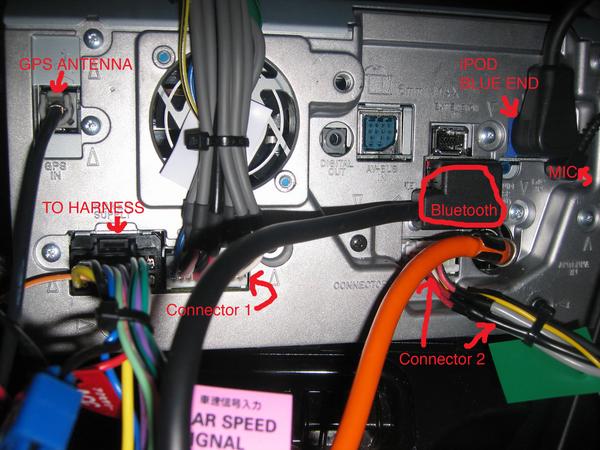
Also I'm actually certain that the black plug goes into that left corner. If it looks like this then that's it. The gray thing does plug into your harness BTW.

Last edited by steve293; May 24, 2006 at 10:41 PM.
Thread Starter
|
Senior Member
Joined: Apr 2005
Posts: 3,009
Likes: 0
From: In a van down by the river
Hmm, I think I figured it out from your gallery. One is blank and the other just has the rear camera.
Someone out there tell me how to take this stupid wiper cowl off pretty please?
Duke
Someone out there tell me how to take this stupid wiper cowl off pretty please?
Duke