



2005 F150 Nav Install Help: Pioneer Z1


Senior Member
Joined: Jun 2005
Posts: 2,376
Likes: 2
From: Plano, TEXAS
Originally Posted by F150 Duke
What are the things in connector 1 and 2?
I really wish someone could help me take this cowl off.
Duke
I really wish someone could help me take this cowl off.
Duke
Senior Member
Joined: Jun 2005
Posts: 2,376
Likes: 2
From: Plano, TEXAS
Originally Posted by F150 Duke
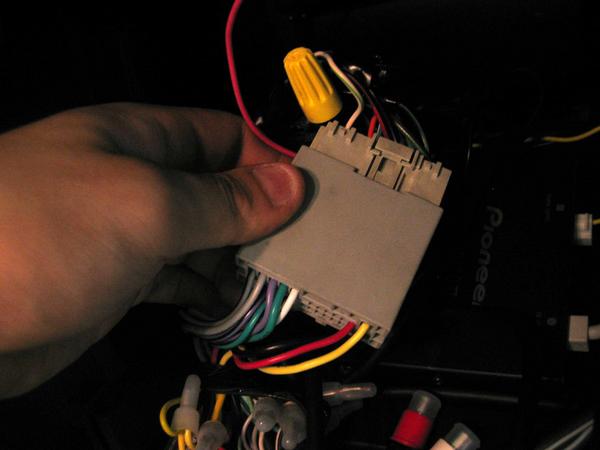
In the picture of your wiring harness. The wires to the right. I also have a blue, orange and black. Do I need those or are they extra


Senior Member
Joined: Mar 2006
Posts: 130
Likes: 0
Originally Posted by -TXF150-
Please dont tell me you are using that twist cap in your truck...

So the illumination wire bit. Do I use the orange/white wire on the CC harness and match it with the ILL wire on the Z1 harness?
White goes to the Dim wire from the car
Orange wire goes to the Orange/White ILL line from the H/U
Red goes to the red wire from the H/U
Black goes to ground (black wire from the H/U)
You probably saw this on the 411 site but here you go just in case:

And about the window cowl..the only picture I could find was from this discussion:
https://www.f150online.com/forums/sh...nna+wiper+cowl
Unfortunately it's from an old model but maybe it could help you. Sorry i can't help you out anymore there Duke
Last edited by steve293; May 25, 2006 at 12:30 AM.

Thread Starter
|
Senior Member
Joined: Apr 2005
Posts: 3,009
Likes: 0
From: In a van down by the river
the cc harness plug says the orange/white wire is the dimmer wire.
I'll go ahead and plug the orange/white ILL wire from the Z1 into the blue and red stock harness AND the orange bypass wire.
The orange/white cc wire will have to stay undone unless the Z1 has a dimmer wire which I don't think it does.
Which would mean you can't dim the z1 with the stock dash lights.
duke
I'll go ahead and plug the orange/white ILL wire from the Z1 into the blue and red stock harness AND the orange bypass wire.
The orange/white cc wire will have to stay undone unless the Z1 has a dimmer wire which I don't think it does.
Which would mean you can't dim the z1 with the stock dash lights.
duke
Last edited by F150 Duke; May 25, 2006 at 12:52 AM.

Senior Member
Joined: Mar 2006
Posts: 130
Likes: 0
Right you can't actually adjust the brightness with your switch for the dash lights. It has a night and day mode as it automatically senses when your headlights are on/off. So assuming you have your auto-lights it would dim automatically, inverse the color of the map, and turn the sky from day to night in driver's view mode when it gets dark. As long as you follow the wiring in the picture i took of the bypass you should be fine. Keep us updated on your progress 
Last edited by steve293; May 25, 2006 at 03:17 AM.
Thread Starter
|
Senior Member
Joined: Apr 2005
Posts: 3,009
Likes: 0
From: In a van down by the river
Originally Posted by steve293
Right you can't actually adjust the brightness with your switch for the dash lights. It has a night and day mode as it automatically senses when your headlights are on/off. So assuming you have your auto-lights it would dim automatically, inverse the color of the map, and turn the sky from day to night in driver's view mode when it gets dark. As long as you follow the wiring in the picture i took of the bypass you should be fine. Keep us updated on your progress
Well time for round 2 or is it 3 now? Anyhow, I was up till 1am this morning finishing the wiring harness for this thing. I also wires my yellow and black wires for the ipod and the xm to my z1 harness.
Next steps:
DISCONNECT THE BATTERY
Take apart the wiper cowl, center console, and flow through shifter.
Then I'll tap into the blue/red stock ILL wire with the white wire on the bypass and the ILL wire on the Z1 harness (orange and white).
I'll then tape off the dimmer wire on the CC harness as it appears I won't need it.
Then I'll tap the pink wire on the z1 harness to the VSS located in the trucks wiring harness(grey / black)
Then I'll wire the reverse sensing wire (purple and white) on the z1 harness to the reverse wire of truck located just above fuse box (Green / gold ).
Then I'll run the XM and Nav transmitters from the wiper cowl down through the engine compartment and through the plug thing by the master cylinder and then wire them to the radio area.
Then I'll wire the ipod unit from the flow through console up to the dash opening and mount the ipod in place. (wire harness wires and IP bus wires)
Then I'll mount the XM unit in the bottom of the dash opening and connect it's neccessary wires (wire harness wires and IP bus wires)
Then I'll do some wire management and make sure everything is taped up, wrapped up in tubing and zip tied in place.
Then I'll figure out and mount the brackets on the z1 unit and install/plug in everything and mount the dash kit.
Then I'll reconnect the AC controls, passenger bag light, and cig lighter and the battery and test the unit to make sure it works.
Then I'll put the dash and everything else back together.
Then call XM and subscribe.
Then go for a drive and play with it.
How's the step-by-step? Hopefully it's correct, let me know your edits to the process.
Thanks again fellas for all the help!
Duke
Thread Starter
|
Senior Member
Joined: Apr 2005
Posts: 3,009
Likes: 0
From: In a van down by the river
Ouch, next big hurdel. I have the stock AUDIOPHILE system which means a sub. How the heck do I wire this thing? I didn't see a wire for it on the CC harness.
And how do you disconnect the auto ac stuff? Everything is different
EDIT: So I figured out the AC controls, but ended up breaking one of the grey retainer clips. I'm going to try and hot glue it back together now.
Still need guidance on the audiophile sub though.
Duke
And how do you disconnect the auto ac stuff? Everything is different
EDIT: So I figured out the AC controls, but ended up breaking one of the grey retainer clips. I'm going to try and hot glue it back together now.
Still need guidance on the audiophile sub though.
Duke
Last edited by F150 Duke; May 25, 2006 at 09:21 AM.
Thread Starter
|
Senior Member
Joined: Apr 2005
Posts: 3,009
Likes: 0
From: In a van down by the river
So I'm getting better at answering my own problems. I found the information below and though I'd include it for review. Also, Steve, on your setup is anything going to the mute wire. Maybe the bluetooth deal going to the cellular mute? I want to make sure it'll automatically turn down the audio volume when the nav voice comes on. If it doesn't do it automatically then can someone tell me how to wire that?
To Avoid the Turn On Thump of the Sub:
Add a 1.5kohm resistor in line with the blue remote turn on. This will prevent turn on pop noise.
On your harness coming out of the eclipse there is a blue wire with a white stripe on it. That wire is conected to the blue wire on the metra harness.
Cut those 2 wires apart from each other.
Get a 1.5K ohm resistor (rad shack is fine).
Connect 1 side of the resistor to the blue&white wire from the clipse.
Connect the other side of the resistor to the blue wire from the metra harness.
Sub Volume Control:
Check if the Z1 has sub volume control, if not the sub may overpower the rest of the system.
FIX:
Its an easy fix, just get a low pass filter with an input gain adjustment and that will take care of it. It will also make the factory sub sound better (less boomy) crossed over.
Sub Control:
Metra 70-5522 for just the sub plug
To Avoid the Turn On Thump of the Sub:
Add a 1.5kohm resistor in line with the blue remote turn on. This will prevent turn on pop noise.
On your harness coming out of the eclipse there is a blue wire with a white stripe on it. That wire is conected to the blue wire on the metra harness.
Cut those 2 wires apart from each other.
Get a 1.5K ohm resistor (rad shack is fine).
Connect 1 side of the resistor to the blue&white wire from the clipse.
Connect the other side of the resistor to the blue wire from the metra harness.
Sub Volume Control:
Check if the Z1 has sub volume control, if not the sub may overpower the rest of the system.
FIX:
Its an easy fix, just get a low pass filter with an input gain adjustment and that will take care of it. It will also make the factory sub sound better (less boomy) crossed over.
Sub Control:
Metra 70-5522 for just the sub plug
Thread Starter
|
Senior Member
Joined: Apr 2005
Posts: 3,009
Likes: 0
From: In a van down by the river
What color is the reverse sensing wire? I pulled the taillight but can't figure out which one it'd be.
I read a post that said maybe green and gold, but I don't see a green and gold wire anywhere.
I looked in the passenger's side kick panel and also can't figure it out.
EDIT: Good news I found the Chris Adams post where he said the reverse wire was green/yellow even though the taillight shows black/pink.
HOWEVER, I looked above the fuse box on the passenger's side and I have two thin green with yellow stripe wires and one thick green with yellow stripe wire. Which one is it?
Duke
I read a post that said maybe green and gold, but I don't see a green and gold wire anywhere.
I looked in the passenger's side kick panel and also can't figure it out.
EDIT: Good news I found the Chris Adams post where he said the reverse wire was green/yellow even though the taillight shows black/pink.
HOWEVER, I looked above the fuse box on the passenger's side and I have two thin green with yellow stripe wires and one thick green with yellow stripe wire. Which one is it?
Duke
Last edited by F150 Duke; May 25, 2006 at 11:05 AM.

Senior Member
Joined: Aug 2003
Posts: 998
Likes: 0
From: Southern Cali
Originally Posted by F150 Duke
Ouch, next big hurdel. I have the stock AUDIOPHILE system which means a sub. How the heck do I wire this thing? I didn't see a wire for it on the CC harness.
And how do you disconnect the auto ac stuff? Everything is different
EDIT: So I figured out the AC controls, but ended up breaking one of the grey retainer clips. I'm going to try and hot glue it back together now.
Still need guidance on the audiophile sub though.
Duke
And how do you disconnect the auto ac stuff? Everything is different
EDIT: So I figured out the AC controls, but ended up breaking one of the grey retainer clips. I'm going to try and hot glue it back together now.
Still need guidance on the audiophile sub though.
Duke
http://www.crutchfield.com/S-5rhfOPp...&display=L#Tab

Thread Starter
|
Senior Member
Joined: Apr 2005
Posts: 3,009
Likes: 0
From: In a van down by the river
Yup. Just came back from CC. I picked up the correct sub harness now.
So the grey/black VSS wire I need. Is that in the stock headunit harness? I see a grey/black wire but just want to make sure before I tap into it.
I'm about to do the wiring harness in the truck and some wire management, then it's time to plug stuff in.
Duke
So the grey/black VSS wire I need. Is that in the stock headunit harness? I see a grey/black wire but just want to make sure before I tap into it.
I'm about to do the wiring harness in the truck and some wire management, then it's time to plug stuff in.
Duke
Senior Member
Joined: Aug 2003
Posts: 998
Likes: 0
From: Southern Cali
Originally Posted by F150 Duke
Yup. Just came back from CC. I picked up the correct sub harness now.
So the grey/black VSS wire I need. Is that in the stock headunit harness? I see a grey/black wire but just want to make sure before I tap into it.
I'm about to do the wiring harness in the truck and some wire management, then it's time to plug stuff in.
Duke
So the grey/black VSS wire I need. Is that in the stock headunit harness? I see a grey/black wire but just want to make sure before I tap into it.
I'm about to do the wiring harness in the truck and some wire management, then it's time to plug stuff in.
Duke