



How to: Fix blank or dim radio backlight


Thread Starter
|
Senior Member
Joined: Oct 2008
Posts: 3,121
Likes: 4
From: Burlington, VT
How to: Fix blank or dim radio backlight
Tools needed:
7mm socket
T-10
Soldering iron
Solder
Trim remova tool or butter knife
If your 2004-2008 backlights are not working properly, this will fix your issue on your OE radio.
Most will say this is not fixable, however, after doing some research, it's an easy fix. There are radio repare companies out there that are charging $19.99 just for these instructions!
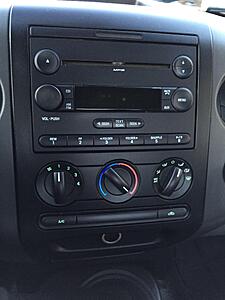
Before. Dimly lit and not readable:
Step 1.
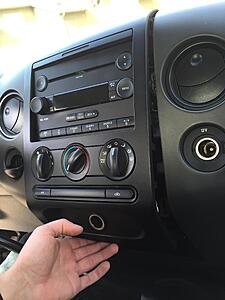
Remove trim around radio. Start at the bottom and pry out.
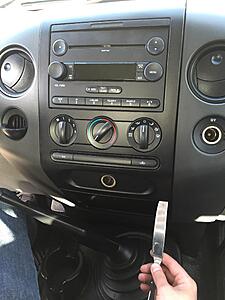
Keep you'll feel the trim pop out as you keep pulling.
Step 2.
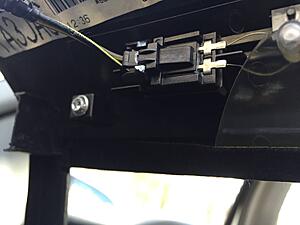
Disconnect airbag warning light. It's located at the top backside of the trim piece. Push in the tab and it comes out easily.
Step 3.
Remove the four 7mm screws on the four corners of the radio.
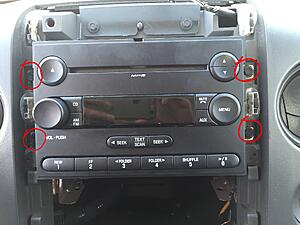
Step 4.
Not pictured, remove harness and antennae plug from rear of radio.
Step 5.
Remove the four T-10 screws located on the front top and bottom (face) of the radio and pull the face off. It will come off easily.
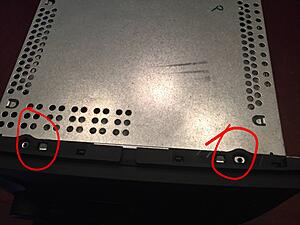
Step 6.
Flip the face over and locate the spots to solder as shown below. They all say "180" on them and there are 4 that need soldering on both sides.
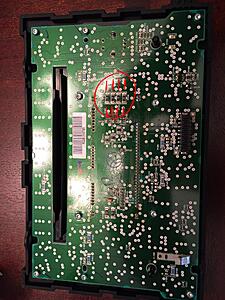
Add solder to the 8 points.
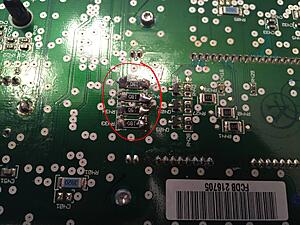
Now reassemble and enjoy the backlight working normally again.
7mm socket
T-10
Soldering iron
Solder
Trim remova tool or butter knife
If your 2004-2008 backlights are not working properly, this will fix your issue on your OE radio.
Most will say this is not fixable, however, after doing some research, it's an easy fix. There are radio repare companies out there that are charging $19.99 just for these instructions!
Before. Dimly lit and not readable:

Step 1.
Remove trim around radio. Start at the bottom and pry out.

Keep you'll feel the trim pop out as you keep pulling.

Step 2.
Disconnect airbag warning light. It's located at the top backside of the trim piece. Push in the tab and it comes out easily.

Step 3.
Remove the four 7mm screws on the four corners of the radio.

Step 4.
Not pictured, remove harness and antennae plug from rear of radio.
Step 5.
Remove the four T-10 screws located on the front top and bottom (face) of the radio and pull the face off. It will come off easily.

Step 6.
Flip the face over and locate the spots to solder as shown below. They all say "180" on them and there are 4 that need soldering on both sides.

Add solder to the 8 points.

Now reassemble and enjoy the backlight working normally again.

Last edited by 2008_XL; Apr 23, 2015 at 07:47 PM.


Senior Member
Joined: Dec 2012
Posts: 567
Likes: 0
From: New Jersey
2008 XL,Thanks for the great post, Don't have a problem with my radio yet, but its nice to see how its fixed just in case I need to do it in the future! Does anyone know if there is one place on the site where ALL the fixes are listed w/o reading every post out there. If not it would be great to see one. Like Radio fixes, window fixes, rear end fixes, tail light fixes, etc... Just an idea.

Senior Member


Joined: Dec 2006
Posts: 43,540
Likes: 819
From: Joplin MO
Thread Starter
|
Senior Member
Joined: Oct 2008
Posts: 3,121
Likes: 4
From: Burlington, VT
Maybe a mod could add this to that section?
Senior Member
Joined: Dec 2006
Posts: 43,540
Likes: 819
From: Joplin MO
That's how the articles are done - the mods copy them to the articles forum after they are posted elsewhere and vetted.
Trending Topics


Thread Starter
|
Senior Member
Joined: Oct 2008
Posts: 3,121
Likes: 4
From: Burlington, VT
Of course! thanks for the kind words!

Global Moderator &
Senior Member
Senior Member

Joined: Aug 2007
Posts: 7,890
Likes: 61
From: Among javelinas and scorpions in Zoniestan
2008 XL,Thanks for the great post, Don't have a problem with my radio yet, but its nice to see how its fixed just in case I need to do it in the future! Does anyone know if there is one place on the site where ALL the fixes are listed w/o reading every post out there. If not it would be great to see one. Like Radio fixes, window fixes, rear end fixes, tail light fixes, etc... Just an idea.
- Jack

Junior Member
Joined: Nov 2016
Posts: 1
Likes: 0
06 and up CD6 displays
Well the resistors are an issue however there is another. There are 8 other power connections for the display they are the two through hole junctions at the extreme corners where the display solders to the board. All eight of mine were fractured from pushing on display to get it to turn on. Just a touch of an iron with some fine flux core solder re-flowed the solder on mine, about 3 seconds is all it took just as the solder joint goes liquid count to 3 and remove. Reinstalled and OOPA display again. Hope that helps

Junior Member
Joined: Mar 2017
Posts: 2
Likes: 0
OEM radio illumination
Hi,
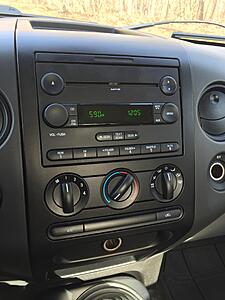
I just bought a used 2008 F150 and the radio has no illumination on the controls. Image of my radio attached.
I'm referring to the the *****, preset buttons, CD, AM, FM, SEEK, MENU, VOL-PUSH etc..
The display does light up (clock, stations etc..)
Maybe these never light up. Unsure. Does anyone?
I just bought a used 2008 F150 and the radio has no illumination on the controls. Image of my radio attached.
I'm referring to the the *****, preset buttons, CD, AM, FM, SEEK, MENU, VOL-PUSH etc..
The display does light up (clock, stations etc..)
Maybe these never light up. Unsure. Does anyone?
Thread Starter
|
Senior Member
Joined: Oct 2008
Posts: 3,121
Likes: 4
From: Burlington, VT
Hi,
I just bought a used 2008 F150 and the radio has no illumination on the controls. Image of my radio attached.
I'm referring to the the *****, preset buttons, CD, AM, FM, SEEK, MENU, VOL-PUSH etc..
The display does light up (clock, stations etc..)
Maybe these never light up. Unsure. Does anyone?
I just bought a used 2008 F150 and the radio has no illumination on the controls. Image of my radio attached.
I'm referring to the the *****, preset buttons, CD, AM, FM, SEEK, MENU, VOL-PUSH etc..
The display does light up (clock, stations etc..)
Maybe these never light up. Unsure. Does anyone?