


pics of the blacked out decals


Thread Starter
|
Senior Member
Joined: Feb 2008
Posts: 2,048
Likes: 0
From: SW FLORIDA
pics of the blacked out decals
i just put the flat black and dark shadow grey decals on that i got from patriotdecals.com . heres a few pics
[IMG]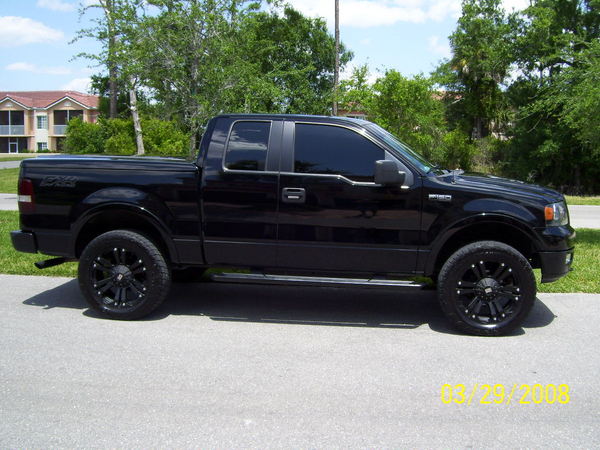 [/IMG]
i put the new fx4 decals on, the side badge inlays, and the oval ford badges
[IMG] [/IMG]

[IMG] [/IMG]
all of the decals were easy to apply with just a little bit of patience
[IMG]
[/IMG]i put the new fx4 decals on, the side badge inlays, and the oval ford badges
[IMG]
[/IMG][IMG]
[/IMG]all of the decals were easy to apply with just a little bit of patience
 [/IMG]


Member
Joined: Jan 2008
Posts: 55
Likes: 0
From: Tonganoxie
i have almost the same exact truck as you. so much for trying to be original...i ordered the inlays a week ago and cant wait for them to get here. i painted my decals matte black and am putting gloss black inlays. i will post pics as soon as i get them.
by the way, if you dont use your fogs much just niteshade them to match like i did.
by the way, if you dont use your fogs much just niteshade them to match like i did.


Senior Member
Joined: Jul 2007
Posts: 113
Likes: 0
From: Philadelphia, PA

Trending Topics
Thread Starter
|
Senior Member
Joined: Feb 2008
Posts: 2,048
Likes: 0
From: SW FLORIDA
Originally Posted by jadams
i have almost the same exact truck as you. so much for trying to be original...i ordered the inlays a week ago and cant wait for them to get here. i painted my decals matte black and am putting gloss black inlays. i will post pics as soon as i get them.
by the way, if you dont use your fogs much just niteshade them to match like i did.
by the way, if you dont use your fogs much just niteshade them to match like i did.
Originally Posted by jadams
i have almost the same exact truck as you. so much for trying to be original...i ordered the inlays a week ago and cant wait for them to get here. i painted my decals matte black and am putting gloss black inlays. i will post pics as soon as i get them.
by the way, if you dont use your fogs much just niteshade them to match like i did.
by the way, if you dont use your fogs much just niteshade them to match like i did.
- NCSU


Thread Starter
|
Senior Member
Joined: Feb 2008
Posts: 2,048
Likes: 0
From: SW FLORIDA
Originally Posted by coobies5
paint that grill now to match = D
Originally Posted by jadams
hey NCSU, how do you add your photo gallery to your posts for others to see? i have a gallery set up but not sure how to link it. any help would be great.

Is that you?
When you log in find and click the "User CP" option directly opposite the "Log Out" button. Once you're on that screen click the "Edit Profile" option. After clicking that, scroll to the very bottom where it says "gallery number". Your number is 11201, enter it there, then save changes. That will put the little camera icon by your member info, which links to your gallery. I see you don't have any photos uploaded yet, if you need help with that, just let me know.
- NCSU
Last edited by NCSU_05_FX4; Mar 30, 2008 at 03:38 PM.