



Need assistance with speedometer


Thread Starter
|
Senior Member
Joined: Feb 2005
Posts: 384
Likes: 0
From: Colorado Springs
Need assistance with speedometer
arm location when engine is running and vehicle stopped. I just got my truck and 2 days ago the speedometer screwed up and would only come down to 35mph when stopped so I had to do math in my head as I am driving to figure out my true speed. It has eventually fallen back down and rests on the 10mph mark. Is this the normal starting position or does it fall below the 10mph mark when stopped. Trying to avoid going to the dealer. I did a gauge reset. The arm still didn't go down past the 10mph so just want to know if this is the correct location.
Thanks,
Brian
Thanks,
Brian

Senior Member
Joined: Oct 2004
Posts: 553
Likes: 0
From: Houston, Texas
For me it sits just below the 10 mph mark. When you do the "Sweep Gauges" it should go a good ways below the 10 mph mark then it kind of vibrates(for lack of a better word) there for a while. Then it should sweep all the way past the 120 mph mark then go back and rest just below the 10 mph again.

Senior Member
Joined: Jun 2004
Posts: 2,457
Likes: 0
From: Central California
Originally Posted by KaNigIt
For me it sits just below the 10 mph mark. When you do the "Sweep Gauges" it should go a good ways below the 10 mph mark then it kind of vibrates(for lack of a better word) there for a while. Then it should sweep all the way past the 120 mph mark then go back and rest just below the 10 mph again.

Anyways, with the key in the off position hold the trip reset button and turn the vehicle to RUN, when the display says "test" release the button and it should say "sweep gauges"


Senior Member
Joined: May 2005
Posts: 1,141
Likes: 1
From: HUSKER COUNTRY, USA
I don't know if any of you had ever seen this, with the guage talk and all, but, on some previous model Mustangs with the digital odometer on the dash, if you held the trip button in, you could get to where it would display a digital tach among other things. Since I'm on my motorcycle today, I can't go out and try it, but thought I'd ask...
Senior Member
Joined: Jun 2004
Posts: 2,457
Likes: 0
From: Central California
Originally Posted by Krohbar
I don't know if any of you had ever seen this, with the guage talk and all, but, on some previous model Mustangs with the digital odometer on the dash, if you held the trip button in, you could get to where it would display a digital tach among other things. Since I'm on my motorcycle today, I can't go out and try it, but thought I'd ask...
Senior Member
Joined: Oct 2004
Posts: 553
Likes: 0
From: Houston, Texas
"Dont bother trying to explain how to do this... "
I did in his previous post - https://www.f150online.com/forums/sh...=199541&page=2
I did in his previous post - https://www.f150online.com/forums/sh...=199541&page=2
Trending Topics
Thread Starter
|
Senior Member
Joined: Feb 2005
Posts: 384
Likes: 0
From: Colorado Springs
Originally Posted by KaNigIt
"Dont bother trying to explain how to do this... "
I did in his previous post - https://www.f150online.com/forums/sh...=199541&page=2
I did in his previous post - https://www.f150online.com/forums/sh...=199541&page=2
Kanigit....thanks for the info. It seems to have worked. Great thing to know about.
Brian

Member
Joined: Feb 2005
Posts: 57
Likes: 0
From: Wichita, KS
Originally Posted by Krohbar
hopefully they continued that with the current generation of F1s. Will have to try it later this evening.
Senior Member
Joined: Jun 2004
Posts: 2,457
Likes: 0
From: Central California
Originally Posted by Jakazz
Tried it and it has the digital tach and few other things also, some I don't understand what they are.
i dont feel like formatting it so try your best
TEST TEST Initial entry display into self-test mode.
SWEEP GAUGES SWEEP GAUGES Carries out gauge sweep of all gauges, then displays the present gauge values. Also carries out the checksum test on ROM and EEPROM.
All segments illuminated All segments illuminated Illuminates all integrated circuit/message center segments.
BULB TEST TELLTALES Illuminates all micro-controlled lamps and LEDs.
####-10849-## PART NUMBER, ####-10849-## Displays alpha-numeric part number.
#### — Suffix (last two digits of the part number are displayed as tow byte hexadecimal number).
###### SERIAL NUMBER ###### Displays serial number in decimal.
IGN # IGNITION KEY, # Displays key-in-ignition status.
ROM #### ROM LEVEL ####, CHKSUM #### Returns to normal operation of all micro-controlled lamps and LEDs and displays hexadecimal value for read-only memory (ROM) level (used when requesting assistance from the hotline).
ROM #### — Displays Hex ROM level as stored in nonvolatile memory (NVM) (used when requesting assistance from the hotline).
NVM #### mmmm NVM ##, CHKSUM #### The message center displays #### representing hexadecimal NVM level and mmmm representing ROM level as stored in NVM. The base cluster displays #### representing hexadecimal ROM level as stored in NVM.
DATE #### FINAL DATE, #### Displays hexadecimal coding of final manufacturing test date.
CONFIG1-CONFIG5 ## MODULE CONFIG, BYTE1-BYTE5= ## Displays hexadecimal of bytes 1-5 of module configuration settings.
DTC #### DIAG TROUBLE, CODE: #### Displays a 16 bit DTC in hexadecimal format. DTCs displayed are those detected in continuous operation, not during self-test.
SPEED E ###.# VEHICLE SPEED, ###.# MPH Displays English speed value being input, speedometer will indicate present speed.
SPEED M ###.# VEHICLE SPEED, ###.# KPH Displays metric speed value being input, speedometer will indicate present speed.
TACH #### TACH VALUE, #### RPM Displays the tachometer value being input to the instrument cluster. Tachometer will indicate present rpm.
F A/D ### FUEL LEVEL A/D, ### Displays present fuel level analog/digital ratio input in decimal. The instrument cluster will indicate present fuel level.
FUEL P ### FUEL LEVEL %, ### Displays present fuel level percent status in decimal.
C TEMP ### COOLANT TEMP, ### Displays last temperature gauge input value from SCP, temperature gauge will indicate present temperature.
ODO CAN ### ODO CAN INPUT, ### Displays the odometer input received through SCP in decimal.
OIL ### OIL PRESSURE, ### Displays the last analog/digital reading of the engine oil pressure switch contact resistance, oil gauge will indicate present level.
BRAKE # BRAKE FLUID AD, # Displays the brake fluid level received from the ABS module.
VOLTS ##.# BATTERY VOLTS, ##.# Displays present SBATT reading in 10th of volt.
DIM ### PWM DIM INPUT ### Displays present rounded duty cycle (%PWM).
PRNDL ## PRNDL ## Displays hexadecimal value of PRNDL inputs packed into a single byte.
PARK # PARK BRAKE, # Displays input status of the park brake switch.
DOOR # DOOR AJAR, # Displays input status of any door ajar input.
DOOR2 # JET DOOR AJAR, # Displays input status of jet door ajar input.
SEATBLT # SEATBELT # Displays input status of safety belt switch.
— RUN/START, # RUN/START sense circuit check.
— RUN/ACC, # RUN/ACC sense circuit check.
PA, Pb, PE, PG, PH, PP, PS, PT and PCAn ## PORT A, B, E, J, H, IB, P, S and T ## Displays 8-bit hexadecimal value for the ports (used when requesting information from the hotline).
AD00-AD07 ## PORT AD00-AD07 ## Displays 8-bit hexadecimal value for the ports AD00-AD07 in analog/digital readings (used when requesting information from the hotline).
AD10-AD17 ## AD10-AD17 ## Displays 8-bit hexadecimal value for the ports AD10-AD17 in analog/digital readings (used when requesting information from the hotline).


Senior Member
Joined: Mar 2005
Posts: 1,708
Likes: 0
From: McAllen, TX
Thanks Bro You got a nice truck there too, I wanted to get a silver STX but it was not offered in a longbed ( needed it for work) so I got this one..And yes they are covers, I really wanted to get the OEM ones but would had been a PIA to change plus the cost would had been pretty high..They look nice IMO. Here is a link to them.
http://cgi.ebay.com/ebaymotors/FORD-...34879436QQrdZ1
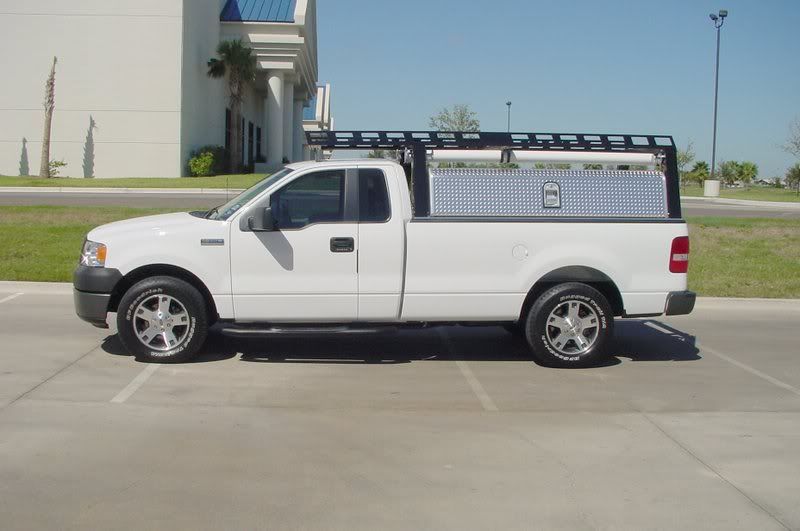
You got a nice truck there too, I wanted to get a silver STX but it was not offered in a longbed ( needed it for work) so I got this one..And yes they are covers, I really wanted to get the OEM ones but would had been a PIA to change plus the cost would had been pretty high..They look nice IMO. Here is a link to them. http://cgi.ebay.com/ebaymotors/FORD-...34879436QQrdZ1