


Gryphon install and update directions


Thread Starter
|
Technical Article Contributor
Joined: Nov 2008
Posts: 409
Likes: 0
From: Shawnee, KS
Gryphon install and update directions
This post outlines the steps needed to upload custom tunes from PHP to a Gryphon and how to install a Gryphon/Evolution in a 2004-2008 F150. It is a continuation of the thread by tarajerame on how to load SCT tunes (https://www.f150online.com/forums/ch...mail-tune.html) and is meant to answer questions like "How hard is it to install a Gryphon?", or "How do I load my new PHP tunes?".
First, you'll want to download Pegasus from PHP's website. They've documented pretty well how to download and install it, so I won't repeat those instructions here. However, I've provided a link to the page on PHP's website where you can find the installer for Pegasus. http://dygytalworld.ehost-services13...p/Support.html
After you've downloaded and installed Pegasus, open it and plug the Gryphon into your computer using the supplied USB cable. (You can use any mini USB plug if you don't have the specific one that comes with an Evolution/Gryphon.) You should see the word "Connected" in the second box of the status bar on the bottom of the Pegasus screen. You will also see the serial number of your Gryphon in the last box of the status bar. WARNING: If you have already installed your Gryphon in your truck and have programmed your PCM with a "canned" tune, you MUST return your vehicle to the "stock" tune, (Level 0) before you remove the Gryphon to upload custom tunes. Failure to heed this warning may render your Gryphon inoperable.

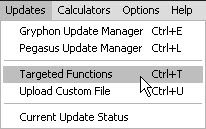
In Pegasus, click Updates, then Targeted Functions. DO NOT choose Gryphon Update Manager here, that choice is for updating firmware, not for uploading custom tunes.
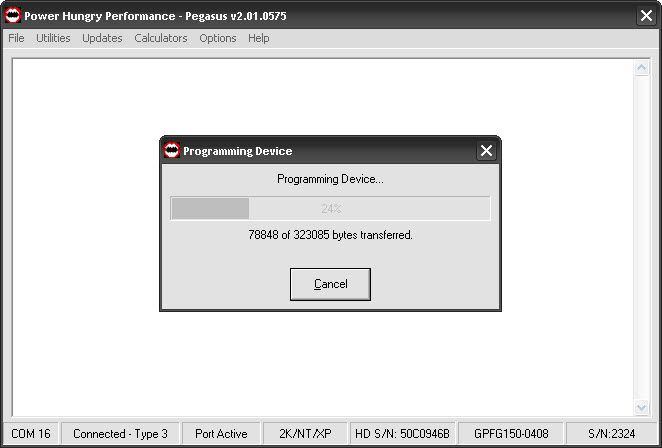
Pegasus will go through a series of updates, giving you a status of each step along the way.
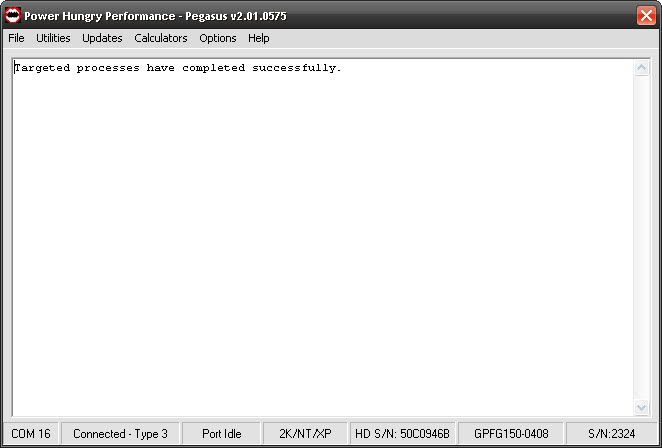
After all updates have been applied, Pegasus will display the following screen:
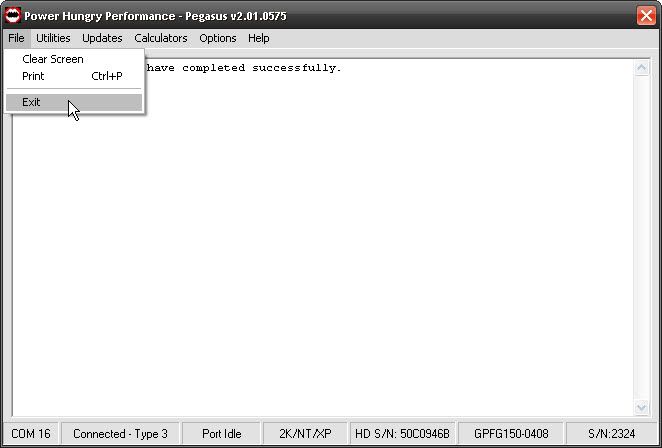
You can now unplug the Gryphon and close Pegasus.
Continued...
First, you'll want to download Pegasus from PHP's website. They've documented pretty well how to download and install it, so I won't repeat those instructions here. However, I've provided a link to the page on PHP's website where you can find the installer for Pegasus. http://dygytalworld.ehost-services13...p/Support.html
After you've downloaded and installed Pegasus, open it and plug the Gryphon into your computer using the supplied USB cable. (You can use any mini USB plug if you don't have the specific one that comes with an Evolution/Gryphon.) You should see the word "Connected" in the second box of the status bar on the bottom of the Pegasus screen. You will also see the serial number of your Gryphon in the last box of the status bar. WARNING: If you have already installed your Gryphon in your truck and have programmed your PCM with a "canned" tune, you MUST return your vehicle to the "stock" tune, (Level 0) before you remove the Gryphon to upload custom tunes. Failure to heed this warning may render your Gryphon inoperable.
In Pegasus, click Updates, then Targeted Functions. DO NOT choose Gryphon Update Manager here, that choice is for updating firmware, not for uploading custom tunes.
Pegasus will go through a series of updates, giving you a status of each step along the way.
After all updates have been applied, Pegasus will display the following screen:
You can now unplug the Gryphon and close Pegasus.
Continued...
Last edited by cstanek; Nov 9, 2009 at 02:04 PM. Reason: Updating with Jack's suggestions
Thread Starter
|
Technical Article Contributor
Joined: Nov 2008
Posts: 409
Likes: 0
From: Shawnee, KS
Now, to install the Gryphon (or Evolution), follow these steps:
1. Make sure your ignition is turned to OFF.
2. Open the driver side door and remove the access panel on the left side of the dashboard.
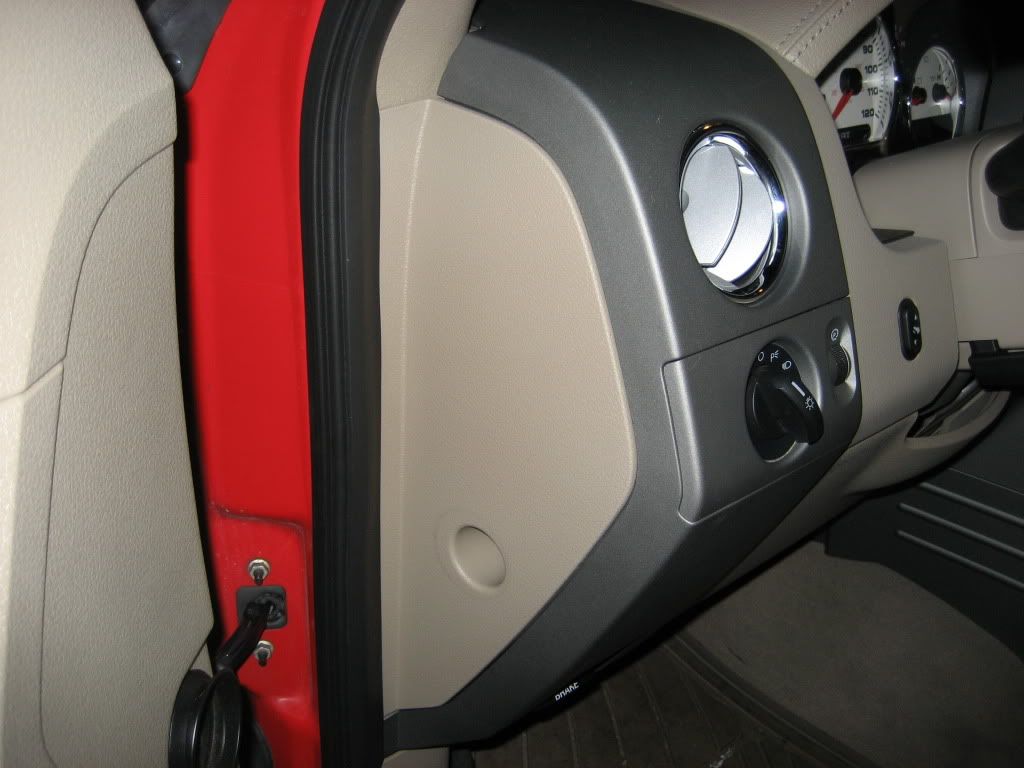
You can just stick your finger into the hole and pull straight out. There are a series of plastic clips, but they're pretty resilient and the panel isn't in very tight at all.
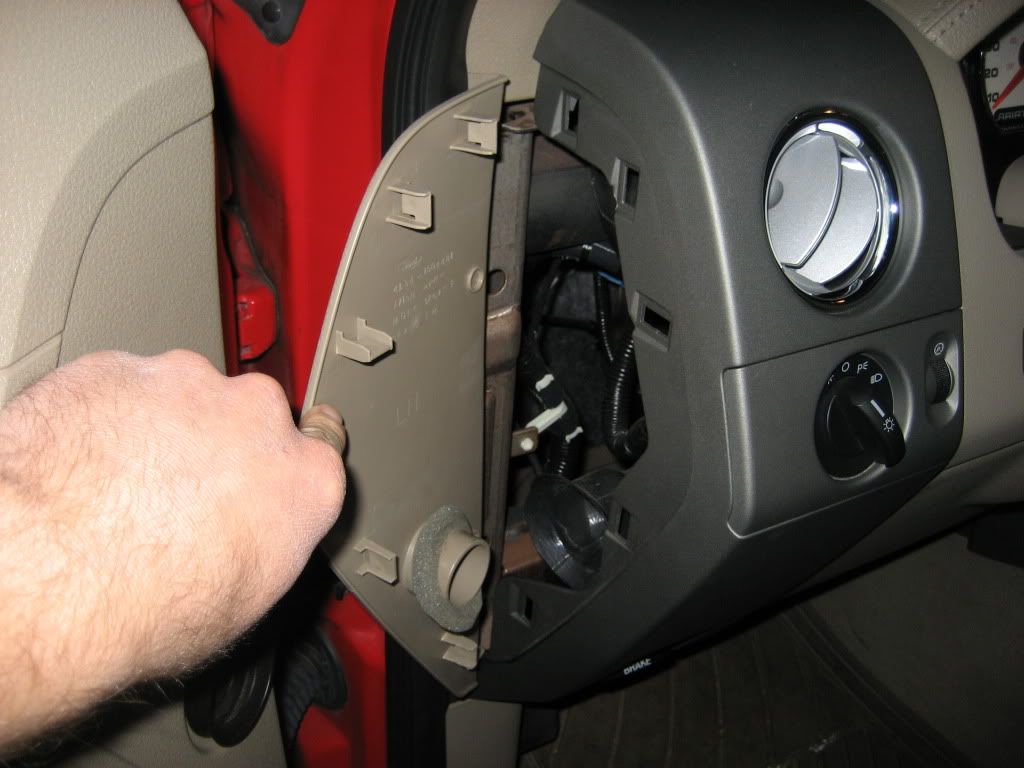
3. Feed the ODBII cable up from underneath the dashboard through the opening behind the dashboard and feed approximately 6-8 inches through the crack between the A pillar and the dashboard.
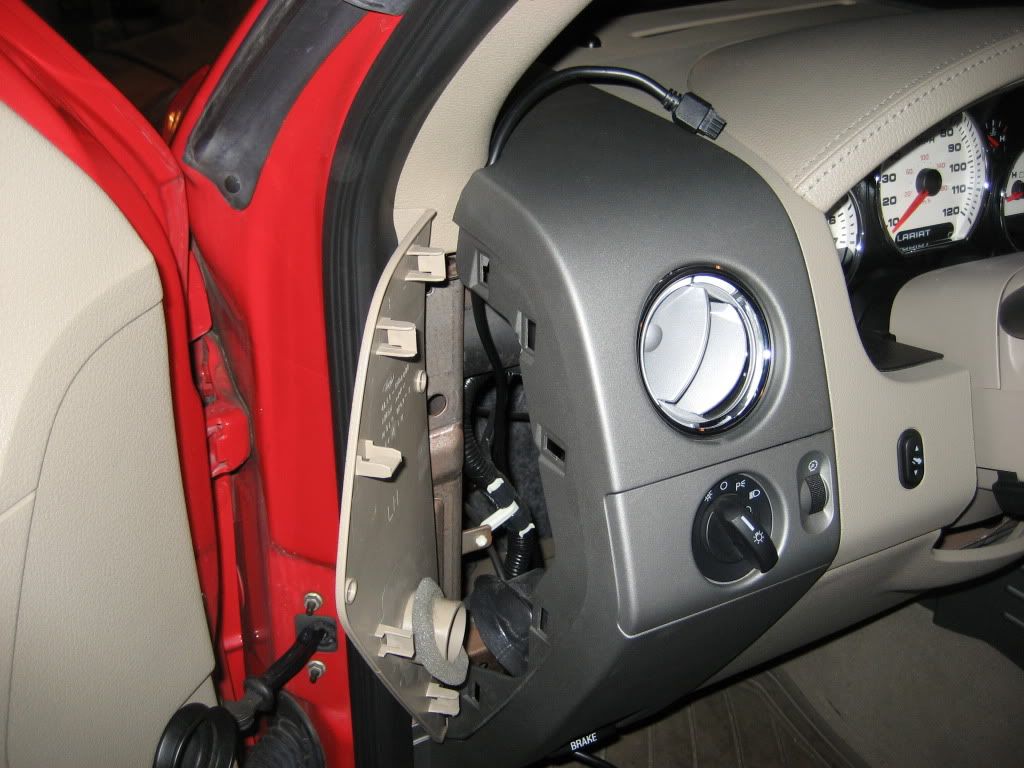
4. Set the pod onto the dashboard. I've used double-sided tape in the past just to make sure it won't move, and I think others have even screwed the pod to the dashboard. Others just set it on. Feed the cable through the opening in the pod.
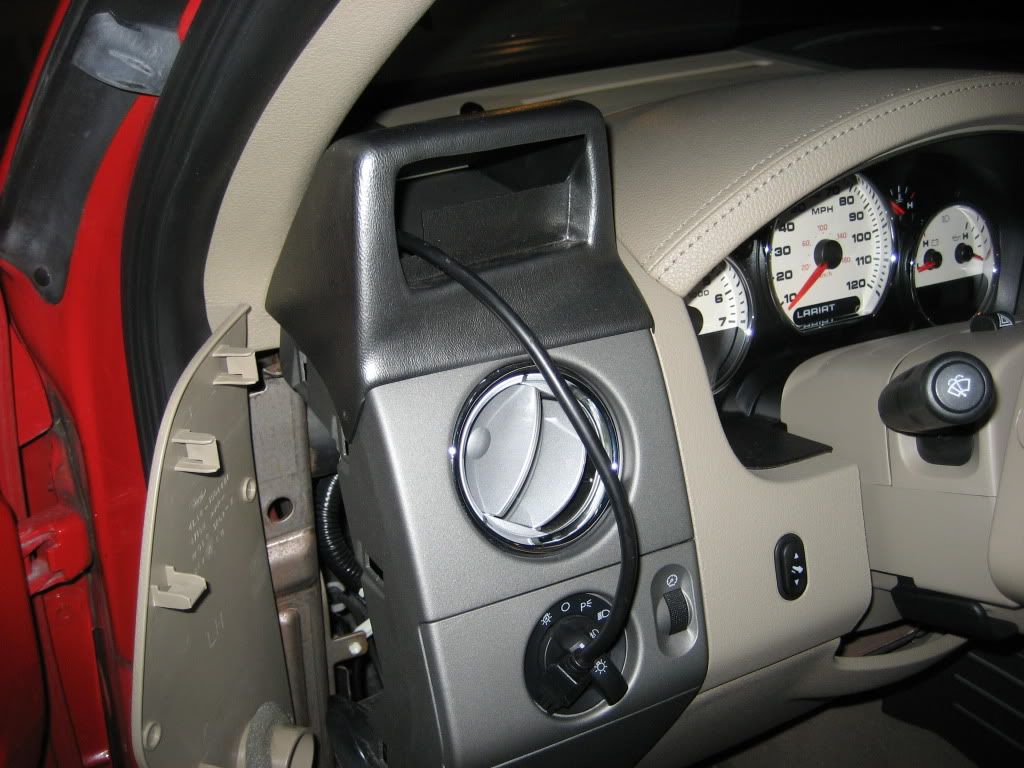
5. Plug the cable into the Gryphon/Evolution and insert the programmer into the pod.
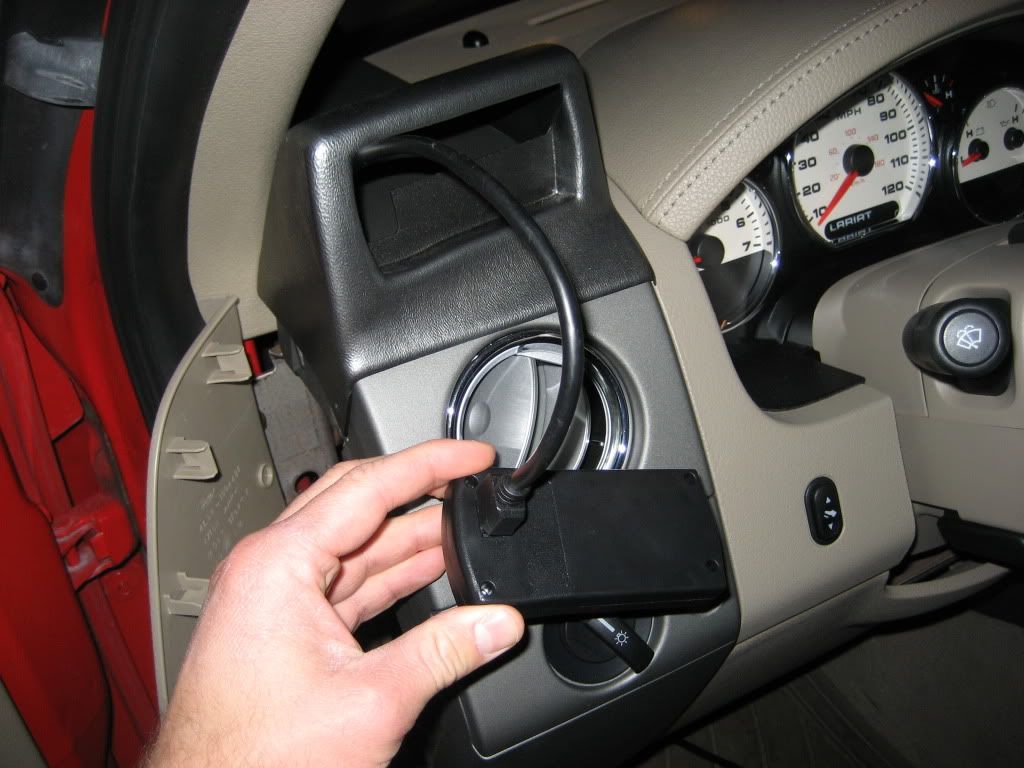
It just snaps right into the pod.
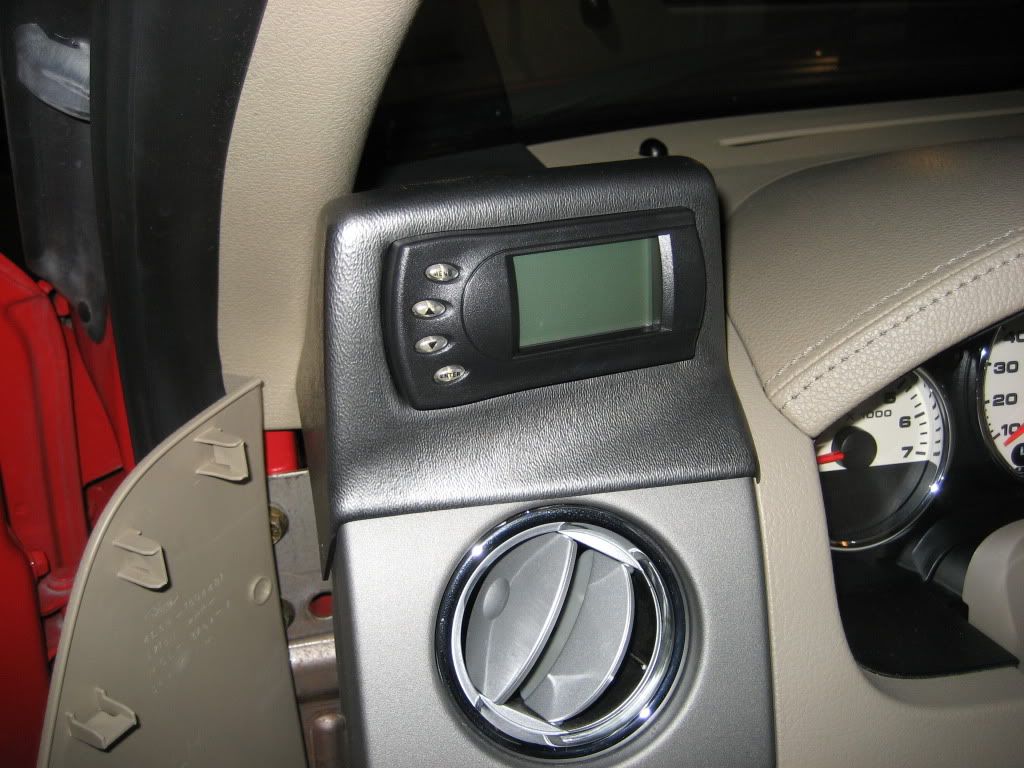
6. I like to pull the extra cable back into the area behind the dashboard and use a plastic tie to make sure it's clean. Then snap the access panel back into place.
7. Turn the ignition to ON.
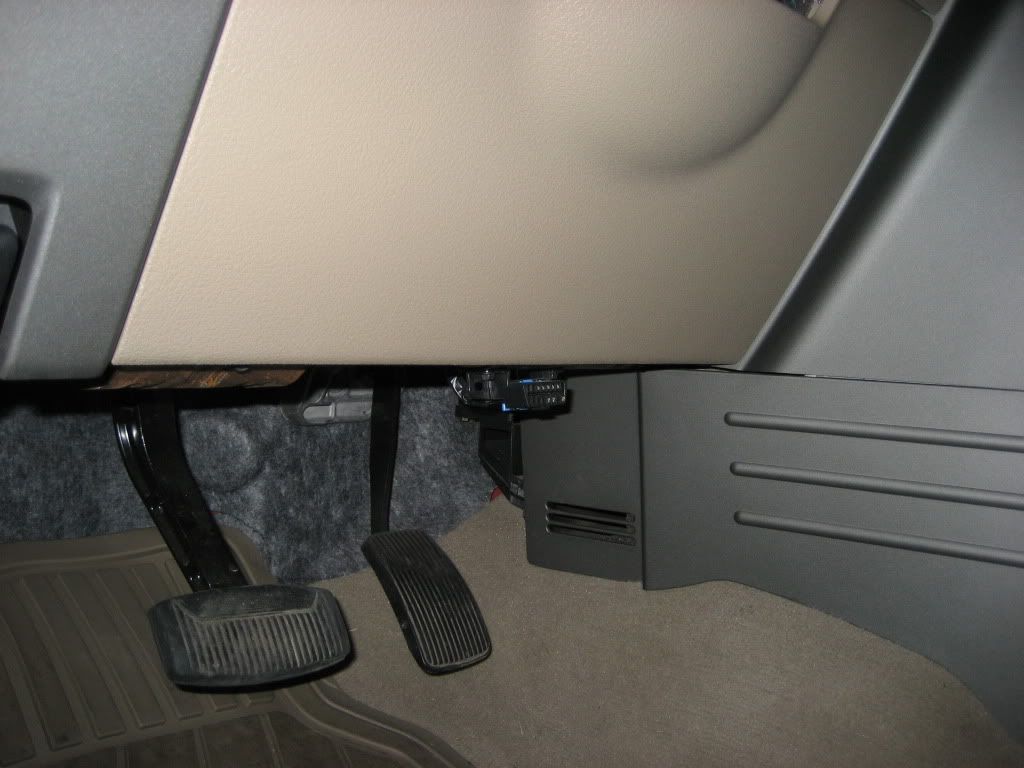
8. Then plug the cable into the ODBII connector. Note: Don't plug it in until the ignition is turned to ON. The connector is directly under the dashboard on the driver's side, directly in the middle of this picture:
9. Press ENTER to access the truck's HEX code (you'll do this only once), then press ENTER to accept the warning message (you'll do this the first three times the programmer turns on).
Continued...
1. Make sure your ignition is turned to OFF.
2. Open the driver side door and remove the access panel on the left side of the dashboard.
You can just stick your finger into the hole and pull straight out. There are a series of plastic clips, but they're pretty resilient and the panel isn't in very tight at all.
3. Feed the ODBII cable up from underneath the dashboard through the opening behind the dashboard and feed approximately 6-8 inches through the crack between the A pillar and the dashboard.
4. Set the pod onto the dashboard. I've used double-sided tape in the past just to make sure it won't move, and I think others have even screwed the pod to the dashboard. Others just set it on. Feed the cable through the opening in the pod.
5. Plug the cable into the Gryphon/Evolution and insert the programmer into the pod.
It just snaps right into the pod.
6. I like to pull the extra cable back into the area behind the dashboard and use a plastic tie to make sure it's clean. Then snap the access panel back into place.
7. Turn the ignition to ON.
8. Then plug the cable into the ODBII connector. Note: Don't plug it in until the ignition is turned to ON. The connector is directly under the dashboard on the driver's side, directly in the middle of this picture:
9. Press ENTER to access the truck's HEX code (you'll do this only once), then press ENTER to accept the warning message (you'll do this the first three times the programmer turns on).
Continued...
Thread Starter
|
Technical Article Contributor
Joined: Nov 2008
Posts: 409
Likes: 0
From: Shawnee, KS
Finally, to program your custom Gryphon tunes or the canned Evolution tunes into your truck, follow these steps:
1. From the main menu, press the MENU button, use the arrow buttons move the selector radio button to Power Programming, and press ENTER.
2. Move the selector radio button to the tune you want to load and press ENTER.
3. You'll need to confirm by pressing ENTER one more time.
4. You will then be asked if you want to create a custom program.
4a. If this is your first programming session, or if you want to bypass setting any custom options, select No and skip to step 6. (Note: you should always complete the first programming session without adding "custom options". This helps to ensure that the initial custom files are built from valid stock data that is in the PCM.) Skip to step 6.
4b. Select Yes if you do want to change any of the custom options. If you've re-geared, have larger tires than stock, or otherwise want to change maximum RPM, speed, the rev limiter, etc., then you want to select Yes here. (See the Gryphon or Evolution manual for a complete list of custom options. http://www.edgeproducts.com/product_...manual-277.pdf)
5. If you choose to create a custom program, make the changes you want using the arrow buttons to move up and down, the ENTER button to confirm selections, and the MENU key to go back. When you are finished making changes, move the radio button to Done, and hit enter.
6. You will be asked to turn the ignition OFF, then right back to ON (but do not start the truck).
7. The programmer will save your stock PCM tune and replace it with the tune you selected in step 2.
8. When the programmer is completed, it will display "Programming is complete!"
9. Enjoy the advanced driveability of your newly tuned truck.
Please feel free to contribute additional tips if you have any. In addition, if I've missed anything, please feel free to point it out and I will update.
1. From the main menu, press the MENU button, use the arrow buttons move the selector radio button to Power Programming, and press ENTER.
2. Move the selector radio button to the tune you want to load and press ENTER.
3. You'll need to confirm by pressing ENTER one more time.
4. You will then be asked if you want to create a custom program.
4a. If this is your first programming session, or if you want to bypass setting any custom options, select No and skip to step 6. (Note: you should always complete the first programming session without adding "custom options". This helps to ensure that the initial custom files are built from valid stock data that is in the PCM.) Skip to step 6.
4b. Select Yes if you do want to change any of the custom options. If you've re-geared, have larger tires than stock, or otherwise want to change maximum RPM, speed, the rev limiter, etc., then you want to select Yes here. (See the Gryphon or Evolution manual for a complete list of custom options. http://www.edgeproducts.com/product_...manual-277.pdf)
5. If you choose to create a custom program, make the changes you want using the arrow buttons to move up and down, the ENTER button to confirm selections, and the MENU key to go back. When you are finished making changes, move the radio button to Done, and hit enter.
6. You will be asked to turn the ignition OFF, then right back to ON (but do not start the truck).
7. The programmer will save your stock PCM tune and replace it with the tune you selected in step 2.
8. When the programmer is completed, it will display "Programming is complete!"
9. Enjoy the advanced driveability of your newly tuned truck.
Please feel free to contribute additional tips if you have any. In addition, if I've missed anything, please feel free to point it out and I will update.
Last edited by cstanek; Nov 9, 2009 at 02:05 PM. Reason: Updating with Jack's suggestions

Member
Joined: Jul 2009
Posts: 37
Likes: 0
From: Delco, PA
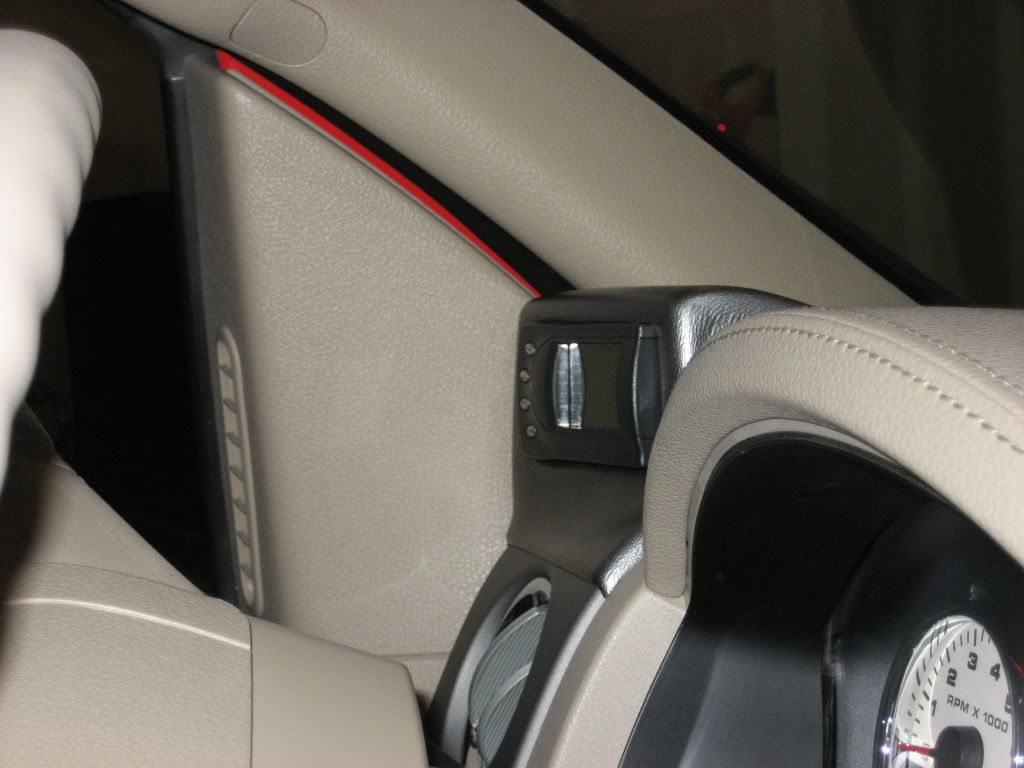
Great write up. I am looking into getting one but I have one small problem. I have installed a tweeter on the door panel where when I close the door the speaker is in the general area where the Gryphon sits. I was hoping if you could post a pic with the door closed and the view from the passenger seat. Sorry to be so picky but I think that will tell me if I will be able to install the Gryphon or not. Thanks in advanced.

Technical Article Contributor
Joined: Apr 2009
Posts: 10,697
Likes: 14
From: In the fast lane from LA to Tokyo...
Nice write up!
Just a few things to add about when programming.
When programming make sure you have a good or fully charged battery.
When programming make sure ambient temperature is above 30 F or if below 30 F you will need to run your truck a few minutes to warm up pcm.
Just some thoughts.
Just a few things to add about when programming.
When programming make sure you have a good or fully charged battery.
When programming make sure ambient temperature is above 30 F or if below 30 F you will need to run your truck a few minutes to warm up pcm.
Just some thoughts.
Thread Starter
|
Technical Article Contributor
Joined: Nov 2008
Posts: 409
Likes: 0
From: Shawnee, KS
Great write up. I am looking into getting one but I have one small problem. I have installed a tweeter on the door panel where when I close the door the speaker is in the general area where the Gryphon sits. I was hoping if you could post a pic with the door closed and the view from the passenger seat. Sorry to be so picky but I think that will tell me if I will be able to install the Gryphon or not. Thanks in advanced.
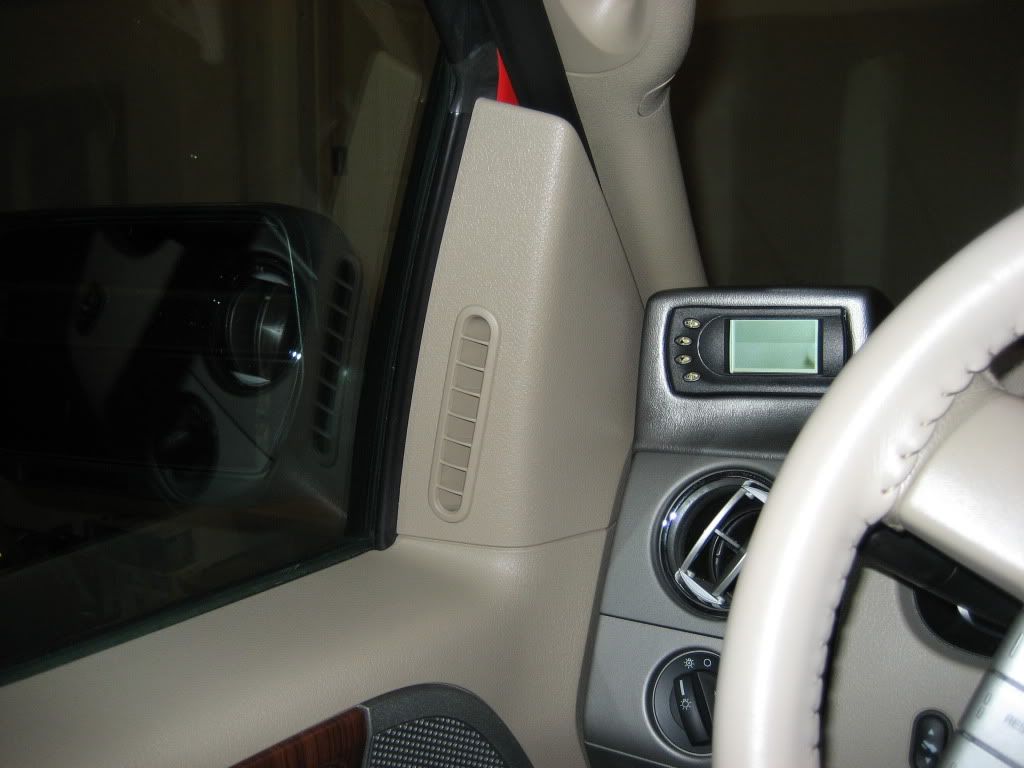
Technical Article Contributor
Joined: Apr 2009
Posts: 10,697
Likes: 14
From: In the fast lane from LA to Tokyo...
Another one:
While doing any programming sessions with your truck. Keep frequency emiting devices off or away from vehicle. Such as cellphones, cb's, pagers, garage door openers. Their frequency may interupt programming if used at the wrong time.
Another one:
When installing the OBDII cable and routing it up to the gryphon make sure to keep away from high draw power source wires or emiting frequency source wires. Such as trailer brake controllers and cb's. If while installing the cable don't run it close and parallel try to stay away from those previously mentioned wires. If need be use the perpendicular crossing strategy if you do need to run by them.
Another one:
During the " key on engine off" if a message saying "Checksum Failure" displays on the screen just STOP and don't go any further. Your truck probably has canned or a custom tune left on it by a previous owner. Yes, your truck will still run and the gryphon won't let you do anything else. Call PHP and talk to Bill, he will have to help you reprogram your trucks pcm to a stock calibration via pegasus and the gryphon.
Another one:
Absolutly during anytime don't leave vehicle during programming session.
Another one:
Don't turn the ignition key(on/off) until prompted to during the programming session. Don't crank the motor either.
Another one:
Don't try to program truck while engine is running. This programmer is not designed like multi position chips.
Another one:
If the programming session goes to long your truck's PATS(security) system could be activated. If this happens there is a procedure that must be done with the keys to reset the PATS system. The chances of this happening are very unlikely. More prone to Excursions.
While doing any programming sessions with your truck. Keep frequency emiting devices off or away from vehicle. Such as cellphones, cb's, pagers, garage door openers. Their frequency may interupt programming if used at the wrong time.
Another one:
When installing the OBDII cable and routing it up to the gryphon make sure to keep away from high draw power source wires or emiting frequency source wires. Such as trailer brake controllers and cb's. If while installing the cable don't run it close and parallel try to stay away from those previously mentioned wires. If need be use the perpendicular crossing strategy if you do need to run by them.
Another one:
During the " key on engine off" if a message saying "Checksum Failure" displays on the screen just STOP and don't go any further. Your truck probably has canned or a custom tune left on it by a previous owner. Yes, your truck will still run and the gryphon won't let you do anything else. Call PHP and talk to Bill, he will have to help you reprogram your trucks pcm to a stock calibration via pegasus and the gryphon.
Another one:
Absolutly during anytime don't leave vehicle during programming session.
Another one:
Don't turn the ignition key(on/off) until prompted to during the programming session. Don't crank the motor either.
Another one:
Don't try to program truck while engine is running. This programmer is not designed like multi position chips.
Another one:
If the programming session goes to long your truck's PATS(security) system could be activated. If this happens there is a procedure that must be done with the keys to reset the PATS system. The chances of this happening are very unlikely. More prone to Excursions.
Last edited by 88racing; Nov 11, 2009 at 09:14 PM.
Trending Topics
Thread Starter
|
Technical Article Contributor
Joined: Nov 2008
Posts: 409
Likes: 0
From: Shawnee, KS
I thought of another tip that I don't think has been mentioned in this thread: turn off anything that will draw power (lights, heat, A/C, etc.) Close the door to make sure the interior lights stay off. This ensures all the power available from the battery is provided to the programmer. (This goes along with the previous suggestion to make sure you have a fully charged battery.)

Global Moderator &
Senior Member
Senior Member


Joined: Aug 2007
Posts: 7,890
Likes: 61
From: Among javelinas and scorpions in Zoniestan
All these latter points by 88racing and cstanek are absolutely correct. (For all of you who didn't know this, 88racing is a Moderator on PHP's website and is VERY knowledgeable about the Gryphon/Edge programming platform, among other performance mods).
The bottom line during programming is: you want the truck to be in a non-demanding environment temperature and electromagnetic interference wise and with an electrical system that's putting out full power. I have even programmed my truck with a 2 Amp battery charger on the battery to keep the voltage level up.
And, ANY time you disconnect the battery or unplug the programmer, BEFORE you plug the programmer back in, you MUST have the ignition in the ON position, or the programmer will not initialize properly.
- Jack
The bottom line during programming is: you want the truck to be in a non-demanding environment temperature and electromagnetic interference wise and with an electrical system that's putting out full power. I have even programmed my truck with a 2 Amp battery charger on the battery to keep the voltage level up.
And, ANY time you disconnect the battery or unplug the programmer, BEFORE you plug the programmer back in, you MUST have the ignition in the ON position, or the programmer will not initialize properly.
- Jack