


Virus Scam


Thread Starter
|
Global Moderator &
Senior Member
Senior Member

Joined: Mar 2005
Posts: 26,083
Likes: 85
From: Burleson/Athens/Brownsboro, TX
Virus Scam
Hey folks, if you get a pop up from Best Malware telling you that you have viruses, showing you the infected files, it is a scam. They want $49 to get rid of the stuff they are telling you is on your computer that is not really there. There is a special procedure for getting rid of the Best Malware invasion. Google Best Malware if you get hit. I'm glad I took my time checking this out rather than over reacting.
__________________
Jim
Jim


Senior Member
Joined: Aug 2008
Posts: 1,075
Likes: 0
From: Yorba Linda, CA
Yeah, most Malware when it enters your computer it won't allow you to close your browser unless you click on the malware window's X. Doing that or clicking anywhere on the malware window will allow the virus to infect your computer.
When the malware window pops up on my screen I immediately press and hold CTRL+ALT then depress DELETE, this brings up my log off window.
I then select "Start Task Manager" then select the browser where the malware's window is located and then click "End Task".
A pop up window appear I select "End Now".
I Re-open my browser and DONOT click on "Restore My Browser" but "Open New Page".
Thanks for posting.
When the malware window pops up on my screen I immediately press and hold CTRL+ALT then depress DELETE, this brings up my log off window.
I then select "Start Task Manager" then select the browser where the malware's window is located and then click "End Task".
A pop up window appear I select "End Now".
I Re-open my browser and DONOT click on "Restore My Browser" but "Open New Page".
Thanks for posting.
Thread Starter
|
Global Moderator &
Senior Member
Senior Member
Joined: Mar 2005
Posts: 26,083
Likes: 85
From: Burleson/Athens/Brownsboro, TX
Not sure all those things will work in this case. This is a scam, telling you that you HAVE malware when in fact you don't. They make it look like you have infected files and they take over your browser.
__________________
Jim
Jim
Senior Member
Joined: Aug 2008
Posts: 1,075
Likes: 0
From: Yorba Linda, CA
Yes, it takes over your browser, that's what I said on my first sentence, when it enters your computer it won't allow you to close your browser.
CTRL + ALT + DELETE works for me all the time but yeah, it doesn't mean it works for everybody but doesn't hurt to try in the event one doesn't want to click on the malware's window.
When I get one I'll take a picture and post it.
CTRL + ALT + DELETE works for me all the time but yeah, it doesn't mean it works for everybody but doesn't hurt to try in the event one doesn't want to click on the malware's window.
When I get one I'll take a picture and post it.
Trending Topics
Thread Starter
|
Global Moderator &
Senior Member
Senior Member
Joined: Mar 2005
Posts: 26,083
Likes: 85
From: Burleson/Athens/Brownsboro, TX
Yes, it takes over your browser, that's what I said on my first sentence, when it enters your computer it won't allow you to close your browser.
CTRL + ALT + DELETE works for me all the time but yeah, it doesn't mean it works for everybody but doesn't hurt to try in the event one doesn't want to click on the malware's window.
When I get one I'll take a picture and post it.
CTRL + ALT + DELETE works for me all the time but yeah, it doesn't mean it works for everybody but doesn't hurt to try in the event one doesn't want to click on the malware's window.
When I get one I'll take a picture and post it.
__________________
Jim
Jim



Senior Member
Joined: Aug 2008
Posts: 1,075
Likes: 0
From: Yorba Linda, CA
OK, I see what you mean now, in your case you downloaded the malware not thinking it was a virus in the first place.
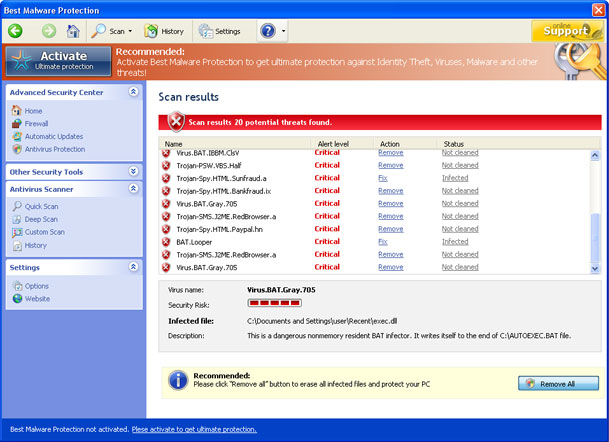
Here is what I'm talking about, sometimes when I'm browsing for info, a picture, or whatever, I get this when I click on what I'm attempting to view.

If I clicking anywhere on the malware window it will allow the virus to infect my computer. It also takes control of my browser and won't allow me to click on the red X.
I then have to press and hold CTRL+ALT then depress DELETE, this brings up my log off window. I then select "Start Task Manager" and select "End Task"

I then get this window and select "End Now"
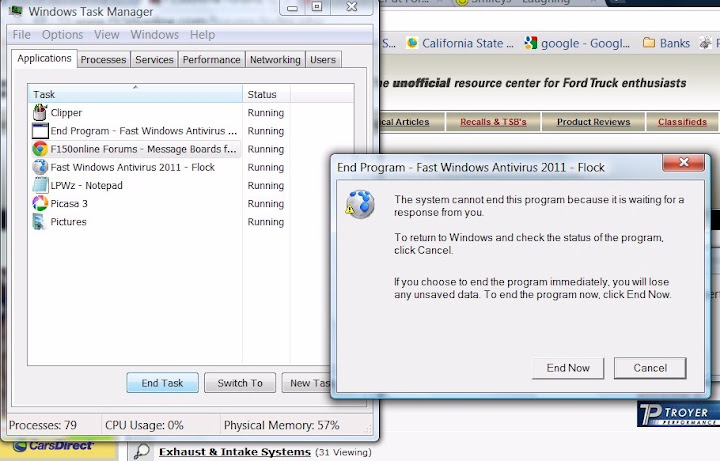
Which closes my browser and everything in it.

Here is what I'm talking about, sometimes when I'm browsing for info, a picture, or whatever, I get this when I click on what I'm attempting to view.
If I clicking anywhere on the malware window it will allow the virus to infect my computer. It also takes control of my browser and won't allow me to click on the red X.
I then have to press and hold CTRL+ALT then depress DELETE, this brings up my log off window. I then select "Start Task Manager" and select "End Task"
I then get this window and select "End Now"
Which closes my browser and everything in it.

Senior Member
Joined: Sep 2008
Posts: 3,480
Likes: 6
From: San Angelo, TX
I do about 5 to 10 of these kind of scams everyday. Malwarebytes has always got rid of the Rouge Security Software.
Main thing to remember when using malwarebytes is to always update before you scan. I actually fixed a computer today with the same thing that Bluejay had.After i ran malwarebytes i Launched Internet Explorer. In Internet Explorer go to: Tools->Internet Options->Connections tab. Click Lan Settings button and uncheck the checkbox labeled Use a proxy server for your LAN. Click OK.
Main thing to remember when using malwarebytes is to always update before you scan. I actually fixed a computer today with the same thing that Bluejay had.After i ran malwarebytes i Launched Internet Explorer. In Internet Explorer go to: Tools->Internet Options->Connections tab. Click Lan Settings button and uncheck the checkbox labeled Use a proxy server for your LAN. Click OK.
Last edited by KingRanchCoy; May 2, 2011 at 04:53 PM.

