


Photo Printer...whats a good one?


Thread Starter
|
Senior Member
Joined: Feb 2002
Posts: 2,616
Likes: 0
From: South Jersey
Ok...I think I have it narrowed down to 2 machines.
The Canon IP6000D
https://www.f150online.com/forums/li...&modelid=10441
And the HP 8250
http://www.shopping.hp.com/webapp/sh...rowse3/PDP_PDP
Anyone have either one of these? I dont know a whole lot about photo printers, but I do know I want good quality photos when printed. Any info would be great.
BREW
The Canon IP6000D
https://www.f150online.com/forums/li...&modelid=10441
And the HP 8250
http://www.shopping.hp.com/webapp/sh...rowse3/PDP_PDP
Anyone have either one of these? I dont know a whole lot about photo printers, but I do know I want good quality photos when printed. Any info would be great.
BREW

Senior Member
Joined: Dec 2003
Posts: 6,550
Likes: 2
From: Mount Airy,MD
Unfortunately, I can't say anything good or bad about Canon, as I have never owned one. I have had multiple HP's and have never been disappointed.
PSS-Mag, for a color laser, you might also want to look at Okidatas. I have heard good things about them, especially the 5100/5300 series.
PSS-Mag, for a color laser, you might also want to look at Okidatas. I have heard good things about them, especially the 5100/5300 series.

Senior Member
Joined: Dec 2004
Posts: 891
Likes: 1
From: Lost some where in the middle of the Ozark Mountains!
Originally Posted by kingfish51
Unfortunately, I can't say anything good or bad about Canon, as I have never owned one. I have had multiple HP's and have never been disappointed.
PSS-Mag, for a color laser, you might also want to look at Okidatas. I have heard good things about them, especially the 5100/5300 series.
PSS-Mag, for a color laser, you might also want to look at Okidatas. I have heard good things about them, especially the 5100/5300 series.
I have looked at a few Brothers out of the corner of my eye too.
Brew,
I don't understand the 6 cartridges phenomenon. Here is what the HP says they are.
6 HP ink cartridges: Black, Cyan, Magenta, Yellow, Light Cyan, Light Magenta
RGB achieves billions of colors by adding Photo Red and using all colors to create black on the paper. Which when black is made that way it is called Registration which is a deeper black than standard black.
In short it appears to me to be a marketing ploy to get us to buy more ink. It also adds 2 more print heads to the mechanical equation which is 2 more componets to mess with that can go out. I could be wrong, but I'm not sure I'm buying in to the 6 head yet. I'll stick to my favorite rule of thumb K.I.S. (Keep It Simple). The less there is to break the less likey something will break, and the extra parts that they are adding and marketing on... Really don't seem to serve a functional purpose to the quality of print that it can produce.
That's just my opinion, But that's just me. I think you would be pleased with the quality of either one thou.
Having 2 of the same color just throu's a red flag of needless non sence to me.
Senior Member
Joined: Dec 2003
Posts: 6,550
Likes: 2
From: Mount Airy,MD
Originally Posted by PSS-Mag
Whats the purpose of having the 2 cyan's and 2 magenta's? Can't they achieve those two light colors the same way that they produce the other 252 colors on a CMYK document, or billion of other colors on an RGB document? By simply limiting the amount of ink that is put on the paper??? I could see if it were Black, Cyan, Magenta, Yellow, Photo Red. That would be sweet and very versatile.
Not sure how many you can truly get with just the single 3 color cartridge.
Senior Member
Joined: Dec 2004
Posts: 891
Likes: 1
From: Lost some where in the middle of the Ozark Mountains!
Originally Posted by kingfish51
On my 5550 if doing high quality photos, you replace the black cartridge with a second 3 color cartridge. By using the second 3 color cartridge, it allows you to get up to 1.2 million colors per the HP web site.
Not sure how many you can truly get with just the single 3 color cartridge.
Not sure how many you can truly get with just the single 3 color cartridge.
I was wrong on the black. CMYK can elimiate the K becase CMY can make black ny mixing them all equally. But RGB needs black.
For CMYK to make black it requires all colors at full opacity to create it. So it is better to have a seperate black rather than mixing and using them all everytime you need black.
3 colors plus black is a CMYK (cyan, magenta, yellow, and black) printer that gives you 256 colors. That's equal in colors to a print press like magazines, newspapers, etc are printed with.

RGB (Red, Green, Blue) is 1.2 million colors. The only color of those three that can not be created from a CMYK pallette is True Red.
The picture below will give a visual.
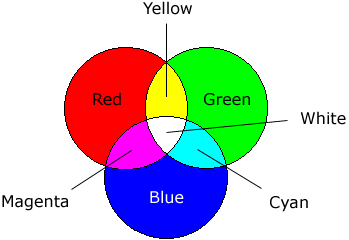
Just guessing the second 3 color cartridge is probably a true RGB (Red, Green, and Blue) cartridge. Then uses the other color cartridge, the CMY cartridge, to make Registration Black. That would be sweet because then the software dosen't have to try and mix to get those primary colors. That would give you 1.2 million colors. But it would use alot of ink using the three ink wells to make black.
Last edited by PSS-Mag; Oct 2, 2005 at 07:33 PM.

Senior Member
Joined: Mar 2004
Posts: 964
Likes: 0
From: Lancaster, PA
If photo printing is your desire, My reccomendation is a cheap inkjet for text, and a Dye Sublimation for photos. Dye sublimation is THE WAY to go for photos. A 300 DPI DyeSub will vastly outperform a 2400DPI inkjet. Dye sublimation prints use continuous tone printing, so a lower resolution can actually make a much more pleasing and smooth image. I've yet to see an inkjet print that I like; at the same time I have yet to see a dye-sub print that I don't like. Many commercial printers actually use dye sub technology in lieu of a chemical print.
you said you wanted something larger than 4x6, so there's really only a couple top notch units that are affordable:
http://www.adorama.com/IKK1400DPP.html The Kodak 1400 is the photo printer of photo printers for the general consumer looking for a full sized printer.
Dye subs work by thermal transfer; you'll buy a ribbon cassette and paper. The paper is specific to the ribbon cartridge. If you buy a 50 print pack (8x12), you will get 50 sheets of paper and 50 prints worth of ribbon for $1.60 a print. This price is generally more than most inkjets, but the quality is unmatched. Compared to $2.00-$2.50 for a c-41 chemical print, the price is good, and you'd be hard pressed to tell the difference.
The sheet will go through the printer 4 times; Cyan one pass, Magenta another, and yellow. The final pass puts a clear finish on the whole page, in a sense permanently laminating it as part of the printing process.
Dye subs definately have their drawbacks, but for print quality and durability, nothing short of a chemical print comes close.
you said you wanted something larger than 4x6, so there's really only a couple top notch units that are affordable:
http://www.adorama.com/IKK1400DPP.html The Kodak 1400 is the photo printer of photo printers for the general consumer looking for a full sized printer.
Dye subs work by thermal transfer; you'll buy a ribbon cassette and paper. The paper is specific to the ribbon cartridge. If you buy a 50 print pack (8x12), you will get 50 sheets of paper and 50 prints worth of ribbon for $1.60 a print. This price is generally more than most inkjets, but the quality is unmatched. Compared to $2.00-$2.50 for a c-41 chemical print, the price is good, and you'd be hard pressed to tell the difference.
The sheet will go through the printer 4 times; Cyan one pass, Magenta another, and yellow. The final pass puts a clear finish on the whole page, in a sense permanently laminating it as part of the printing process.
Dye subs definately have their drawbacks, but for print quality and durability, nothing short of a chemical print comes close.
Senior Member
Joined: Dec 2003
Posts: 6,550
Likes: 2
From: Mount Airy,MD
The three colors on the regular cartridge are cyan, magenta, and yellow. The three colors on the photo cartridge look like light magenta, light cyan, and black. Per the HP website, when mixing the 3 colors of the regular tri-color cartridge, the best you can get is dark gray, not true black.
All I know is that when I use that cartridge, the best quality photo paper, and the best settings on the printer, I get prints that look as good as the prints I would get off a 35mm camera. They are that good.
All I know is that when I use that cartridge, the best quality photo paper, and the best settings on the printer, I get prints that look as good as the prints I would get off a 35mm camera. They are that good.
Senior Member
Joined: Dec 2004
Posts: 891
Likes: 1
From: Lost some where in the middle of the Ozark Mountains!
Originally Posted by kingfish51
The three colors on the regular cartridge are cyan, magenta, and yellow. The three colors on the photo cartridge look like light magenta, light cyan, and black. Per the HP website, when mixing the 3 colors of the regular tri-color cartridge, the best you can get is dark gray, not true black.
All I know is that when I use that cartridge, the best quality photo paper, and the best settings on the printer, I get prints that look as good as the prints I would get off a 35mm camera. They are that good.
All I know is that when I use that cartridge, the best quality photo paper, and the best settings on the printer, I get prints that look as good as the prints I would get off a 35mm camera. They are that good.
Originally Posted by inbred
...snip..
A 300 DPI DyeSub will vastly outperform a 2400DPI inkjet.
...snip..
A 300 DPI DyeSub will vastly outperform a 2400DPI inkjet.
...snip..
I have not seen a jet (bubble or laser) printer that I can not spot the splatter on either.
BUT dang you Inbred!!! I did not know that they had a dyesub printer that would do 8x10's for less than $1000! I was perfectly happy with my Sony DPP, and it only doing 3.5x5's.... Til now!

My wallet could have done with out knowing that info!
Have you seen any prints from that Kodak?
If you know someone who has one of those then please send me an E-mail. Then if you and them wouldn't care to, I'll send you an SASE so that I could see some prints from it. Millers will hate you if it is good. I hate paying the shipping on snap shots. But all the 1 hour photo labs here are way out of calibration and I can't stand to even see a snap shot printed by them.
I havent printed my snap shots all year so I have roughly about 1000-1500 pics I need to print or have printed. There is a new Walgreens being built here now so I am going to take a cd with 20 or so on it and see how they come out soon as they open. But I expect that with in 6 months it will be out of calibrtation too. No one seems to train thier lab workers how to do maintence or how to calibrate the equipment. Even kodak and even more so fugi out labs seem to be getting careless. if I take them some where that's pretty much my out lab options here.
Last edited by PSS-Mag; Oct 2, 2005 at 09:17 PM.
Senior Member
Joined: Mar 2004
Posts: 964
Likes: 0
From: Lancaster, PA
PSS--sub $500 dye sub printers have been around for a couple years. I haven't looked around for any for a year or two; I am still waiting to buy one if I have some spare cash pop up. I almost pulled the trigger on one two years ago; Olympus had a p-400 or something like that that did a true 8x10 and the price was really good; can't remember what it was though; around $400 or $500 at the time. The kodak was selling for around $800. From what the local guys told me, the kodak was a slightly better printer than the olympus, especially the matte finish prints. But the difference wasn't worth the about double the price.
I haven't seen anything from the kodak 1400 first hand, but I have seen many from the oplympus 2 years ago when I almost bought one. They were outstanding! if the kodak was better, even marginally, it must be one helluva printer. This was 2 years ago mind you. Now for this thread, I went to digup specs on the olympus to compare to the kodak, and it appears it is no longer made. Only dye subs olympus is making anymore are small formats. But I also discovered that the kodak has undergone a huge price break over that time; if my "don't need but would like to have" budget wasn't empty, I'd definately be picking one up. Only big prints I ever get are from big jobs, which get chem prints from the lab anyway. So I really don't need one, but
And a low res dye sub will outperform a hi res inkjet because of the dot size. The jets of an inkjet can only produce one size of dot. Tone changes are created by changing the spacing between these dots. A dye sub can infinitly vary the size of the dot blending them together into a continuous tone. It takes a huge amount of resolution for the dots of an inkjet to fool your eye and seemingly blend together. The dye sub, while in fact not as sharp, is smoother, so it is much more pleasing to your eye. It's all an illusion, but it works like a champ. This is also the reason though why they not only are extremely expensive for text, but also do it horribly.
I haven't seen anything from the kodak 1400 first hand, but I have seen many from the oplympus 2 years ago when I almost bought one. They were outstanding! if the kodak was better, even marginally, it must be one helluva printer. This was 2 years ago mind you. Now for this thread, I went to digup specs on the olympus to compare to the kodak, and it appears it is no longer made. Only dye subs olympus is making anymore are small formats. But I also discovered that the kodak has undergone a huge price break over that time; if my "don't need but would like to have" budget wasn't empty, I'd definately be picking one up. Only big prints I ever get are from big jobs, which get chem prints from the lab anyway. So I really don't need one, but
And a low res dye sub will outperform a hi res inkjet because of the dot size. The jets of an inkjet can only produce one size of dot. Tone changes are created by changing the spacing between these dots. A dye sub can infinitly vary the size of the dot blending them together into a continuous tone. It takes a huge amount of resolution for the dots of an inkjet to fool your eye and seemingly blend together. The dye sub, while in fact not as sharp, is smoother, so it is much more pleasing to your eye. It's all an illusion, but it works like a champ. This is also the reason though why they not only are extremely expensive for text, but also do it horribly.