


F150 Factory Remote Start Install help/Questions.


Thread Starter
|
Member
Joined: Aug 2010
Posts: 70
Likes: 0
From: Colorado
F150 Factory Remote Start Install help/Questions.
I just purchased the factory Remote start/ alarm for my 2007 King ranch. ( PN's 7L3Z-19G364-AA and secure lock 8L3Z-19G356-BA )
Have a few questions for the experts or anyone who has installed this unit.
I am not so interested in the Alarm portion, just wanted the 6 button remote start and retain factory door lock functionality etc.
I will attach each page of the diagram with the questions.
Page 1:
I assume everything in the first diagram needs to be connected but do I really need to hook up the hood sensor?
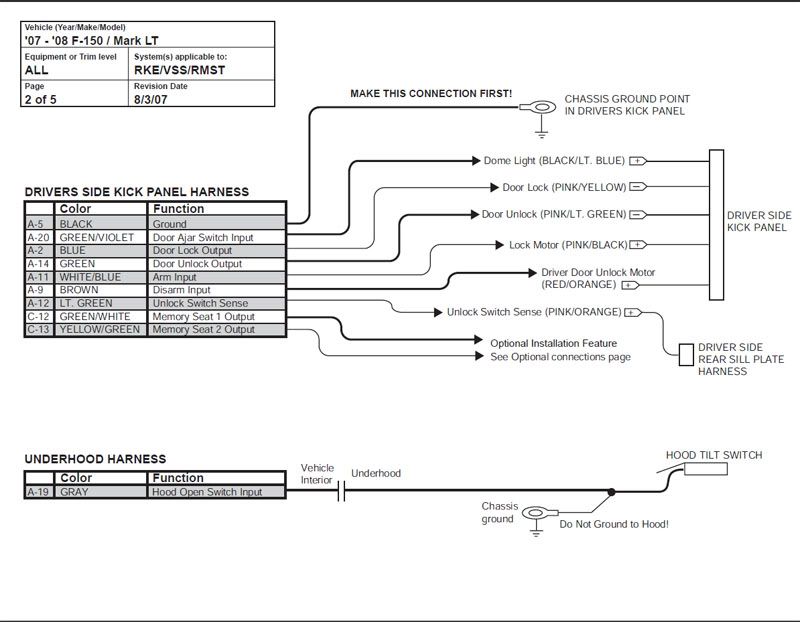
Page 2:
Assume everything here needs to be connected except rear defrost (don't have) and what does the headlight output do?
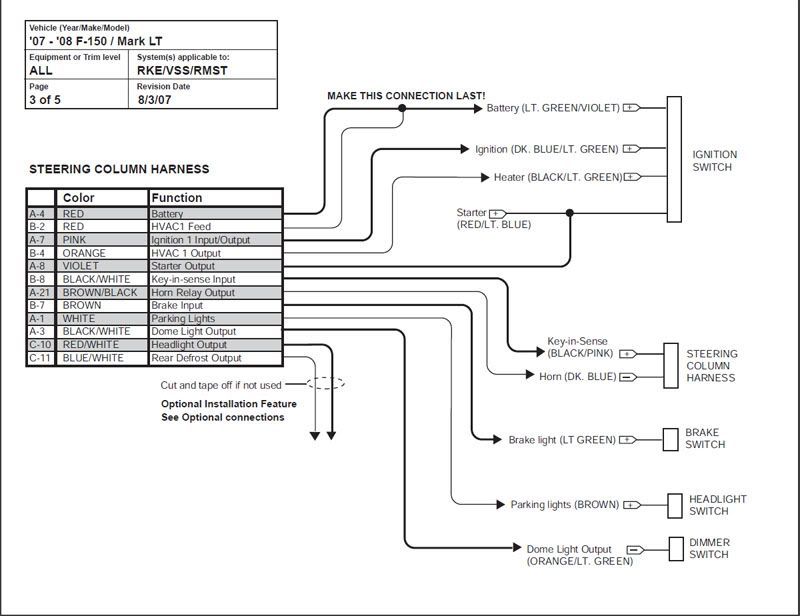
Page 3:
Door priority needs to be hooked up? But what about Memory seats, do I need it and what does it do?. Also do I need the headlight circuit connected and what does it do?

Page 4:
Power window interupt. Do I need it connected?

Any help would be appreciated.
Thanks,
JP
Have a few questions for the experts or anyone who has installed this unit.
I am not so interested in the Alarm portion, just wanted the 6 button remote start and retain factory door lock functionality etc.
I will attach each page of the diagram with the questions.
Page 1:
I assume everything in the first diagram needs to be connected but do I really need to hook up the hood sensor?
Page 2:
Assume everything here needs to be connected except rear defrost (don't have) and what does the headlight output do?
Page 3:
Door priority needs to be hooked up? But what about Memory seats, do I need it and what does it do?. Also do I need the headlight circuit connected and what does it do?
Page 4:
Power window interupt. Do I need it connected?
Any help would be appreciated.
Thanks,
JP

Technical Article Contributor
Joined: Jun 2002
Posts: 10,511
Likes: 10
From: Under the flightpath of old ORD 22R
The hood sensor stops the RMST from starting the engine with the hood up. It is a safety feature. Your call on this, I am not going to pontificate on the pro or con of it, your truck.
The headlamp connection is for the headlamp options. On the Silver RMST / RKE system if you press and hold the lock button the headlamp will turn on. Kind of a visual car finder type option, or the ability to illuminate in front of the truck if you want to from a distance.
I did not install this option on my 2006.
Door priority is for the single press of unlock, only the driver's door unlocks ( just like the factory RKE. You can wire it that way, and option the RKE part to unlock all door at the same time.
The memory seats, do you have the button 1 & 2 on the side of the seat ? This is so a specific RKE fob can be set to a seat setting, so when it is unlocked the seat moved for that setting / Fob combination.
Power window interrupt stops the power windows from working when the vehicle is remote started until the key is placed into the ignition.
The relay is a 5 pin relay that has both the normally open and normally closed contacts for this option. The install has them as normally closed, and unless the RMST is used, the relay does nothing.
The install for the rear defroster you use for anything. Think it is press and hold the key button on the remote after the vehicle is remote started. You are just activating the relay for it. Using it for factory heated seats would require a momentary relay instead of a normal relay ( those button pulse the heated seat module, not a constant on thing ).
Hope this helps with your questions, just tried to explain what they do, your call if you want to install them.
The headlamp connection is for the headlamp options. On the Silver RMST / RKE system if you press and hold the lock button the headlamp will turn on. Kind of a visual car finder type option, or the ability to illuminate in front of the truck if you want to from a distance.
I did not install this option on my 2006.
Door priority is for the single press of unlock, only the driver's door unlocks ( just like the factory RKE. You can wire it that way, and option the RKE part to unlock all door at the same time.
The memory seats, do you have the button 1 & 2 on the side of the seat ? This is so a specific RKE fob can be set to a seat setting, so when it is unlocked the seat moved for that setting / Fob combination.
Power window interrupt stops the power windows from working when the vehicle is remote started until the key is placed into the ignition.
The relay is a 5 pin relay that has both the normally open and normally closed contacts for this option. The install has them as normally closed, and unless the RMST is used, the relay does nothing.
The install for the rear defroster you use for anything. Think it is press and hold the key button on the remote after the vehicle is remote started. You are just activating the relay for it. Using it for factory heated seats would require a momentary relay instead of a normal relay ( those button pulse the heated seat module, not a constant on thing ).
Hope this helps with your questions, just tried to explain what they do, your call if you want to install them.
Thread Starter
|
Member
Joined: Aug 2010
Posts: 70
Likes: 0
From: Colorado
Thanks for the input SSCULLY, great info.
I do have the memory seats but honestly never use them. (i'm the only driver)
Don't think I'll use that function.
On the door Priority, If I want to keep it like the factory RKE I should cut that wire like shown and also tie the A9 wire with the C9 wire?
The other stuff I don't think I realy need. May hook up the hood sensor though?
Question, If I choose not to hook up the Power window interupt, the hood sensor, headlights, etc. do I need to do anything to bypass these functions or do I just not hook them up?
Thanks again!
I do have the memory seats but honestly never use them. (i'm the only driver)
Don't think I'll use that function.
On the door Priority, If I want to keep it like the factory RKE I should cut that wire like shown and also tie the A9 wire with the C9 wire?
The other stuff I don't think I realy need. May hook up the hood sensor though?
Question, If I choose not to hook up the Power window interupt, the hood sensor, headlights, etc. do I need to do anything to bypass these functions or do I just not hook them up?
Thanks again!
Technical Article Contributor
Joined: Jun 2002
Posts: 10,511
Likes: 10
From: Under the flightpath of old ORD 22R
The wire for the factory RKE is the bottom one in the diagram ( A9 ) the other is broken to get the same RKE factory function, so you would need to do that.
The hood switch is there as a safety feature, you are going to need to decide if you want that feature. I have seen posts for both sides of the install ( pro and con ), so it can only be answered by the person that owns the truck.
The other options, just blind end tape each of the leads from the VSS/RMST/RKE unit, so they are insulated.
The hood switch is there as a safety feature, you are going to need to decide if you want that feature. I have seen posts for both sides of the install ( pro and con ), so it can only be answered by the person that owns the truck.
The other options, just blind end tape each of the leads from the VSS/RMST/RKE unit, so they are insulated.

Senior Member
Joined: Aug 2007
Posts: 2,441
Likes: 0
From: Scottsdale, Arizona
ABSOLUTELY HOOK UP THE HOOD SENSOR. THIS IS A MAJOR SAFETY FEATURE AND I HAVE HEARD OF PEOPLE LOSING HANDS/ARMS BECAUSE OF AN IMPROPERLY INSTALLED OR NON EXISTING HOOD PIN.
Sorry for the caps but I cannot stress the importance of this enough.
Sorry for the caps but I cannot stress the importance of this enough.
Thread Starter
|
Member
Joined: Aug 2010
Posts: 70
Likes: 0
From: Colorado
Yeah, I'm going to hook up the hood sensor.
Never thought about the safty aspect of it. Thought it was purly for anti-theft.
Any pointers before I start the install? Going to have to do it a little bit at a time. I have 2 little ones running around the house so my time to work on this will be a hour here hour there.
I've tried to gather all the info I could off the net so hopefully this will be a smooth install. Plan on soldering all the connections so I know it's going to take a while.
Thanks.
Never thought about the safty aspect of it. Thought it was purly for anti-theft.
Any pointers before I start the install? Going to have to do it a little bit at a time. I have 2 little ones running around the house so my time to work on this will be a hour here hour there.
I've tried to gather all the info I could off the net so hopefully this will be a smooth install. Plan on soldering all the connections so I know it's going to take a while.
Thanks.

Senior Member
Joined: Aug 2004
Posts: 627
Likes: 0
From: Kansas City, Missouri

Trending Topics
Thread Starter
|
Member
Joined: Aug 2010
Posts: 70
Likes: 0
From: Colorado
Help!
Okay, I tackled this today. Took my time and thought everything went well....until I tried the system out.
Nothing works
Can't enter program mode, When I hit the started button the lights flash, it beeps 4 times and the wipers come on. ( I think 4 beeps is something about the tach not being correct but it never said to hook it up according to the diagrams?)
I did a few searches and my guess is that the door wires are not hooked up correctly. I found that a couple of people had a similar issue but they never posted the exact fix.
Some said there are more then one set of the same colored wires on the left side kick panel.
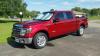
Attached is a pic of where I found/hooked up the door wires. I connected them to the wires going into the green connector.
Door ajar switch input (blk/LT Blu)
Door Lock Output (Pink/YEL)
Door unlock Output (Pink/LT GRN)
Is this correct or is there another set of these wires on the left kick panel?

Any help would be appreciated.
Thanks,
JP
Nothing works
Can't enter program mode, When I hit the started button the lights flash, it beeps 4 times and the wipers come on. ( I think 4 beeps is something about the tach not being correct but it never said to hook it up according to the diagrams?)
I did a few searches and my guess is that the door wires are not hooked up correctly. I found that a couple of people had a similar issue but they never posted the exact fix.
Some said there are more then one set of the same colored wires on the left side kick panel.
Attached is a pic of where I found/hooked up the door wires. I connected them to the wires going into the green connector.
Door ajar switch input (blk/LT Blu)
Door Lock Output (Pink/YEL)
Door unlock Output (Pink/LT GRN)
Is this correct or is there another set of these wires on the left kick panel?
Any help would be appreciated.
Thanks,
JP
Thread Starter
|
Member
Joined: Aug 2010
Posts: 70
Likes: 0
From: Colorado
Bump ...anyone? I have the truck apart still and want to get this figured out.
Pretty sure the PNK/YEL Door Lock and PNK/LT GRN Door Unlock wire is connected to the wrong place (maybe some others?) Just need to find the right location to hook them up.
The only thing the manual says is Drivers Kick Panel.
Thanks!
.
Pretty sure the PNK/YEL Door Lock and PNK/LT GRN Door Unlock wire is connected to the wrong place (maybe some others?) Just need to find the right location to hook them up.
The only thing the manual says is Drivers Kick Panel.
Thanks!
.
Last edited by graphite675; Oct 31, 2010 at 12:48 PM.
Thread Starter
|
Member
Joined: Aug 2010
Posts: 70
Likes: 0
From: Colorado
Okay, Got the door Lock/Unlock working now. The 2 wires were in the wrong place. Still unsure about the Door Ajar wire (BLK/LT BLU)? I still have it connected to the green connector?
Also the the "Disarm input" (red/org) is connected to the wire coming out of the black connector just below the green.
My biggest issue now is I cannot enter program mode? I need to set it to "tachless".
Manual says to open door, insert key and turn to run. Then hold the program/override button for 10 seconds and the horn should honk 3 times. Nothing happens when I do this? I have tried with door open, shut, foot on brake ans still will not enter program mode.
.
Also the the "Disarm input" (red/org) is connected to the wire coming out of the black connector just below the green.
My biggest issue now is I cannot enter program mode? I need to set it to "tachless".
Manual says to open door, insert key and turn to run. Then hold the program/override button for 10 seconds and the horn should honk 3 times. Nothing happens when I do this? I have tried with door open, shut, foot on brake ans still will not enter program mode.
.
Thread Starter
|
Member
Joined: Aug 2010
Posts: 70
Likes: 0
From: Colorado
I'm a little closer. Found that the door ajar wire was not in the right place. (There are several Blk/Blu wires in that area)
So now the doors lock/unlock. I was able to enter program mode and set it to "tachless" etc. But it still won't start.
I hold the start button. It locks the doors, beeps once, flashes the headlights, turns on the ignition, beeps the horn again but doesn't try to start?
Any suggestions?
I looked at the trouble shooting guide but it doesn't have anything for one beep? It has two beeps (brake pressed or hood open) but I'm not getting 2 beeps in a row. Just one, then lights, ignition, then another beep?
.
So now the doors lock/unlock. I was able to enter program mode and set it to "tachless" etc. But it still won't start.
I hold the start button. It locks the doors, beeps once, flashes the headlights, turns on the ignition, beeps the horn again but doesn't try to start?
Any suggestions?
I looked at the trouble shooting guide but it doesn't have anything for one beep? It has two beeps (brake pressed or hood open) but I'm not getting 2 beeps in a row. Just one, then lights, ignition, then another beep?
.
Thread Starter
|
Member
Joined: Aug 2010
Posts: 70
Likes: 0
From: Colorado
Next clue.......
I put a meter on the Starter output wire (A-8 Violet from unit connected to Red/LT Blu starter wire at ignition connector) and I see 12.45V when I hit the starter button on the remote.
Also just check the starter wire at the fuse/relay box. Tan/Red wire that activates the relay (Other side of coil is pulled down to gnd via the PCM I believe?)
I am getting 12V at the tan/red wire but the relay is not being activated. Guessing there is some sort of security setting that is preventing the PCM from pulling the other side of the relay coil to gnd?
Beeps, Locks doors, turns on ignition, I then see 12v at the starter wire for about 5 seconds then it goes away and I get another beep.
I am completely baffled?
.
I put a meter on the Starter output wire (A-8 Violet from unit connected to Red/LT Blu starter wire at ignition connector) and I see 12.45V when I hit the starter button on the remote.
Also just check the starter wire at the fuse/relay box. Tan/Red wire that activates the relay (Other side of coil is pulled down to gnd via the PCM I believe?)
I am getting 12V at the tan/red wire but the relay is not being activated. Guessing there is some sort of security setting that is preventing the PCM from pulling the other side of the relay coil to gnd?
Beeps, Locks doors, turns on ignition, I then see 12v at the starter wire for about 5 seconds then it goes away and I get another beep.
I am completely baffled?
.
Last edited by graphite675; Oct 31, 2010 at 07:10 PM.
Thread Starter
|
Member
Joined: Aug 2010
Posts: 70
Likes: 0
From: Colorado
We have sucess!
After I got the wires sorted out the last issue turned out to be the Securelok/PATs module programming. I gues it didn't take the first time I tried it? You have to be careful and make sure you do the programming quickly. It only allows you 5 seconds between switching key's etc.
All seems to be working, just need to put all the panels on and mount the antenna and theft light..
Not a easy job by any means. If you ever try and tackle this make sure (with a meter) that you have the right wire before you hook it up. When they say attach to the BLK/BLUE wire at the drivers kick panel don't assume it's the first one you see. There are several of the same color that do different things.
.
After I got the wires sorted out the last issue turned out to be the Securelok/PATs module programming. I gues it didn't take the first time I tried it? You have to be careful and make sure you do the programming quickly. It only allows you 5 seconds between switching key's etc.
All seems to be working, just need to put all the panels on and mount the antenna and theft light..
Not a easy job by any means. If you ever try and tackle this make sure (with a meter) that you have the right wire before you hook it up. When they say attach to the BLK/BLUE wire at the drivers kick panel don't assume it's the first one you see. There are several of the same color that do different things.
.
Senior Member
Joined: Dec 2007
Posts: 210
Likes: 0
From: Santa Fe, Texas
I'm glad you got it worked out. The remote start is nice.
I purchased a Compustar from KCAutosound and installed it myself with detailed instructions that Travis included with the R/S. His instructions made it simple to install. I'm happy with it.
I purchased a Compustar from KCAutosound and installed it myself with detailed instructions that Travis included with the R/S. His instructions made it simple to install. I'm happy with it.

Junior Member
Joined: Dec 2011
Posts: 1
Likes: 0
Similar Door Unlock/Lock Situation
I'm curious as to what wires you spliced to get your door lock and unlock. I also spliced in this same green fitting with no luck on the lock and unlock function. Then I found that their are actually two sets of Pink/Green Trace wires on that fitting. I actually unhooked the fitting and found that it has nothing to do with the door.
I've found other pink/green trace and pink/yellow trace under the sill, I probed them but they are not the correct wires. Any chance you remember which wires they were in your image.
I've found other pink/green trace and pink/yellow trace under the sill, I probed them but they are not the correct wires. Any chance you remember which wires they were in your image.