


keyless entry,keypad inoperable


Thread Starter
|
Senior Member
Joined: Oct 2006
Posts: 187
Likes: 0
From: Michigan
keyless entry,keypad inoperable
My keyless f.o.b.'s work fine but the keypad doesn't work. It does illuminate but does not open the doors. I am using the code from the owners manual. I assume it cannot be changed.
I bought this truck a few weeks ago and it doesn't work. The previous owner said it did not work as well.
If anyone has a schematic of the wiring I could really use it. Also where is the keyless "box" located at?
Thanks a lot for any input, bullseye670..................
I bought this truck a few weeks ago and it doesn't work. The previous owner said it did not work as well.
If anyone has a schematic of the wiring I could really use it. Also where is the keyless "box" located at?
Thanks a lot for any input, bullseye670..................

Senior Member
Joined: Mar 2006
Posts: 2,599
Likes: 0
yes the keyless entry codes can be changed, the last owner probably changed it, I dont really know how to re-set it though, If you by any chance know the last owner, ask him what the code he changed it to and write it down in your manuals notes section.

Senior Member
Joined: Jan 2000
Posts: 3,205
Likes: 3
From: Along Lake Erie
Originally Posted by ws6_guyscrew
yes the keyless entry codes can be changed, the last owner probably changed it, I dont really know how to re-set it though, If you by any chance know the last owner, ask him what the code he changed it to and write it down in your manuals notes section.
To find the sticker, sit in the driver's seat like you normally would. Look at your left foot. Now, lay on your back in the foot-well with your head where your left foot just was. Look about 8-10 inches up the firewall and you'll see a white or gray box with a sticker on it. That sticker will have a bar-code and a 5-digit code. That 5-digit code is the factory code and cannot be changed or deleted.
-Joe

Technical Article Contributor
Joined: Jun 2002
Posts: 10,511
Likes: 10
From: Under the flightpath of old ORD 22R
Q1. When you say the keypad does not work, is it the code, or the pad itself ?
- One quick test for this, use you fob to unlock the doors, and then with all the dorrs shut, press the 7/8 and 9/0 buttons at the same time. This should lock all the doors. This will indicated if at least part of the key pad is functioning to the RAP / CSM.
Q2. What code from the owners manual ? There should have been a plastic card with a 5 digit code on it, this is the factory code for your RAP/CSM that is installed in the truck. unless the P.O. wrote the factory code in the owners manual, which is a bad idea.
The location that Joe was trying to describe :
Where to look up under the dash :
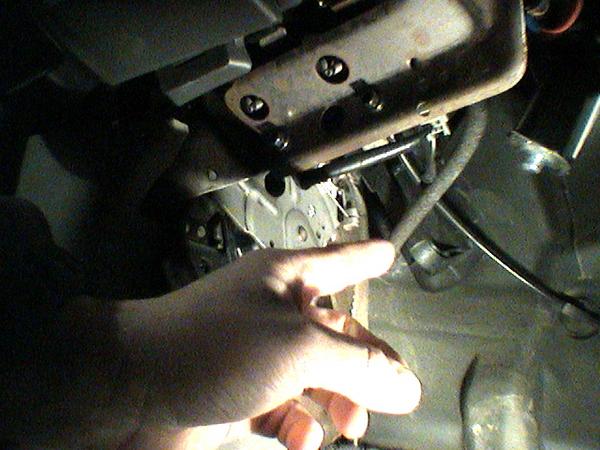
That is the parking brake to the left of my hand.
Lay on the floor, looking up, almost directly above the Central Junction Box ( pass fuse compartment ) and you will see a white / cream colored box, this is the RAP / CSM ( depending on build date it is one or the other ).

Again, that is the parking brake in the lower left hand corner of the picture.
Good luck, let us know the answers to the questions, so we can get you on your way.
- One quick test for this, use you fob to unlock the doors, and then with all the dorrs shut, press the 7/8 and 9/0 buttons at the same time. This should lock all the doors. This will indicated if at least part of the key pad is functioning to the RAP / CSM.
Q2. What code from the owners manual ? There should have been a plastic card with a 5 digit code on it, this is the factory code for your RAP/CSM that is installed in the truck. unless the P.O. wrote the factory code in the owners manual, which is a bad idea.
The location that Joe was trying to describe :
Where to look up under the dash :
That is the parking brake to the left of my hand.
Lay on the floor, looking up, almost directly above the Central Junction Box ( pass fuse compartment ) and you will see a white / cream colored box, this is the RAP / CSM ( depending on build date it is one or the other ).
Again, that is the parking brake in the lower left hand corner of the picture.
Good luck, let us know the answers to the questions, so we can get you on your way.
Thread Starter
|
Senior Member
Joined: Oct 2006
Posts: 187
Likes: 0
From: Michigan
Thanks guys, I'll look up at the box tonight and check the keypad as discribed. The self-check described with the fob's is great. I'll see what happens and post back later.
Thanks again, brian..................
Thanks again, brian..................
Thread Starter
|
Senior Member
Joined: Oct 2006
Posts: 187
Likes: 0
From: Michigan
Ok,heres what I've got. The 7/8 and 9/0 buttons do lock the doors. I've narrowed it down to the #5/6 button. When all the other buttons are pushed the interior light comes on. When I push on the #5 button nothing happens.
Can I fix a single button or do I have to replace the entire keypad??
Anyone ever try using electronic contact cleaner to fix one?
Once again, please help.
thanks, brian.............
Can I fix a single button or do I have to replace the entire keypad??
Anyone ever try using electronic contact cleaner to fix one?
Once again, please help.
thanks, brian.............
Senior Member
Joined: Jan 2000
Posts: 3,205
Likes: 3
From: Along Lake Erie
I've heard that you can separate the skin from the pad, clean the contacts, and put it back together, but I've never tried it myself.
It definately sounds like the problem. A replacement pad isn't all that much, and they should be pretty readily available from Ebay or a junkyard. Doesn't take much to swap it out either.
-Joe
It definately sounds like the problem. A replacement pad isn't all that much, and they should be pretty readily available from Ebay or a junkyard. Doesn't take much to swap it out either.
-Joe
Trending Topics
Technical Article Contributor
Joined: Jun 2002
Posts: 10,511
Likes: 10
From: Under the flightpath of old ORD 22R
Yes, that sounds like a bad button.
You can try the cleaning method, but if you are going to the trouble of yanking it, just install a new one.
The part number I have for when I installed it on my '01 : YL3Z-14A626-AA

If I got that correct, it is 61.94 + Shipping from fordparts.com
https://fordparts.com/cart/?pn=YL3Z-...&submit=Search
Don't know what you consider your time worth, I know my SCrew ( which is a bit different door skin then the SCab and Std cab ) was kind of a PITA to get the door handle with the keypad mounted straight.
My gallery, Album Name: Interior Pics has the pictures of the install for my SCrew when I added the keypad.
Either way, good luck
You can try the cleaning method, but if you are going to the trouble of yanking it, just install a new one.
The part number I have for when I installed it on my '01 : YL3Z-14A626-AA
If I got that correct, it is 61.94 + Shipping from fordparts.com
https://fordparts.com/cart/?pn=YL3Z-...&submit=Search
Don't know what you consider your time worth, I know my SCrew ( which is a bit different door skin then the SCab and Std cab ) was kind of a PITA to get the door handle with the keypad mounted straight.
My gallery, Album Name: Interior Pics has the pictures of the install for my SCrew when I added the keypad.
Either way, good luck
Thread Starter
|
Senior Member
Joined: Oct 2006
Posts: 187
Likes: 0
From: Michigan
Thanks and thanks again. I'm gonna call a few yards today to check on one. I looked on ebay last night but didn't see any right now.
If the scrap yards want more than 25 or 30 bucks I'm just gonna go and buy a new one. Thanks for the link for the new pad.
I'll post when I get this thing done. Sure I'm glad to have it isolated to the keypad.
Brian...............
If the scrap yards want more than 25 or 30 bucks I'm just gonna go and buy a new one. Thanks for the link for the new pad.
I'll post when I get this thing done. Sure I'm glad to have it isolated to the keypad.
Brian...............
Thread Starter
|
Senior Member
Joined: Oct 2006
Posts: 187
Likes: 0
From: Michigan

Well I couldn't get one at a scrap yard. I took the keypad out this evening and took it apart. Sprayed it with contact cleaner and the scraped the contacts on the no. 5 button.
Presto! It works great now! I then was able to add my own code, minus the no. 5 button, just in case.
Thanks a whole lot! Can't say thanks enough, Brian.........
Presto! It works great now! I then was able to add my own code, minus the no. 5 button, just in case.
Thanks a whole lot! Can't say thanks enough, Brian.........
Senior Member
Joined: Jan 2000
Posts: 3,205
Likes: 3
From: Along Lake Erie
Originally Posted by bullseye670
snipI then was able to add my own code, minus the no. 5 button, just in case.
Thanks a whole lot! Can't say thanks enough, Brian.........
Thanks a whole lot! Can't say thanks enough, Brian.........
Glad it worked! Did you get any pics for us?
-Joe
Thread Starter
|
Senior Member
Joined: Oct 2006
Posts: 187
Likes: 0
From: Michigan
I didn't think to take any. I am very sorry. I guess that pics of the contact would given a good visual as to what they look like when bad. Next time I go after somthing like that I will be sure to get some.
I wouldn't want to replace the keypad. It doesn't have a wire plug on the back. You'd need to reroute the wires through the door jamb, looks like all the way to the control box.
I wouldn't want to replace the keypad. It doesn't have a wire plug on the back. You'd need to reroute the wires through the door jamb, looks like all the way to the control box.
Last edited by bullseye670; Nov 8, 2006 at 12:15 PM.
Technical Article Contributor
Joined: Jun 2002
Posts: 10,511
Likes: 10
From: Under the flightpath of old ORD 22R
Originally Posted by bullseye670
..<snip>...It doesn't have a wire plug on the back. You'd need to reroute the wires through the door jamb, looks like all the way to the control box.
The green plug is the keypad connector :


Junior Member
Joined: Nov 2006
Posts: 2
Likes: 0
unlock problem
Also have a problem with locking unlocking. Have a 2002 f150 the keypad on door works fine, the remote works fine but the door switch does not unlock the doors.The diagram I'm looking at shows a pink and yellow wire coming from a "remote anti-theft personality (Rap) module. This wire has no voltage on it and I think the Module is the problem, But I don't know where it is located..Any help would be great.
Senior Member
Joined: Jan 2000
Posts: 3,205
Likes: 3
From: Along Lake Erie
RAP module is on the driver's side firewall, about 8-10" above where your left foot rests.
Before you look at the RAP module, look at the wiring where it flexes in the door jamb. Check the wires where it runs into the hinge area first. Often the wires flexing can break them.
-Joe
Before you look at the RAP module, look at the wiring where it flexes in the door jamb. Check the wires where it runs into the hinge area first. Often the wires flexing can break them.
-Joe