


2001 power mirrors quit working


Thread Starter
|
Member
Joined: Apr 2006
Posts: 11
Likes: 0
From: Florida
2001 power mirrors quit working
I have checked all the fuses and they are good but both mirrors quit working at the same time and nothing else in the truck seems to be having a problem. Any ideas?

Technical Article Contributor
Joined: Jun 2002
Posts: 10,511
Likes: 10
From: Under the flightpath of old ORD 22R
Sounds like the directional switch gave up the ghost.
Here is the 2001 EVTM on power mirrors, you can see the feed in from the CJB, feeding the L/OFF/R directional switch.
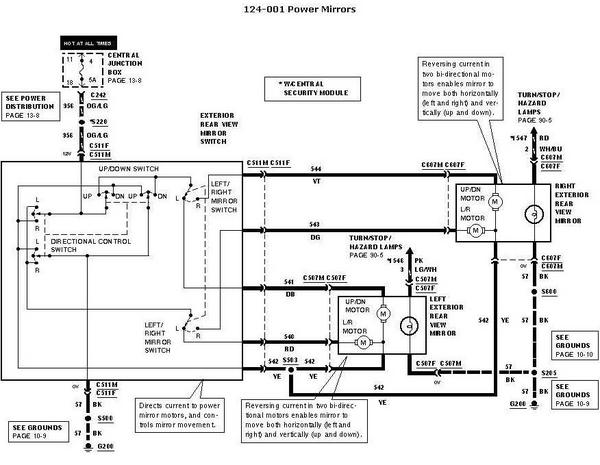
If you pull up the switch trim panel ( front first ) and take out the switch, you could test it with a meter.
First thing is to check that the Orange w/ Light Green stripe wire has power to it at the door ( checking for a broken wire between the CJB and the Door ).
Good luck, let us know what you come up with for a soultion for the next member that has the same problem.
The last time I put this up for a similar problem, the member did not report back:
https://www.f150online.com/forums/sh...d.php?t=234126
Here is the 2001 EVTM on power mirrors, you can see the feed in from the CJB, feeding the L/OFF/R directional switch.
If you pull up the switch trim panel ( front first ) and take out the switch, you could test it with a meter.
First thing is to check that the Orange w/ Light Green stripe wire has power to it at the door ( checking for a broken wire between the CJB and the Door ).
Good luck, let us know what you come up with for a soultion for the next member that has the same problem.
The last time I put this up for a similar problem, the member did not report back:
https://www.f150online.com/forums/sh...d.php?t=234126
Last edited by SSCULLY; Apr 18, 2006 at 12:11 AM.
Thread Starter
|
Member
Joined: Apr 2006
Posts: 11
Likes: 0
From: Florida
fixed it
I ended up taking the control switch out and tested it. It was not working so I took a small flat screw driver and unsnapped and seperated it. It was very tarnished. It has a insert inside that slides out which has the contacts on it so i removed it and cleaned with a pencil erarser then spray with contact cleaner I did the same thing on the pin contacts where the harness plugs in. This all took about 20 minutes but now works great and I am sure it was worth the time compared to the price of a new control. I hope this may also help someone else.
Thanks for your help on how to remove the cover I really didn't want to break it.
thanks again,
Stuart
Thanks for your help on how to remove the cover I really didn't want to break it.
thanks again,
Stuart

Member
Joined: Feb 2006
Posts: 22
Likes: 0
From: Amarillo,TX
well..it worked for the power mirrors but not the door locks...does anybody how to fix this problem?..when the unlock button is pushed the locks come up about halfway out of the hole then retract back in and then if you keep pushin the button it only makes a clicking noise that come from the front center portion of the dash. same if you try to lock them..you have to do it manually. any help would be appreciated
Technical Article Contributor
Joined: Jun 2002
Posts: 10,511
Likes: 10
From: Under the flightpath of old ORD 22R
Originally Posted by darkblue228
well..it worked for the power mirrors but not the door locks...does anybody how to fix this problem?..when the unlock button is pushed the locks come up about halfway out of the hole then retract back in and then if you keep pushin the button it only makes a clicking noise that come from the front center portion of the dash. same if you try to lock them..you have to do it manually. any help would be appreciated
If you search with the term power door lock and weed through them, you will find this one:
https://www.f150online.com/forums/sh...ower+door+lock
This refers to another thread, which I think covers the problem you are seeing.
Another one on the similar topic :
https://www.f150online.com/forums/sh...ower+door+lock
Take a read through, and see if this is what you are seeing. From the brief description, it seems like it is.
Good luck, let us know what you come up with.
BTW : Thanks for posting back in that other thread as well with the soultion for the power windows. At least the next guy searching does not run into a dead end. So many times, the problem is posted, and a bunch of suggestions on diagnoses are posted back in the thread, without the resoultion being put back in ( i.e. leaving the next guy to hunt and peck through the list to see what it is, and again not post back ).
Good to see another understands helping the next guy, with the soultion to the problem ( at least one soultion, might not be his ).


