


How to: Disable Perimeter Lighting (Save your HIDs!!)


Thread Starter
|
Senior Member

Joined: Aug 2008
Posts: 2,042
Likes: 1
From: Clemson, SC
How to: Disable Perimeter Lighting (Save your HIDs!!)
This question was just asked and I've seen it asked a few times before. It's hiding in the manual in the section on the keyless entry, of all places. Pretty hard to find.
With so many members changing over to HIDs I thought this was worth a post. Since they require a heat up/cool down period, it's a great idea to disable the perimeter lighting feature on our trucks.
What is perimeter lighting?
When you press the unlock button with your keyless entry fob, the headlights come on for ~25 seconds. It is used to illuminate the exterior of the vehicle and give better visibility to the user while approaching the vehicle.
Why disable it?
The perimeter lighting feature will, to be blunt, greatly reduce the life of your HIDs. The constant flickering on and off from the perimeter lighting causes unnecessary wear on the bulbs since they don't have time to properly warm up or cool down before their next use.
How to disable it.
Straight from a 2007 Ford F-150 Owner's Guide:
Hope this helps some of you guys out! Oh yeah, please readjust your HIDs after installing them. Now that you've readjusted them, aim them a bit further down.
With so many members changing over to HIDs I thought this was worth a post. Since they require a heat up/cool down period, it's a great idea to disable the perimeter lighting feature on our trucks.
What is perimeter lighting?
When you press the unlock button with your keyless entry fob, the headlights come on for ~25 seconds. It is used to illuminate the exterior of the vehicle and give better visibility to the user while approaching the vehicle.
Why disable it?
The perimeter lighting feature will, to be blunt, greatly reduce the life of your HIDs. The constant flickering on and off from the perimeter lighting causes unnecessary wear on the bulbs since they don't have time to properly warm up or cool down before their next use.
How to disable it.
Straight from a 2007 Ford F-150 Owner's Guide:
Originally Posted by F150 Manual, pg. 137
Enabling/Disabling the perimeter lighting feature
Your vehicle comes with the perimeter lighting feature enabled. All vehicle doors must be closed before beginning the procedure. You must complete Steps 1-5 withing 30 seconds, or the procedure will have to be repeated. If the procedure needs to be repeated, you must wait a minimum of 30 seconds to begin again.
1. Turn the ignition to the ON position, then press the unlock control three times.
2. Turn the ignition to the OFF/LOCK position, then press the unlock control three times.
3. Turn the ignition to the ON position; the horn will chirp to indicate the driver configuration mode has been activated.
4. Within five seconds, press the unlock control two times.
Note: One horn chirp should be heard, indicating the system has been disabled. Conversely, a horn chirp followed by a honk will indicate the system is enabled. Pressing the power door unlock control two times again will turn the feature ON if it was previously OFF, or OFF if it was previously ON. Every two consecutive presses of the unlock control after successfully entering the configuration mode will change the enable/disable condition of the feature.
5. Turn the ignition to the OFF/LOCK position to exit programming.
Note: After exiting the driver configuration mode, the horn will chirp once to indicate a feature has been activated/deactivated.
Your vehicle comes with the perimeter lighting feature enabled. All vehicle doors must be closed before beginning the procedure. You must complete Steps 1-5 withing 30 seconds, or the procedure will have to be repeated. If the procedure needs to be repeated, you must wait a minimum of 30 seconds to begin again.
1. Turn the ignition to the ON position, then press the unlock control three times.
2. Turn the ignition to the OFF/LOCK position, then press the unlock control three times.
3. Turn the ignition to the ON position; the horn will chirp to indicate the driver configuration mode has been activated.
4. Within five seconds, press the unlock control two times.
Note: One horn chirp should be heard, indicating the system has been disabled. Conversely, a horn chirp followed by a honk will indicate the system is enabled. Pressing the power door unlock control two times again will turn the feature ON if it was previously OFF, or OFF if it was previously ON. Every two consecutive presses of the unlock control after successfully entering the configuration mode will change the enable/disable condition of the feature.
5. Turn the ignition to the OFF/LOCK position to exit programming.
Note: After exiting the driver configuration mode, the horn will chirp once to indicate a feature has been activated/deactivated.
Hope this helps some of you guys out! Oh yeah, please readjust your HIDs after installing them. Now that you've readjusted them, aim them a bit further down.
Last edited by mblouir; Oct 23, 2009 at 06:11 PM.


Thread Starter
|
Senior Member
Joined: Aug 2008
Posts: 2,042
Likes: 1
From: Clemson, SC
Yeah the note for Step 4 is a little confusing. Basically do the exact same process to reverse it. If it is enabled the horn will chirp then honk, as opposed to just chirping for being disabled.


Thread Starter
|
Senior Member
Joined: Aug 2008
Posts: 2,042
Likes: 1
From: Clemson, SC
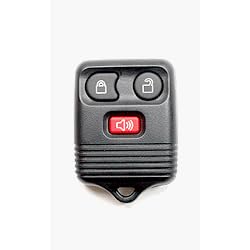
Not sure if all F150s come with it now, but the keyless entry controller.
Trending Topics


Thread Starter
|
Senior Member
Joined: Aug 2008
Posts: 2,042
Likes: 1
From: Clemson, SC
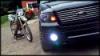
Saw the post before you edited. Ignition ON means you flip the key to turn the accessories on, not turn the truck on. The truck will not start during the entire process.

Junior Member
Joined: Aug 2008
Posts: 9
Likes: 0
when you by an hid kit, buy a relay harness. The relay harness will eliminate any flickering issues.The lights come on like normal because instead of the ballasts pulling the power from the truck meaning the stock harness the relay pulls the power straight from the battery. The headlights usually flicker due to the lack of volts that's being sent to the ballasts.The harness costs like 25 bucks on ebay and it takes like 5 min. to install. The best part is you dont have to disable your lights.