


MTX Thunderform Install w/Pics


Thread Starter
|
Junior Member
Joined: Sep 2006
Posts: 6
Likes: 0
MTX Thunderform Install w/Pics
Over the weekend, I tackled my Thunderform install. Pretty simplistic unit, especially when compared to some of the systems on this forum! For starters, MTX's instructions are pretty much useless. There are huge glaring errors, and they are very basic, meaning they make blanket statements, with no guidance, no description, no actual instruction. Hopefully my trial and error install will help anyone using the Thunderform. I should mention that I have a 2006 Supercab truck, for reference. 1st thing I ran the wiring 'harness' lol. The wires all tuck nicely, behind the seats, just under the carpet lip. Getting them in there, behind all of the seatbelt brackets etc. was alot of fun! I actually rubbed the skin off of a couple of my knuckles, stuffing my hands in and out of that tight seat joint, about a thousand times! I found a nice grounding point, on one of the bolts that holds down the jack.

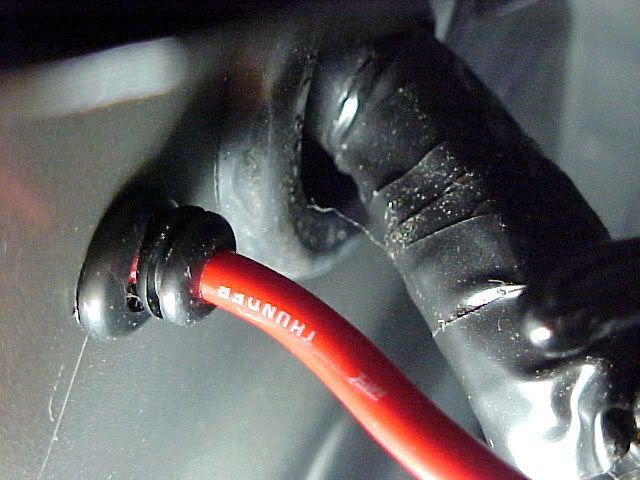
I spent the better part of an hour, banging my head into the wall, trying to route the power wire into the engine bay, up to the battery. I did not want to drill any holes in my brand new truck! I noticed the antenna wire going down into the fender, and it could (somewhat) easily be seen, up under the passenger footwell. I thought if worse comes to worse, I can enlarge that hole, and install a new grommet. Turned out to not be necessary. Once the splashguard was moved out of the way, I found a nice 3/8" hole in the firewall, just under one of the main wiring harness holes/grommet. It is unused, and is only covered with a sticker.
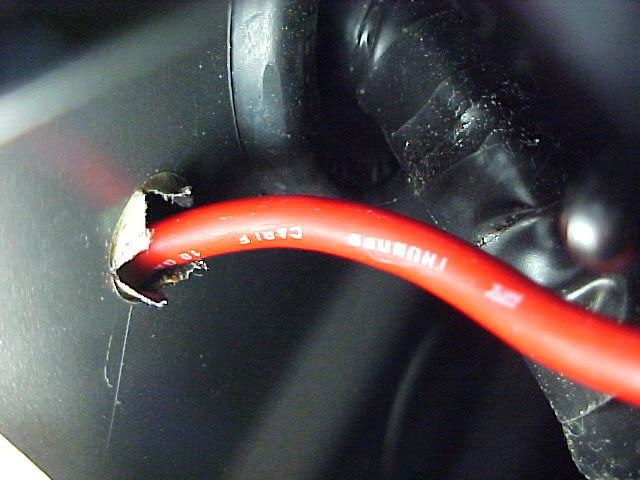
I installed a couple of grommets on the power wire, to ensure that no water or whatever, found its way into the passenger compartment.
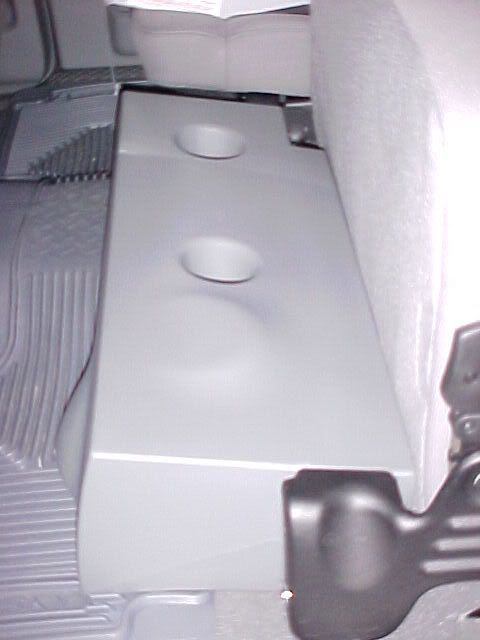
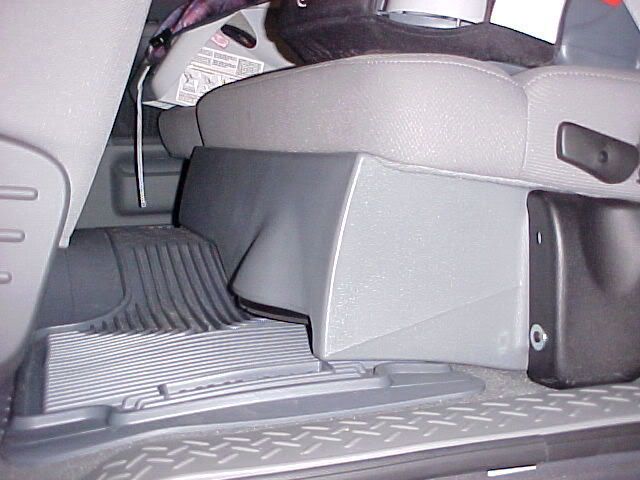
Next, I routed the speaker wires. These simply tap into the existing rear speaker wires, making it unnecessary to run lines up to your head unit. I'm 99.9% sure that the factory head unit does not have RCA outputs, at any rate. The MTX directions state that the speaker wires run under the drivers side threshold?! Hmmm, doesn't make sense to me, but I stupidly run both sets of RCA cables over to the drivers side. I know, I'm an idiot. I am only able to finde the LH speaker wires, of course, the RH wires are on the passenger side threshold, duh. Thats what I get for taking these 'directions' too literally. Meaning I have to reroute the passenger side RCA cable, meaning a couple more mm of knuckle skin worn off! After that, It was smooth sailing, the box screws right in snugly, and actually sounds quite good for what it is.
I nearly forgot to mention, I mounted my remote speaker volume ****, in the center console. Again, no way I was going to drill out the dash or wherever for this (kind of cheesy) ****. Also, there was no way I was attempting to run any more wires, any further than I had to. I give Ford credit, this truck is well put together, this was one of the harder installs I have done. Simply because there isn't much space, and things don't just come apart easily etc. Here's the volume ****:

My post isn't meant to replace the instruction that MTX provides, merely augment them, since they are woefully lacking. Hope this helps.
I spent the better part of an hour, banging my head into the wall, trying to route the power wire into the engine bay, up to the battery. I did not want to drill any holes in my brand new truck! I noticed the antenna wire going down into the fender, and it could (somewhat) easily be seen, up under the passenger footwell. I thought if worse comes to worse, I can enlarge that hole, and install a new grommet. Turned out to not be necessary. Once the splashguard was moved out of the way, I found a nice 3/8" hole in the firewall, just under one of the main wiring harness holes/grommet. It is unused, and is only covered with a sticker.
I installed a couple of grommets on the power wire, to ensure that no water or whatever, found its way into the passenger compartment.
Next, I routed the speaker wires. These simply tap into the existing rear speaker wires, making it unnecessary to run lines up to your head unit. I'm 99.9% sure that the factory head unit does not have RCA outputs, at any rate. The MTX directions state that the speaker wires run under the drivers side threshold?! Hmmm, doesn't make sense to me, but I stupidly run both sets of RCA cables over to the drivers side. I know, I'm an idiot. I am only able to finde the LH speaker wires, of course, the RH wires are on the passenger side threshold, duh. Thats what I get for taking these 'directions' too literally. Meaning I have to reroute the passenger side RCA cable, meaning a couple more mm of knuckle skin worn off! After that, It was smooth sailing, the box screws right in snugly, and actually sounds quite good for what it is.
I nearly forgot to mention, I mounted my remote speaker volume ****, in the center console. Again, no way I was going to drill out the dash or wherever for this (kind of cheesy) ****. Also, there was no way I was attempting to run any more wires, any further than I had to. I give Ford credit, this truck is well put together, this was one of the harder installs I have done. Simply because there isn't much space, and things don't just come apart easily etc. Here's the volume ****:
My post isn't meant to replace the instruction that MTX provides, merely augment them, since they are woefully lacking. Hope this helps.


Thread Starter
|
Junior Member
Joined: Sep 2006
Posts: 6
Likes: 0
Where to buy
I bought mine from Supercrew sound. The guy I dealt with (Mark?) was really cool, and I received the product quickly, even though it was not in stock. I saved a whopping $150 buying from Supercrew, instead of Crutchfield or another 'authorized' dealer. BTW, you can get just the box, with no amp, and you can even delete the sub, if you want to use your own (subtract $40, I think). Right now I am using my Ipod, with a wireless FM transmitter, so the quality is not that great. This sub is more than I need, in such a confined space. However, I am not into the thumping bass that can be heard from a block away, lol! I am just an old school headbanger... 
Trending Topics

Senior Member
Joined: Jul 2005
Posts: 2,400
Likes: 0
From: Temecula, CA
Originally Posted by Metalcop
I bought mine from Supercrew sound. The guy I dealt with (Mark?) was really cool, and I received the product quickly, even though it was not in stock. I saved a whopping $150 buying from Supercrew, instead of Crutchfield or another 'authorized' dealer. BTW, you can get just the box, with no amp, and you can even delete the sub, if you want to use your own (subtract $40, I think). Right now I am using my Ipod, with a wireless FM transmitter, so the quality is not that great. This sub is more than I need, in such a confined space. However, I am not into the thumping bass that can be heard from a block away, lol! I am just an old school headbanger...
BTW, I'm an oldschool headbanger...what's that got to do with hearing a system from a block away? LOL


Senior Member
Joined: Sep 2007
Posts: 859
Likes: 0
From: Tampa Bay, Florida
Originally Posted by wookie13
would a jl 10w3 work in that box? i like the mtx box just dont like their junk subs and amps!!

Senior Member
Joined: Jul 2004
Posts: 4,480
Likes: 0
From: Nashville, TN
Cool write up. I will be using this when i install mine next week. To anyone who has one of these...is the plastic enclosure pretty strong and sturdy or is it really thin and flimsy?
To anyone who has one of these...is the plastic enclosure pretty strong and sturdy or is it really thin and flimsy?
Last edited by freekyFX4; Feb 22, 2008 at 02:56 PM.

Senior Member
Joined: Aug 2007
Posts: 248
Likes: 0
From: Fairfax
I have a single 12 thunderform in my 2005 supercab. I bought it unloaded for $100 when sounddomain.com was having it's close out sale. I put a JL 12w1-8 in it. I have 500watts going to it and it sounds great. The box is pretty stout and the plastic is plenty thick.
For the price, convenience, and the ability to have a 12" I don't think it can be beat.
For the price, convenience, and the ability to have a 12" I don't think it can be beat.
Senior Member
Joined: Jul 2004
Posts: 4,480
Likes: 0
From: Nashville, TN
Originally Posted by davewvu86
I have a single 12 thunderform in my 2005 supercab. I bought it unloaded for $100 when sounddomain.com was having it's close out sale. I put a JL 12w1-8 in it. I have 500watts going to it and it sounds great. The box is pretty stout and the plastic is plenty thick.
For the price, convenience, and the ability to have a 12" I don't think it can be beat.
For the price, convenience, and the ability to have a 12" I don't think it can be beat.