


Uses for a tablet?


Thread Starter
|
Senior Member
Joined: May 2005
Posts: 1,007
Likes: 0
From: Kamloops. B.C.
Uses for a tablet?
I was wondering about uses for a tablet with design programs like AutoCAD, Architectural Desktop, Inventor...etc. Has anyone tried it? I'm not sure if it would be bennificial or combersome.

Senior Member
Joined: Dec 2005
Posts: 1,530
Likes: 0
From: San Antonio, Tx
I've been using AutoCad programs off & on for the last 9 yrs (Architectual - Res. and Commercial, Civil Engineering - Land Development) and I've never used or had the need to use a tablet.

Senior Member
Joined: Feb 2003
Posts: 984
Likes: 0
From: SW MO
Originally Posted by Budha05STX
I've been using AutoCad programs off & on for the last 9 yrs (Architectual - Res. and Commercial, Civil Engineering - Land Development) and I've never used or had the need to use a tablet.
I even find it somewhat cumbersome to use a laptop...
Thread Starter
|
Senior Member
Joined: May 2005
Posts: 1,007
Likes: 0
From: Kamloops. B.C.
I never use programs like Photoshop and I too find laptops cumbersome to use for CAD programs unless I connect a mouse to it. I guess I don't even know how it would be used for CAD programs. I've read about people using it but not how. Just curious I guess.


Senior Member
Joined: May 2000
Posts: 873
Likes: 1
From: Somewhere in the EU
Originally Posted by SAtownTX
do u mean a laptop or a tablet where u can draw on the screen?
Yeah, I was just thinking the same thing as I read the responses. Where the hell did laptop come from?
Do you mean tablet, as in a Wacom tablet:

or a TabletPC ?
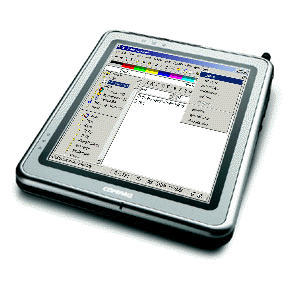
If you mean tablet PC, then stay away. I have one and it's pretty much useless for everything, let alone something that requires horsepower like cad, plus the screen is of no use for something like cad.
If you mean something like a Wacom Tablet, well, your answer earlier, if you were referring to this demonstrates you probably would find no use for it either. For CAD and such,the tablet makes more use of highly precise mouse use, which probably ain't gonna help you all that much. Tablets like the Wacom are great for pressure sensitive art work and photo work like in photoshop where pen-like and brush-like simulation is required.
Carry on.
Trending Topics
Senior Member
Joined: Dec 2005
Posts: 1,530
Likes: 0
From: San Antonio, Tx
Originally Posted by kobiashi
Yeah, I was just thinking the same thing as I read the responses. Where the hell did laptop come from?
Do you mean tablet, as in a Wacom tablet:
If you mean something like a Wacom Tablet, well, your answer earlier, if you were referring to this demonstrates you probably would find no use for it either. For CAD and such,the tablet makes more use of highly precise mouse use, which probably ain't gonna help you all that much. Tablets like the Wacom are great for pressure sensitive art work and photo work like in photoshop where pen-like and brush-like simulation is required.
Carry on.
Do you mean tablet, as in a Wacom tablet:
If you mean something like a Wacom Tablet, well, your answer earlier, if you were referring to this demonstrates you probably would find no use for it either. For CAD and such,the tablet makes more use of highly precise mouse use, which probably ain't gonna help you all that much. Tablets like the Wacom are great for pressure sensitive art work and photo work like in photoshop where pen-like and brush-like simulation is required.
Carry on.


Thread Starter
|
Senior Member
Joined: May 2005
Posts: 1,007
Likes: 0
From: Kamloops. B.C.
Sorry, I did mean a tablet like the Wacom in the pic. The laptop reference came from closer9's response. Really had nothing to do with anything, sorry for the confusion.
Senior Member
Joined: May 2000
Posts: 873
Likes: 1
From: Somewhere in the EU
No worries, was just unclear on what "tablet" meant.
If you ever get into Photoshop or Painter or any type of artistic type programs, you'll need a Wacom tablet.
You might be interested to know that when CAD first started to be used (in the old days before graphical user interface that used a mouse), tablets were what they used for input, using a puck with a crosshair attachment. Here's an excerpt from something I read:
Evidently, once GPU and computers with a mouse came into use, the CAD tablet with 16 button puck fell out of use and the tablet evolved into being used by artists graphics and fine art uses with the stylus replacing the puck.
FYI
If you ever get into Photoshop or Painter or any type of artistic type programs, you'll need a Wacom tablet.
You might be interested to know that when CAD first started to be used (in the old days before graphical user interface that used a mouse), tablets were what they used for input, using a puck with a crosshair attachment. Here's an excerpt from something I read:
Digital tablets, in one form, predate even the mouse. Early CAD (computer-aided design) systems used a "puck" that was very similar to a modern mouse. The puck often contained as many as 16 buttons and had a lens with a crosshair mounted on the front of it. CAD designers had to use the puck on a special tablet that provided them with the accuracy they needed. The crosshair let them make very precise movements with the mouse and access key functions from any one of the 16 buttons. Even today, CAD designers use tablets similar to these early ones.
Later graphical tablets replaced the puck with a stylus but needed to find a way to power the stylus in order to track its movements. A popular solution was to tether the stylus to the tablet. This, however, occasionally impeded the artist's range of motion and generally got in the way. Another solution was to provide batteries inside the pen. Unfortunately, batteries caused similar problems. Battery life was often short, and batteries added weight to the stylus, causing it to be top heavy and otherwise unbalanced. Batteries did liberate the stylus from the tablet, however.
Modern digital tablets provide wireless input tools without the use of batteries, giving artists the best of both worlds. Other advances in digital tablets include the ability of a tablet to differentiate between multiple tools (for instance, to differentiate between several different styli), and the ability to track more than one device at time.
Over the years, tablets have also increased in quality. A tablet's resolution, measured in LPI, or the number of unique lines per inch that the tablet can distinguish, has steadily improved over the years. Pressure sensitivity has also increased over the years, giving artists more control over their digital work.
Later graphical tablets replaced the puck with a stylus but needed to find a way to power the stylus in order to track its movements. A popular solution was to tether the stylus to the tablet. This, however, occasionally impeded the artist's range of motion and generally got in the way. Another solution was to provide batteries inside the pen. Unfortunately, batteries caused similar problems. Battery life was often short, and batteries added weight to the stylus, causing it to be top heavy and otherwise unbalanced. Batteries did liberate the stylus from the tablet, however.
Modern digital tablets provide wireless input tools without the use of batteries, giving artists the best of both worlds. Other advances in digital tablets include the ability of a tablet to differentiate between multiple tools (for instance, to differentiate between several different styli), and the ability to track more than one device at time.
Over the years, tablets have also increased in quality. A tablet's resolution, measured in LPI, or the number of unique lines per inch that the tablet can distinguish, has steadily improved over the years. Pressure sensitivity has also increased over the years, giving artists more control over their digital work.
FYI