


Bought a new remote control


Thread Starter
|
Senior Member
Joined: Jan 2000
Posts: 2,075
Likes: 1
From: Central Florida
Bought a new remote control
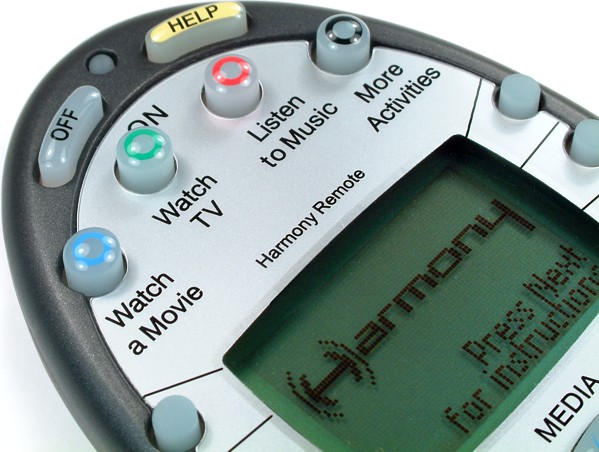
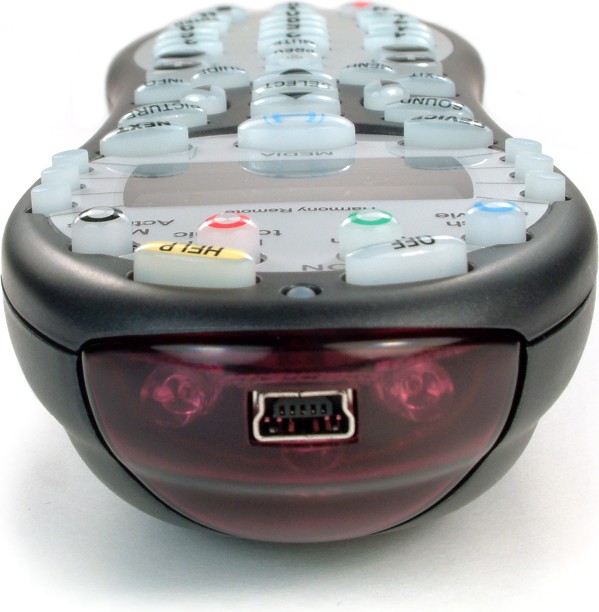
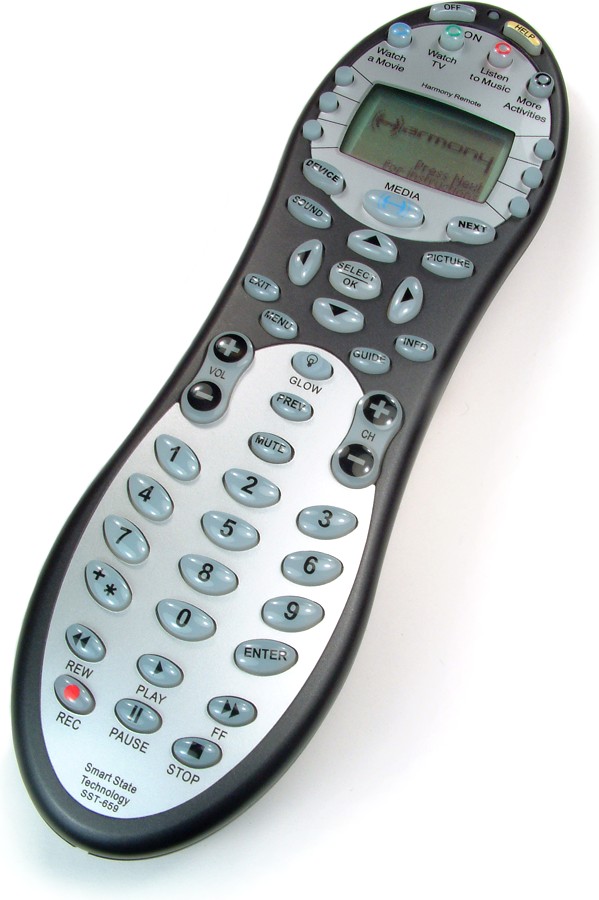
I have the RCA HD DirecTV receiver and it came with a universal RF remote. It worked fine for the first 6 months and then it got to where I had to reprogram all of my devices almost daily. It controls my TV, DVD, VCR, Audio receiver and Satellite. I have been looking around and decided to try the Logitech Harmony 659. Comp USA had them for $104 (normally $150). This is rocks! You hook it up via USB to your computer. You have to install the software, input all of your devices and their model numbers and then answer a bunch of questions as to what input the TV needs to be at to watch TV, watch a DVD, etc. After you have it all set up all you have to do is push one button to watch TV. It turns on the TV, Satellite and audio receiver and sets them all to the correct inputs. It does the same for DVD and VCR.
Here is their description:
Product Description:
The Harmony Remote is the world's only remote with Smart State Technology Activity Control. Just press an Activity button such as "Watch TV" or "Watch a Movie", and the Harmony Remote will automatically set-up your entertainment system in seconds without you ever having to program a 'macro'. The Harmony Remote provides simple, intuitive control of even the most elaborate entertainment system for anyone in the family.With the world's only Smart State Database of electronic devices, set-up is a snap. The community-driven database together with IR learning ensures support of all infrared-controlled devices made by any manufacturer, including TiVo, HDVCR, HDTV, Plasma Displays, Monitors, Projectors, Lighting Control, CD/DVD-R, PVR, Satellite Radios, Amplifiers, DVD Players, Receivers, Dual VCRs and even combination devices like DVD-VCR components. With interactive media capabilities, you can select TV Shows, Movies or Music titles from the interactive display. You can even control devices like lights, fireplace and your personal computer!
http://www.logitech.com/index.cfm/pr...CONTENTID=8865
http://www.amazon.com/gp/product/B00...lance&n=172282

Here is their description:
Product Description:
The Harmony Remote is the world's only remote with Smart State Technology Activity Control. Just press an Activity button such as "Watch TV" or "Watch a Movie", and the Harmony Remote will automatically set-up your entertainment system in seconds without you ever having to program a 'macro'. The Harmony Remote provides simple, intuitive control of even the most elaborate entertainment system for anyone in the family.With the world's only Smart State Database of electronic devices, set-up is a snap. The community-driven database together with IR learning ensures support of all infrared-controlled devices made by any manufacturer, including TiVo, HDVCR, HDTV, Plasma Displays, Monitors, Projectors, Lighting Control, CD/DVD-R, PVR, Satellite Radios, Amplifiers, DVD Players, Receivers, Dual VCRs and even combination devices like DVD-VCR components. With interactive media capabilities, you can select TV Shows, Movies or Music titles from the interactive display. You can even control devices like lights, fireplace and your personal computer!
http://www.logitech.com/index.cfm/pr...CONTENTID=8865
http://www.amazon.com/gp/product/B00...lance&n=172282

Senior Member
Joined: Jan 2003
Posts: 2,079
Likes: 0
From: Pikesville, MD
Sounds great, I'm looking to replace a huge remote that I have.
I checked the links and it doesnt answer these two questions so maybe you can double check your software.
Does it support Tivo Series 2 units.
Does is support Magnavox TV/VCR/DVD combination units.
(I know this sucks but it is what I have to deal with right now)
if you get time to check....thanks.
if not....
I checked the links and it doesnt answer these two questions so maybe you can double check your software.
Does it support Tivo Series 2 units.
Does is support Magnavox TV/VCR/DVD combination units.
(I know this sucks but it is what I have to deal with right now)
if you get time to check....thanks.
if not....
Thread Starter
|
Senior Member
Joined: Jan 2000
Posts: 2,075
Likes: 1
From: Central Florida
Originally Posted by vader716
Sounds great, I'm looking to replace a huge remote that I have.
I checked the links and it doesnt answer these two questions so maybe you can double check your software.
Does it support Tivo Series 2 units.
Does is support Magnavox TV/VCR/DVD combination units.
(I know this sucks but it is what I have to deal with right now)
if you get time to check....thanks.
if not....
I checked the links and it doesnt answer these two questions so maybe you can double check your software.
Does it support Tivo Series 2 units.
Does is support Magnavox TV/VCR/DVD combination units.
(I know this sucks but it is what I have to deal with right now)
if you get time to check....thanks.
if not....
What are your model numbers and I can see if they are listed?
Thread Starter
|
Senior Member
Joined: Jan 2000
Posts: 2,075
Likes: 1
From: Central Florida
Here are the devices that they say it will not control:
Question:
What types of devices can be controlled by the Harmony Remote?
Answer:
The Harmony remote can control most types of devices that come with an infrared remote control. However, there are some exceptions listed below:
Bose Lifestyle® 20, 25, 30, 40, and 50 MiniSystems.
The Bose Lifestyle 20, 25, 30, 40, and 50 systems are controlled by Radio Frequency (RF or UHF) only. The Bose RF Controller, which is available at many electronics stores, allows you to control your system using your Harmony remote.
The Bose Lifestyle 20, 25, 30, 40, and 50 systems cannot be controlled with our current range of Harmony remotes, unless the RF Controller is used. The Bose RF Controller takes IR commands transmitted by your Harmony remote, translates them into RF, and sends them to your system.
Bang & Olufsen (B&O)
Bang & Olufsen equipment uses a very high frequency infrared which cannot be analyzed (learned) by the Harmony Remote, or any other universal remote to our knowledge. Therefore you cannot directly teach commands from your Bang & Olufsen to the Harmony Remote. However, we are committed to providing support for Bang & Olufsen devices and are working diligently to solve this problem. To date we have even been able to create two infrared languages to work with Bang & Olufsen equipment. The two B&O devices that we have in our database are the BeoSound 4000 and the BeoSystem 2500. These are located under the "Mini System (CD, Radio, Cassette)" device category. If you have either of these devices, then you can add them to your account, include them in Activities and then update your Harmony Remote and control them.
Sony VisionTouch™
No learning remote can work with a VisionTouch receiver.
The VisionTouch system uses a 455KHz carrier frequency, which seems compatible with many learning remotes, but uses a completely unique IR protocol that cannot be learned by almost every universal remote to-date, including Sony's own models. The problem prevents you from using the regular Sony remotes or IR codes to control the receiver.
Note: Sony has dropped the entire VisionTouch system from their line-up.
Question:
What types of devices can be controlled by the Harmony Remote?
Answer:
The Harmony remote can control most types of devices that come with an infrared remote control. However, there are some exceptions listed below:
Bose Lifestyle® 20, 25, 30, 40, and 50 MiniSystems.
The Bose Lifestyle 20, 25, 30, 40, and 50 systems are controlled by Radio Frequency (RF or UHF) only. The Bose RF Controller, which is available at many electronics stores, allows you to control your system using your Harmony remote.
The Bose Lifestyle 20, 25, 30, 40, and 50 systems cannot be controlled with our current range of Harmony remotes, unless the RF Controller is used. The Bose RF Controller takes IR commands transmitted by your Harmony remote, translates them into RF, and sends them to your system.
Bang & Olufsen (B&O)
Bang & Olufsen equipment uses a very high frequency infrared which cannot be analyzed (learned) by the Harmony Remote, or any other universal remote to our knowledge. Therefore you cannot directly teach commands from your Bang & Olufsen to the Harmony Remote. However, we are committed to providing support for Bang & Olufsen devices and are working diligently to solve this problem. To date we have even been able to create two infrared languages to work with Bang & Olufsen equipment. The two B&O devices that we have in our database are the BeoSound 4000 and the BeoSystem 2500. These are located under the "Mini System (CD, Radio, Cassette)" device category. If you have either of these devices, then you can add them to your account, include them in Activities and then update your Harmony Remote and control them.
Sony VisionTouch™
No learning remote can work with a VisionTouch receiver.
The VisionTouch system uses a 455KHz carrier frequency, which seems compatible with many learning remotes, but uses a completely unique IR protocol that cannot be learned by almost every universal remote to-date, including Sony's own models. The problem prevents you from using the regular Sony remotes or IR codes to control the receiver.
Note: Sony has dropped the entire VisionTouch system from their line-up.
Thread Starter
|
Senior Member
Joined: Jan 2000
Posts: 2,075
Likes: 1
From: Central Florida
This will control all of the same things. Basically, anything that can be remote controlled can be controlled by this remote.
Here is a very in-depth review:
http://www.remotecentral.com/sst659/
Here is a very in-depth review:
http://www.remotecentral.com/sst659/

Senior Member
Joined: Dec 2004
Posts: 891
Likes: 1
From: Lost some where in the middle of the Ozark Mountains!
Will it control the cieling fans?
I don't care to have my blender on a remote control, I have to be in there to fill it anyway.
But if I get a built in automated coffe maker, theeeen maybe..... LOL
I don't care to have my blender on a remote control, I have to be in there to fill it anyway.
But if I get a built in automated coffe maker, theeeen maybe..... LOL
Trending Topics

Senior Member
Joined: Mar 2000
Posts: 481
Likes: 0
From: Westminster, CO
Originally Posted by PSS-Mag
Will it control the cieling fans?
I don't care to have my blender on a remote control, I have to be in there to fill it anyway.
But if I get a built in automated coffe maker, theeeen maybe..... LOL
I don't care to have my blender on a remote control, I have to be in there to fill it anyway.
But if I get a built in automated coffe maker, theeeen maybe..... LOL
UC
Senior Member
Joined: Dec 2004
Posts: 891
Likes: 1
From: Lost some where in the middle of the Ozark Mountains!
Cieling fans are already remote, but if I could get a universal to take them and all the A/V.
A remote outlet? I can see that for maybe a toaster, put your pop tart and push it down at night, then when you wake up just turn the outlet on. Then when you get to the kitchen your coffee and breakfast are done.
I'm ready for voice command.
No more remotes to lose, no more switches on the wall, have a mic in every room then just tell the house what you want to do and it does it.
Example:
Wake up in the morning and the house is a little cool, I say: House temperature 78º. It raises thr thermostat to 78º and the central unit kick on.
I like a hot room when I shower so I also say, "bathroom 1 heater, 80º" It kicks that heater on in that bathroom. I wait a few minutes, then say "bathroom 1 light on." that light comes on and I go in there to get ready.
Now it's time for a shower, so I say "shower on". It recognizes my voice and turns the shower on to my preset water temperture. as I 'm taking a shower I realize I woke up a little early so my coffee pot hasn't started yet. So I say, "start coffee" and it does. I also want it hooked up to my phone line so I can call the house, type the houses ext. # and give it commands over teh phone. Incase I forget to turn something off or want to turn something on, on my way home.
A remote outlet? I can see that for maybe a toaster, put your pop tart and push it down at night, then when you wake up just turn the outlet on. Then when you get to the kitchen your coffee and breakfast are done.
I'm ready for voice command.
No more remotes to lose, no more switches on the wall, have a mic in every room then just tell the house what you want to do and it does it.
Example:
Wake up in the morning and the house is a little cool, I say: House temperature 78º. It raises thr thermostat to 78º and the central unit kick on.
I like a hot room when I shower so I also say, "bathroom 1 heater, 80º" It kicks that heater on in that bathroom. I wait a few minutes, then say "bathroom 1 light on." that light comes on and I go in there to get ready.
Now it's time for a shower, so I say "shower on". It recognizes my voice and turns the shower on to my preset water temperture. as I 'm taking a shower I realize I woke up a little early so my coffee pot hasn't started yet. So I say, "start coffee" and it does. I also want it hooked up to my phone line so I can call the house, type the houses ext. # and give it commands over teh phone. Incase I forget to turn something off or want to turn something on, on my way home.