


Computer Question...


Senior Member
Joined: Apr 2004
Posts: 4,424
Likes: 0
From: Motor City
Originally Posted by UrbanCowboy
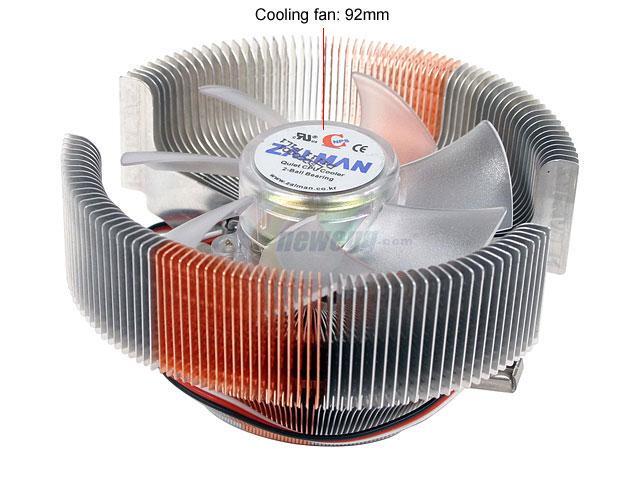
Actually, the CPU fan is not spinning. I didnt think they could die like that. It has a large heat sink under the fan as well. Could the lack of a spinning fan really cause the system to lockup within minutes?

Senior Member
Joined: Jan 2003
Posts: 2,079
Likes: 0
From: Pikesville, MD
Originally Posted by UrbanCowboy
Actually, the CPU fan is not spinning. I didnt think they could die like that. It has a large heat sink under the fan as well. Could the lack of a spinning fan really cause the system to lockup within minutes?
It is a cheap test.
Have I mentioned I hate hardware?

Senior Member
Joined: Jan 2003
Posts: 2,079
Likes: 0
From: Pikesville, MD
Originally Posted by kobiashi
.
Hey Vader . . . just curious. How do you feel about hardware?
(Withour it, ya know, all the software in the world is useless).
Hey Vader . . . just curious. How do you feel about hardware?
(Withour it, ya know, all the software in the world is useless).
Man I hate hardware....
Just like taxes it is a necessary evil....but I hate em.
Pentium this or that....argghh...I hate troubleshooting hardware, I hate replacing it, I hate ordering it, I hate it in general.
Freakin cut my knuckles on it...think you got it fixed and then it locks up...
Arrrgghhhh


Senior Member
Joined: May 2000
Posts: 873
Likes: 1
From: Somewhere in the EU
Originally Posted by vader716
Man I hate hardware....
Just like taxes it is a necessary evil....but I hate em.
Pentium this or that....argghh...I hate troubleshooting hardware, I hate replacing it, I hate ordering it, I hate it in general.
Freakin cut my knuckles on it...think you got it fixed and then it locks up...
Arrrgghhhh
Just like taxes it is a necessary evil....but I hate em.
Pentium this or that....argghh...I hate troubleshooting hardware, I hate replacing it, I hate ordering it, I hate it in general.
Freakin cut my knuckles on it...think you got it fixed and then it locks up...
Arrrgghhhh
Actually, I have no idea what any of y'all are talking about. Such things don't happen when one is protected by Steve's Reality Distortion Field™.

Senior Member
Joined: Apr 2004
Posts: 4,424
Likes: 0
From: Motor City
Originally Posted by kobiashi
Actually, I have no idea what any of y'all are talking about. Such things don't happen when one is protected by Steve's Reality Distortion Field™.

Hardware rules, software blow since most idiot programmers can't actually program. One big thing I like about Macs, they keep a tight reign on commercial developers. Well, at least they used to!


Senior Member
Joined: Jun 2001
Posts: 1,160
Likes: 0
From: Knoxville, TN.
Originally Posted by UrbanCowboy
Actually, the CPU fan is not spinning. I didnt think they could die like that. It has a large heat sink under the fan as well. Could the lack of a spinning fan really cause the system to lockup within minutes?
That's why I suggested it.


Senior Member
Joined: May 2002
Posts: 765
Likes: 0
From: FL
Yeah if the heatsink fan isn't running that could cause the problem. It's overheating and locking up. Hopefully it hasn't done any permanent damage. You can take any old fan and position it to blow over the CPU at highest speed and see if that helps if you don't have a fan to put on the heatsink itself.
So, I have a $1 on the CPU overheating. I run an AMD64 and on the stock heatsink if the fan isn't running it's burning itself up. I ahve an aftermarket HS on it now that would take a bit to overheat without the fan.
So, I have a $1 on the CPU overheating. I run an AMD64 and on the stock heatsink if the fan isn't running it's burning itself up. I ahve an aftermarket HS on it now that would take a bit to overheat without the fan.

Senior Member
Joined: Jul 2005
Posts: 490
Likes: 0
From: Fort Worth Tx
Originally Posted by UrbanCowboy
Could the lack of a spinning fan really cause the system to lockup within minutes?
Without a fan and, therefore, a working heatsink, temps can go from 0 to 70 degrees C in a matter of minutes....SECONDS if you have had it on for a while.
Your problem does NOT seem like a motherboard problem - if it was a motherboard problem you would get spontaneous rebooting on startup. If it freezes, it's either memory or processor. If you know your memory is good, then it's the processor.
Since the fan is bad, the likelihood that the non-working fan has caused your processor to fry is almost 100 percent....especially if you left it on for the time period you said you left it on (presumably without the fan working). Looks like you're going to be buying a new processor and fan combo unless your processor is still under warranty (which it probably isn't unless you've had it for less than 6 months time - even then you have to have the factory "tie-fighter" fan on the processor for the manufacturer to accept the claim).
On another note, test another fan in the motherboard fan slot - if a new fan won't power on, then there's damage to the mobo too.

Senior Member
Joined: Dec 2004
Posts: 891
Likes: 1
From: Lost some where in the middle of the Ozark Mountains!
Originally Posted by Kool Aid
If it's a P-4, it's designed to shut itself off, to prevent killing itself.
AMD's don't have this feature.
AMD's don't have this feature.
Senior Member
Joined: Dec 2004
Posts: 891
Likes: 1
From: Lost some where in the middle of the Ozark Mountains!
If moving air around the processor in some way dosent help, "note I have taken the side of the case off and put a box fan blowing in before to limp along til new heat sink and fan got in." But a last ditch chance to boot it when you know a new processor is on the way.
Enable Bios shadowing
Power up
If it locks up then restart while holding Esc
Run throu shadow test until you reach processor test then hit skip and restart again.
It might, just maybe boot that way. I had a laptop I had to boot like that for a while.
Enable Bios shadowing
Power up
If it locks up then restart while holding Esc
Run throu shadow test until you reach processor test then hit skip and restart again.
It might, just maybe boot that way. I had a laptop I had to boot like that for a while.