


OEM Mirror harness for camera, where is it???


Thread Starter
|
Senior Member
Joined: Aug 2002
Posts: 632
Likes: 0
From: San Antonio, TX
OEM Mirror harness for camera, where is it???
Have a 2011 F250 Lariat 4x4 - came with the factory tailgate camera and mini screen in the rear view mirror. So I swapped out the basic Audiophile unit with an OEM navigation touchscreen unit (BC3T) and well, need some help on locating the camera signal and/or plug in the cab so I can route up to the navigation screen. With my purchase I was provided a video pigtail with the male to female plugs which will plug into the rear of the head unit along with an extra RCA jack, but since this is the OEM to OEM, shouldn't need the RCA at this point and not to mention Ford used their plugs instead of making it easy and using RCA's for the video feed.
Earlier today I called United and wouldn't you know it, for "liability purposes" the only bit of information they will not release is the location for the camera to mirror plug in the cab so I could swap or move. Really gotta love what the legal system and frivolous lawsuits have done to this country.
Can anyone tell me where the factory plug for a 2011 F250 rear view display is located so I can move/splice to view on the larger screen? Additionally, if it is not plug/play, what wires need to be spliced.
Again this is for a SuperDuty and... Thanks in advance!
Earlier today I called United and wouldn't you know it, for "liability purposes" the only bit of information they will not release is the location for the camera to mirror plug in the cab so I could swap or move. Really gotta love what the legal system and frivolous lawsuits have done to this country.
Can anyone tell me where the factory plug for a 2011 F250 rear view display is located so I can move/splice to view on the larger screen? Additionally, if it is not plug/play, what wires need to be spliced.
Again this is for a SuperDuty and... Thanks in advance!

Technical Article Contributor
Joined: Apr 2007
Posts: 3,807
Likes: 2
From: Pearl Harbor
the wire harness is in several places. it goes up the driver frame rail to a connector at the e-brake. from there it goes to the drivers headlight, u-turns and comes back to inside the cab. goes down the drivers footboard and up the rear driver pillar
crosses the headliner and there is a 16 pin connector at the rearview mirror.
look at the pins at the camera to find the color of the wires you are after, you are looking for the wires coming from pin #8 (white/green) and pin #16( brown/purple). Pin #8 is the video +, pin #16 is the video -. Pin #9 (blue/white) is the reverse trigger
here is the pinout chart from a 2011 F-150 mirror. It's the same for your Superduty though. For the wire, your best bet it to find the bundle where it enters the cab by the e-brake. that, or splice the +/- wires and the reverse trigger wire at the rearview mirror, run them along the top of the headliner and down the drivers front pillar to the radio
this is a good mod. I installed a 2010 mirror and 2011 camera into my 2006 F-250 a few weeks back. I'm going to buy a double din radio soon and route the camera feed to it as well.
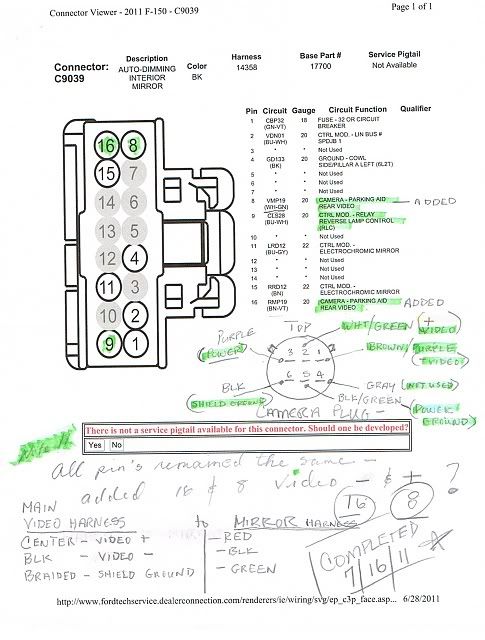
crosses the headliner and there is a 16 pin connector at the rearview mirror.
look at the pins at the camera to find the color of the wires you are after, you are looking for the wires coming from pin #8 (white/green) and pin #16( brown/purple). Pin #8 is the video +, pin #16 is the video -. Pin #9 (blue/white) is the reverse trigger
here is the pinout chart from a 2011 F-150 mirror. It's the same for your Superduty though. For the wire, your best bet it to find the bundle where it enters the cab by the e-brake. that, or splice the +/- wires and the reverse trigger wire at the rearview mirror, run them along the top of the headliner and down the drivers front pillar to the radio
this is a good mod. I installed a 2010 mirror and 2011 camera into my 2006 F-250 a few weeks back. I'm going to buy a double din radio soon and route the camera feed to it as well.
Last edited by Tylus; Sep 23, 2011 at 06:39 PM.
Thread Starter
|
Senior Member
Joined: Aug 2002
Posts: 632
Likes: 0
From: San Antonio, TX
Appreciate the reply. Noticed your information is not exactly accurate for the 2011 Super Duty, but pretty close.. Since the 2011's use the CAN bus, believe that is why locations are slightly different (less wires overall)...
The wiring harness on my truck for the rear view mirror display ran down the passenger side pillar and was mounted to the fender wall with one of those pine tree looking plastic push pins, kind of up and behind the big module with multiple harnesses on the side kick panel. The best way to get to is to actually remove the glove box and reach back through the opening. Reach back and towards the fender (to the right) and you will likely put your hand on or very near it... Removing the kick panel trim is required too and you will ultimately pull the harness down towards the floor, not through the glove box since there is limited space.
Know, you will know you have the right plug because it has one of those red safety clips preventing compression of the piece to release, remove that, then it can be separated/disconnect.
The wires were White with green stripe (+ positive) and Brown with violet stripe (- negative)...
Cut one end off a male-to-male RCA cable and connected the wires (center wire is positive on the RCA) and then plugged the other end with the male RCA connector into the female RCA connector from the head unit I got with my navigation unit.
And there you have it, dual display ability on the mirror and the navigation head unit.
The wiring harness on my truck for the rear view mirror display ran down the passenger side pillar and was mounted to the fender wall with one of those pine tree looking plastic push pins, kind of up and behind the big module with multiple harnesses on the side kick panel. The best way to get to is to actually remove the glove box and reach back through the opening. Reach back and towards the fender (to the right) and you will likely put your hand on or very near it... Removing the kick panel trim is required too and you will ultimately pull the harness down towards the floor, not through the glove box since there is limited space.
Know, you will know you have the right plug because it has one of those red safety clips preventing compression of the piece to release, remove that, then it can be separated/disconnect.
The wires were White with green stripe (+ positive) and Brown with violet stripe (- negative)...
Cut one end off a male-to-male RCA cable and connected the wires (center wire is positive on the RCA) and then plugged the other end with the male RCA connector into the female RCA connector from the head unit I got with my navigation unit.
And there you have it, dual display ability on the mirror and the navigation head unit.
Last edited by ReelWork; Sep 24, 2011 at 07:37 PM.
Thread Starter
|
Senior Member
Joined: Aug 2002
Posts: 632
Likes: 0
From: San Antonio, TX
No worries and again, appreciate your reply. I think I saw your reply on another thread. The information you provided about wiring colors along with my wanting to get it working was really what got me off my **** to just figure it out...
Thanks again!
Thanks again!
Technical Article Contributor
Joined: Apr 2007
Posts: 3,807
Likes: 2
From: Pearl Harbor
luckily it was easy for you. I spent 3 damn days trying to figure out the wires and pinouts. the wires and pin locations changed from 2010 to 2011. Since I had components from both of those, it was confusing as heck.
I'm hoping to put a Kenwood DDX616 from the wifes Expy into my truck and then I'm going to do the dual screens as well. Now the big question is what am I going to put in her Expy.
How do you like that OEM Nav? The more I play with aftermarket radios, the more I want to keep it factory. Especially as the OEM is made by Pioneer. Did you have to get it re-programmed? And are you running the lockpick?
I'm hoping to put a Kenwood DDX616 from the wifes Expy into my truck and then I'm going to do the dual screens as well. Now the big question is what am I going to put in her Expy.
How do you like that OEM Nav? The more I play with aftermarket radios, the more I want to keep it factory. Especially as the OEM is made by Pioneer. Did you have to get it re-programmed? And are you running the lockpick?
Thread Starter
|
Senior Member
Joined: Aug 2002
Posts: 632
Likes: 0
From: San Antonio, TX
I really like the OEM - the NAV works very well and I would put it up against any middle-of-the-line Garmin. Lacks the lane assist, but I feel the prompts it provides are actually better than some of the Garmin units I have used.
Sound wise, it's very good. Impressively loud too. I did notice the Navi HU seems to be a little more bass/low end driven compared the to the Audiophile unit it replaced. Could be due to the bass amp coupled with the navi's external amp which has a litte more umph to it. Basically if I could apply a low pass filter or perhaps boost the mids a bit I would be 100% happy - about 95% happy as is. Also depends on the song and how it was recorded at the studio. For instance my daughter loves the ***** cat dolls song "Don't Cha" and let me tell ya what... That song sounds amazing across the spectrum, however take another song like some of these newer country songs or perhaps off the radio and it's a bit boomy. I keep the bass at 0 or -1. Crank that bass any higher and no lie, you can hear it coming down the road.
Have not had to get it re-programmed and worked with a couple of guys to get through the camera and microphone which really weren't that hard once I got the knowledge on my side.. The ONLY thing that doesn't work is the phone button on the steering wheel and from what I understand a reprogram might fix that (can't confirm...).
The overall impression is very good. I doubt I would be as happy with an aftermarket and also think the OEM is very intuitive. Haven't really had any issues figuring anything out. Sync is great, every now and then it just can't figure out what I am saying but it does a very good about 85% of the time. The other 15% I have either not provided it enough information, wrong title or the like. For instance, went to "Freddy's Frozen Custard" to get some burgers, told Sync "Navigation"... "Destination" and then "Freddy's" - well it came up with Wendy's, Gatti's, Chili's... You get the idea, I was getting frustrated..
Then I told it "Freddy's Frozen Custard" and it popped up, told it yes and we were on our way. So is that my fault or the unit? Debatable, but just need to remember to be clear and kind of think if the unit isn't pulling up the right location, is the information/description accurate..
Unit was pre-programmed and ready to go ad I'm not running lockpick - hear mixed reviews on it.
Pearl Harbor? Are you in the Navy? I retried after 21+ years USAF almost 2 years ago. Civil Service now.
Sound wise, it's very good. Impressively loud too. I did notice the Navi HU seems to be a little more bass/low end driven compared the to the Audiophile unit it replaced. Could be due to the bass amp coupled with the navi's external amp which has a litte more umph to it. Basically if I could apply a low pass filter or perhaps boost the mids a bit I would be 100% happy - about 95% happy as is. Also depends on the song and how it was recorded at the studio. For instance my daughter loves the ***** cat dolls song "Don't Cha" and let me tell ya what... That song sounds amazing across the spectrum, however take another song like some of these newer country songs or perhaps off the radio and it's a bit boomy. I keep the bass at 0 or -1. Crank that bass any higher and no lie, you can hear it coming down the road.
Have not had to get it re-programmed and worked with a couple of guys to get through the camera and microphone which really weren't that hard once I got the knowledge on my side.. The ONLY thing that doesn't work is the phone button on the steering wheel and from what I understand a reprogram might fix that (can't confirm...).
The overall impression is very good. I doubt I would be as happy with an aftermarket and also think the OEM is very intuitive. Haven't really had any issues figuring anything out. Sync is great, every now and then it just can't figure out what I am saying but it does a very good about 85% of the time. The other 15% I have either not provided it enough information, wrong title or the like. For instance, went to "Freddy's Frozen Custard" to get some burgers, told Sync "Navigation"... "Destination" and then "Freddy's" - well it came up with Wendy's, Gatti's, Chili's... You get the idea, I was getting frustrated..
Then I told it "Freddy's Frozen Custard" and it popped up, told it yes and we were on our way. So is that my fault or the unit? Debatable, but just need to remember to be clear and kind of think if the unit isn't pulling up the right location, is the information/description accurate..
Unit was pre-programmed and ready to go ad I'm not running lockpick - hear mixed reviews on it.
Pearl Harbor? Are you in the Navy? I retried after 21+ years USAF almost 2 years ago. Civil Service now.
Last edited by ReelWork; Sep 25, 2011 at 03:14 PM.
Trending Topics
Technical Article Contributor
Joined: Apr 2007
Posts: 3,807
Likes: 2
From: Pearl Harbor
Thx for the reply. I am Navy on a Sub here in Pearl.
I can't run the Sync Nav in either of my vehicles. Which is a shame, but I can live with that. I do wonder if I could install a Sync nav radio into the Expy and use the Sync rearmirror I have. Just to get the Bluetooth phone stuff working.
I don't care about the Nav or other functions working honestly. Just the DVD part and bluetooth. I have a DVD setup for the rear seats that I'm using our current Kenwood to drive.
I can't run the Sync Nav in either of my vehicles. Which is a shame, but I can live with that. I do wonder if I could install a Sync nav radio into the Expy and use the Sync rearmirror I have. Just to get the Bluetooth phone stuff working.
I don't care about the Nav or other functions working honestly. Just the DVD part and bluetooth. I have a DVD setup for the rear seats that I'm using our current Kenwood to drive.
Thread Starter
|
Senior Member
Joined: Aug 2002
Posts: 632
Likes: 0
From: San Antonio, TX
I believe you could add sync as long as you are using 2010 or earlier head units with it. The wiring will be the long pole, but add the microphone, sync unit and such and pretty sure it would work.
Good luck with whatever you do.
Good luck with whatever you do.

Senior Member
Joined: Dec 2009
Posts: 231
Likes: 0
From: New Port Richey, Florida
I'd like to ask if I could bother one of you guys to take a look at the colors and pin locations of the camera harness IN the tailgate. I'm currently in the process of putting and 13-15 tailgate on my 05 with an 08-12 camera and a harness from the same year range and want to be able to get it wired up without messing up the camera (don't know if it's possible but don't want to risk it) .
Off the camera i have pin 1 thin red, pin 2 thin black, pin 3 empty, pin 4 white (?16ga), pin 5 same as 4, pin 6 thin black.
Tailgate harness at camera connector: pin 1 tan/brown stripe, pin 2 black, pin 3 not used, pin 4 white/green, pin 5 brown/purple, pin 6 black/white
Any help you guys can offer would be grated appreciated.
Off the camera i have pin 1 thin red, pin 2 thin black, pin 3 empty, pin 4 white (?16ga), pin 5 same as 4, pin 6 thin black.
Tailgate harness at camera connector: pin 1 tan/brown stripe, pin 2 black, pin 3 not used, pin 4 white/green, pin 5 brown/purple, pin 6 black/white
Any help you guys can offer would be grated appreciated.

Junior Member
Joined: Mar 2024
Posts: 1
Likes: 0
Me too!
Appreciate the reply. Noticed your information is not exactly accurate for the 2011 Super Duty, but pretty close.. Since the 2011's use the CAN bus, believe that is why locations are slightly different (less wires overall)...
The wiring harness on my truck for the rear view mirror display ran down the passenger side pillar and was mounted to the fender wall with one of those pine tree looking plastic push pins, kind of up and behind the big module with multiple harnesses on the side kick panel. The best way to get to is to actually remove the glove box and reach back through the opening. Reach back and towards the fender (to the right) and you will likely put your hand on or very near it... Removing the kick panel trim is required too and you will ultimately pull the harness down towards the floor, not through the glove box since there is limited space.
Know, you will know you have the right plug because it has one of those red safety clips preventing compression of the piece to release, remove that, then it can be separated/disconnect.
The wires were White with green stripe (+ positive) and Brown with violet stripe (- negative)...
Cut one end off a male-to-male RCA cable and connected the wires (center wire is positive on the RCA) and then plugged the other end with the male RCA connector into the female RCA connector from the head unit I got with my navigation unit.
And there you have it, dual display ability on the mirror and the navigation head unit.
The wiring harness on my truck for the rear view mirror display ran down the passenger side pillar and was mounted to the fender wall with one of those pine tree looking plastic push pins, kind of up and behind the big module with multiple harnesses on the side kick panel. The best way to get to is to actually remove the glove box and reach back through the opening. Reach back and towards the fender (to the right) and you will likely put your hand on or very near it... Removing the kick panel trim is required too and you will ultimately pull the harness down towards the floor, not through the glove box since there is limited space.
Know, you will know you have the right plug because it has one of those red safety clips preventing compression of the piece to release, remove that, then it can be separated/disconnect.
The wires were White with green stripe (+ positive) and Brown with violet stripe (- negative)...
Cut one end off a male-to-male RCA cable and connected the wires (center wire is positive on the RCA) and then plugged the other end with the male RCA connector into the female RCA connector from the head unit I got with my navigation unit.
And there you have it, dual display ability on the mirror and the navigation head unit.

Mystery device-