



Outside Temperature Reading - Stuck on 53 degrees


Thread Starter
|
Member
Joined: Oct 2008
Posts: 31
Likes: 0
From: Carlisle, PA
Outside Temperature Reading - Stuck on 53 degrees
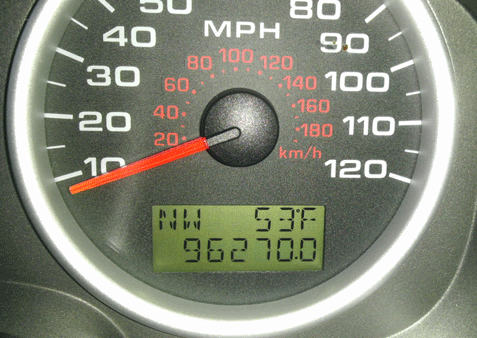
My outside temperature gauge that is on my dashboard is stuck on reading 53 degrees. However, the temperature outside is 37 degrees. Is there any way I can recalibrate or reset it?
Thanks,
Andy
Thanks,
Andy

Senior Member
Joined: Jul 2007
Posts: 2,036
Likes: 2
From: Maine
You need a new ambient air temp sensor in front of the radiator. They are not very expensive, it just plugs in. You might want to check the old one for corrosion on the terminals, but 9 times out of ten..you will have to replace it. It's the top sensor (the one with the point) in front of the rad. VERY easy to change
Thread Starter
|
Member
Joined: Oct 2008
Posts: 31
Likes: 0
From: Carlisle, PA
One post told me to push in the button that switches the miles vs. trip miles on the display odometer, and now it reads CAL...I guess that means calibration, but not sure what to do, lol. Any thoughts?
Thread Starter
|
Member
Joined: Oct 2008
Posts: 31
Likes: 0
From: Carlisle, PA
I looked at the sensor, jiggled it around a little bit, turned the truck on, and the gauges reset themselves. I didn't even have to take it apart. Hopefully it holds up for awhile...if not, at least I know what to replace. Thanks for your help.
Andy
Andy
Senior Member
Joined: Jul 2007
Posts: 2,036
Likes: 2
From: Maine
The 'CAL' means that you set the cluster up to calibrate the compass. (it's in the manual). Glad you got the sensor to work for you though, now you know what and where it is.
