


Disable perimeter lighting (low beams) when using keyless entry


Thread Starter
|
Technical Article Contributor
Joined: Mar 2012
Posts: 154
Likes: 0
Disable perimeter lighting (low beams) when using keyless entry
With lots of people changing over to HIDs I thought this was worth a post. Since they require a heat up/cool down period, it's a great idea to disable the perimeter lighting feature on our trucks. I've seen this question asked a few times before. Mblouir wrote a how-to for the 04-present trucks, however, generation 10's with key fobs are much much different. Actually, the 97-03 model's do not have a programmable function to cut off the perimeter lights when locking the doors via keyless. I have had several members try to find something in their manual, but no such code exist for the general owner.
What is perimeter lighting?
When you press the unlock button with your keyless entry fob, the headlights come on for ~25 seconds or flash (depending on model). It is used to illuminate the exterior of the vehicle and give better visibility to the user while approaching the vehicle.
Why disable it?
The perimeter lighting feature will, to be blunt, greatly reduce the life of your HIDs. The constant flickering on and off from the perimeter lighting causes unnecessary wear on the bulbs since they don't have time to properly warm up or cool down before their next use. The ballast for the HIDs arent made for quick on and off periods, they require time to properly give off their rated wattage.
http://en.wikipedia.org/wiki/Electrical_ballast
How to Instructions:
This mod is related to the flashing of lights that occurs when using the "LOCK" button on your key fobs. Also note, you can do the write up below, then use your dome light trigger to keep all of the following on until you hit the lock button on your remote. Thus unlock turns all lights on, Lock flashes all lights(minus heads) and then immediately turns them off.
So here is the remote/keyless entry module located under the steering column on the fire wall.
[IMG]removed for privacy
I couldn't find any schematics (no where online) for the box or the plugs, so i decided to take it apart to see what we were dealing with.
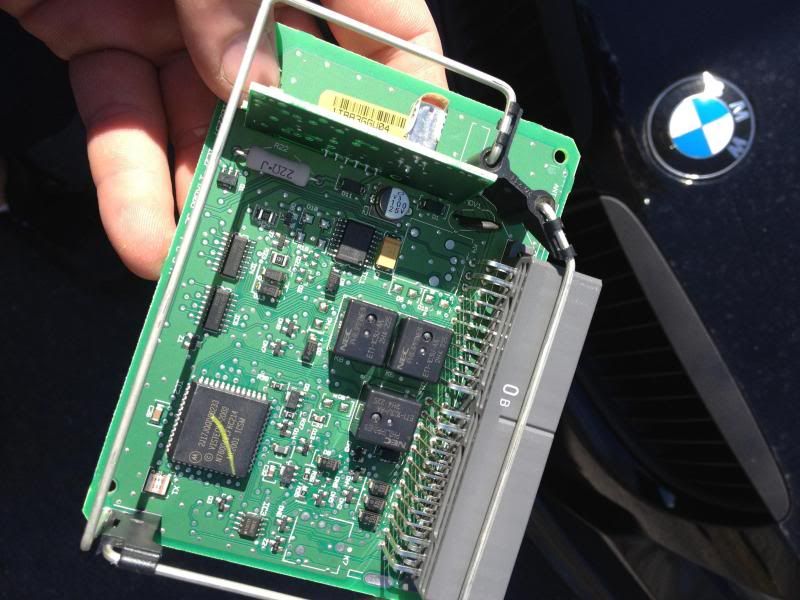
Looking at the picture above, I noticed: the three relays, (one that clicks when locking the doors). So i traced the input/outs to the 555timer/microchip. Their are 4 on the unit, but only one of them ran to the grey wire which can cut power to the perimeter lighting. Thus I traced that pin to the 555timer and sure enough, the 555/mircochip is controlled via a common threshold of 1/3 v of the output. This means all the light flashing via the keyfob is controlled by the grey wire. Moreover, you can't disconnect only the low beams or parking lights by this module. You can only disable both of them.
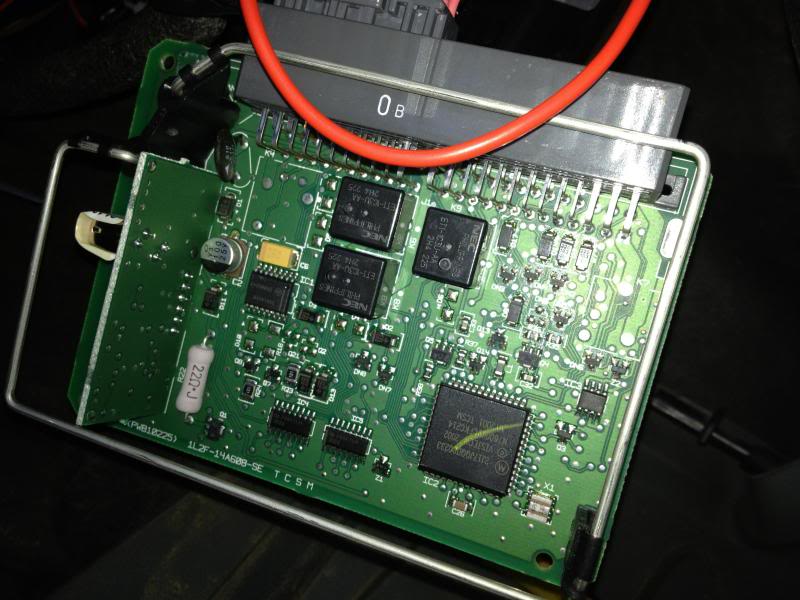
Once I figured that out, I had to trace the grey wire to a couple of relays, the ECM, and then finally to a box of relays under the drivers side dash panel.
Note: the box we are talking about is to the top right, it will have a plastic cover over the top.

There is a small clip on the bottom of the box you need to pretty up to pull the box off the dash. Once you get it off the mounting bracket, there are two clips on both side you need to pull out to get the cover off.


Here is what is revealed.

I found 3 relays in the box and used my DMM to see which ones we need to look at. For simplicity, notice the way I am holding the box, it is in the same position as they were mounted. The top right and bottom right relays, are the only ones we are concerned with.
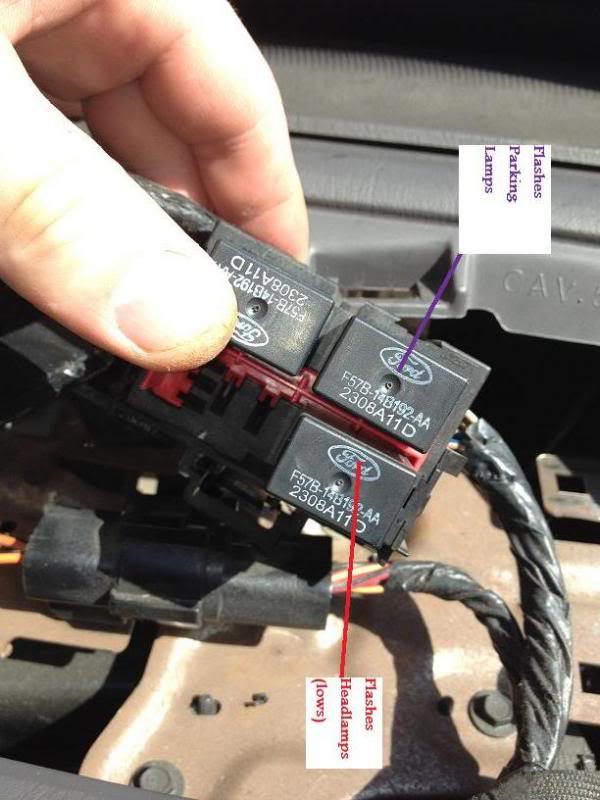
Now to simply disable *ONLY* the low beams when using keyfobs, pull the right bottom relay out of the box.

For those of you who dont want to enable fogs/aux's to flash, you are finished. All you had to do was pull that relay. Panic and everything still work, just the low beams wont flash using any of the keyless entry methods.
What is perimeter lighting?
When you press the unlock button with your keyless entry fob, the headlights come on for ~25 seconds or flash (depending on model). It is used to illuminate the exterior of the vehicle and give better visibility to the user while approaching the vehicle.
Why disable it?
The perimeter lighting feature will, to be blunt, greatly reduce the life of your HIDs. The constant flickering on and off from the perimeter lighting causes unnecessary wear on the bulbs since they don't have time to properly warm up or cool down before their next use. The ballast for the HIDs arent made for quick on and off periods, they require time to properly give off their rated wattage.
http://en.wikipedia.org/wiki/Electrical_ballast
How to Instructions:
This mod is related to the flashing of lights that occurs when using the "LOCK" button on your key fobs. Also note, you can do the write up below, then use your dome light trigger to keep all of the following on until you hit the lock button on your remote. Thus unlock turns all lights on, Lock flashes all lights(minus heads) and then immediately turns them off.
So here is the remote/keyless entry module located under the steering column on the fire wall.
[IMG]removed for privacy
I couldn't find any schematics (no where online) for the box or the plugs, so i decided to take it apart to see what we were dealing with.
Looking at the picture above, I noticed: the three relays, (one that clicks when locking the doors). So i traced the input/outs to the 555timer/microchip. Their are 4 on the unit, but only one of them ran to the grey wire which can cut power to the perimeter lighting. Thus I traced that pin to the 555timer and sure enough, the 555/mircochip is controlled via a common threshold of 1/3 v of the output. This means all the light flashing via the keyfob is controlled by the grey wire. Moreover, you can't disconnect only the low beams or parking lights by this module. You can only disable both of them.
Once I figured that out, I had to trace the grey wire to a couple of relays, the ECM, and then finally to a box of relays under the drivers side dash panel.
Note: the box we are talking about is to the top right, it will have a plastic cover over the top.
There is a small clip on the bottom of the box you need to pretty up to pull the box off the dash. Once you get it off the mounting bracket, there are two clips on both side you need to pull out to get the cover off.
Here is what is revealed.
I found 3 relays in the box and used my DMM to see which ones we need to look at. For simplicity, notice the way I am holding the box, it is in the same position as they were mounted. The top right and bottom right relays, are the only ones we are concerned with.
Now to simply disable *ONLY* the low beams when using keyfobs, pull the right bottom relay out of the box.
For those of you who dont want to enable fogs/aux's to flash, you are finished. All you had to do was pull that relay. Panic and everything still work, just the low beams wont flash using any of the keyless entry methods.
Last edited by Patman; Apr 5, 2013 at 12:37 AM.
Thread Starter
|
Technical Article Contributor
Joined: Mar 2012
Posts: 154
Likes: 0
No problem. I could have made the write up alot shorter, just kind of wanted to explain how I got to the relay!

Senior Member
Joined: Nov 2008
Posts: 521
Likes: 1
From: Katy, TEXAS/ Laramie, Wyoming
First of all nice write up!
So to make my headlights come on when unlocking the doors, run a +12v jumper wire from a dome light source to the relay you are removing in the above writeup?
So to make my headlights come on when unlocking the doors, run a +12v jumper wire from a dome light source to the relay you are removing in the above writeup?
Thread Starter
|
Technical Article Contributor
Joined: Mar 2012
Posts: 154
Likes: 0
You can use the Black/Light blue wire in the passenger door threshold to be the trigger. Use a relay and run the output to the headlight turn on lead behind the factory headlamp switch.

Trending Topics



Senior Member
Joined: Jul 2010
Posts: 2,519
Likes: 2
From: U.P. of Michigan
Hate to bring up a kinda old thread, but taking out that relay also makes it so your lights don't turn on when your headlight switch is in the auto lamp position.
Everything else turns on (parking light, and fogs if you modified your switch to have them turn on)
Everything else turns on (parking light, and fogs if you modified your switch to have them turn on)