


Kenwood, Swix and steering wheel controls


Thread Starter
|
Technical Article Contributor
Joined: Mar 2006
Posts: 1,460
Likes: 1
From: Near Houston
Kenwood, Swix and steering wheel controls
This thread has been getting significant refrence from questions arising from the Wheel controls. For those of you who were linked here and want to upgrade your truck to the steering wheel audio controls, please read up till the first step on post #8 That is the wire you have to run to control your Factory head unit. Everything after that is for wiring and programming of the SWIX unit to control an aftermarket radio. Good luck
Ok guys, i know the amount of questions that are posted and i have done some research.
Let me do a rundown of what i want to do and the few questions i have.
I currrently have a Kenwood DDX 6015 installed along with a kenwood keg
I have an XLT so no fancy steering wheel controls.
Heres what im looking to do.
Upgrade to the lariat steering wheel controls.
Use the swix to control the Kenwood.
I checked a few threads and didnt find a difinitive answer. If i overlooked them please accept my appologies.
First off, does the XLT wiring harness accept the Lariat controls?
What im asking is if the plugs and wiring is there to hook up the swix
Number two..
with the new buttons installed, does the comp have to relearn the new cruise control buttons? I only ask this as i saw a post about using the new controls and it not working. I would imagine that they are simply buttons, and that the cruise prog is already on the truck... but i asked anyway.
Number three
this one is for the guys having installed the swix.
Does it learn ALL the steering wheel buttons? in other words can it learn the fan and temp buttons too? ( i browsed over the SWIX pdf instructions and it seems like programing these buttons is an option)
Basic questions for a not so basic install. This could help and benefit other members.
Heres the goodies.
I want to program the fan and temp (+-) buttons to run my playlist +- (cd +-for you guys with changers) and my track +-
I really want just a definitive answer to the first question as its the one that mainly concerns me. the other two arent big issues and can be overcome.
I will post the changes and pics when i find a sutible set of buttons.
THanks guys.
Ok guys, i know the amount of questions that are posted and i have done some research.
Let me do a rundown of what i want to do and the few questions i have.
I currrently have a Kenwood DDX 6015 installed along with a kenwood keg
I have an XLT so no fancy steering wheel controls.
Heres what im looking to do.
Upgrade to the lariat steering wheel controls.
Use the swix to control the Kenwood.
I checked a few threads and didnt find a difinitive answer. If i overlooked them please accept my appologies.
First off, does the XLT wiring harness accept the Lariat controls?
What im asking is if the plugs and wiring is there to hook up the swix
Number two..
with the new buttons installed, does the comp have to relearn the new cruise control buttons? I only ask this as i saw a post about using the new controls and it not working. I would imagine that they are simply buttons, and that the cruise prog is already on the truck... but i asked anyway.
Number three
this one is for the guys having installed the swix.
Does it learn ALL the steering wheel buttons? in other words can it learn the fan and temp buttons too? ( i browsed over the SWIX pdf instructions and it seems like programing these buttons is an option)
Basic questions for a not so basic install. This could help and benefit other members.
Heres the goodies.
I want to program the fan and temp (+-) buttons to run my playlist +- (cd +-for you guys with changers) and my track +-
I really want just a definitive answer to the first question as its the one that mainly concerns me. the other two arent big issues and can be overcome.
I will post the changes and pics when i find a sutible set of buttons.
THanks guys.
Last edited by Fabian06SC; Nov 17, 2007 at 10:11 PM.
Thread Starter
|
Technical Article Contributor
Joined: Mar 2006
Posts: 1,460
Likes: 1
From: Near Houston
So i like working to answer my own questions.
I installed the new buttons on the truck wed night in about 45 min.
1 The lariat and the XLT are wired the same, as i had absolutly no problems wiring in the new radio/crusie buttons, and i checked the radio harness and the SWC wire is there on the factory plug.
2 i was right, and the truck runs just fine on cruise with the new buttons. no programming necessary.
and on 3 im still on the fence, i checked out the swix and it can learn ANY fucntion that is held by the SWC wire (steering wheel control) the problem i have to solve now is checking to see if the fan and temp buttons share the same SWC wire as the radio controls.
I will post some pics up when i get the swix (prob a week or two) as well as the removal of the cruise buttons without taking the wheel off.
I installed the new buttons on the truck wed night in about 45 min.
1 The lariat and the XLT are wired the same, as i had absolutly no problems wiring in the new radio/crusie buttons, and i checked the radio harness and the SWC wire is there on the factory plug.
2 i was right, and the truck runs just fine on cruise with the new buttons. no programming necessary.
and on 3 im still on the fence, i checked out the swix and it can learn ANY fucntion that is held by the SWC wire (steering wheel control) the problem i have to solve now is checking to see if the fan and temp buttons share the same SWC wire as the radio controls.
I will post some pics up when i get the swix (prob a week or two) as well as the removal of the cruise buttons without taking the wheel off.

Thread Starter
|
Technical Article Contributor
Joined: Mar 2006
Posts: 1,460
Likes: 1
From: Near Houston
ok so i have to backtrack a bit.
the XLT doesnt have the steering control wire on the radio harness. but i do believe it has it on the wheel. and if it doesnt mine soon will.
I have been busy installing my painted mirrors and new speakers... and working to get money for my new 22" shoes.
I have some time off this weekend and im going to tear the wheel apart again and see if i can run my own SWC wire from the wheel to the radio harness. shouldnt be that hard. after that i can finally install the swix thats been sitting in my room for two weeks now.
06 lariat.
ill take plenty of pics for you.
im going to do one of the following depending on where i decide to mount the swix.
either run the IR in the a pillar and down near the mirror (tried this location with my kenwood remote and it worked fine)
or near the bottom of the radio mount in a hidden position but where the radio will still "see" it
the XLT doesnt have the steering control wire on the radio harness. but i do believe it has it on the wheel. and if it doesnt mine soon will.
I have been busy installing my painted mirrors and new speakers... and working to get money for my new 22" shoes.
I have some time off this weekend and im going to tear the wheel apart again and see if i can run my own SWC wire from the wheel to the radio harness. shouldnt be that hard. after that i can finally install the swix thats been sitting in my room for two weeks now.
06 lariat.
ill take plenty of pics for you.
im going to do one of the following depending on where i decide to mount the swix.
either run the IR in the a pillar and down near the mirror (tried this location with my kenwood remote and it worked fine)
or near the bottom of the radio mount in a hidden position but where the radio will still "see" it
Thread Starter
|
Technical Article Contributor
Joined: Mar 2006
Posts: 1,460
Likes: 1
From: Near Houston
BIG UPDATE! (as if anyone was paying attention)
Ok solved the problem with XLTs and Audio controls. (once again solved my own question)
the controls have signal, but the output signal (to the radio) is NOT included in our XLT harness's
I went through my local ford service, and although helpfull, they simply had no clue what i was doing so i had to pay to access ford tech data onlilne.
(well worth the ten bucks)
In conclusion, the audio and temp buttons when added to the XLT are functional, but they dont have wiring to output the signals.
Furthermore the hvac controls have a different signal wire than the audio controls so if you have a lariat.. you retain your hvac controls, but if your like me and dont have the fancy electronic HVACs then guess what!
You can use the fan and temp buttons to control your radio! (non factory)
I have all the tech sheets DL on my computer and i had the column and wheel completely apart today but had to put it back together while i looked for the info. Tomorrow i will run the wiring and take it for a test listen/drive
after everything checks out i will post pics and wiring connections. I dont know if i can paste up the tech data as it is copywriten. Ill look into it.
Im so stoked, cant wait to finally wire up that damn SWIX!
Ok solved the problem with XLTs and Audio controls. (once again solved my own question)
the controls have signal, but the output signal (to the radio) is NOT included in our XLT harness's
I went through my local ford service, and although helpfull, they simply had no clue what i was doing so i had to pay to access ford tech data onlilne.
(well worth the ten bucks)
In conclusion, the audio and temp buttons when added to the XLT are functional, but they dont have wiring to output the signals.
Furthermore the hvac controls have a different signal wire than the audio controls so if you have a lariat.. you retain your hvac controls, but if your like me and dont have the fancy electronic HVACs then guess what!
You can use the fan and temp buttons to control your radio! (non factory)
I have all the tech sheets DL on my computer and i had the column and wheel completely apart today but had to put it back together while i looked for the info. Tomorrow i will run the wiring and take it for a test listen/drive
after everything checks out i will post pics and wiring connections. I dont know if i can paste up the tech data as it is copywriten. Ill look into it.
Im so stoked, cant wait to finally wire up that damn SWIX!
Thread Starter
|
Technical Article Contributor
Joined: Mar 2006
Posts: 1,460
Likes: 1
From: Near Houston
Its finished! Works great! all 8 buttons work exceptionally well! (four buttons two switches per)
The addition of Lariat buttons on an XLT truck is 100% possible
If you have an aftermarket HU that uses the SWIX then you can program all the buttons including the temp. if you are simply wanting to add the buttons to your stock radio only the volume and the mem buttons will work.
Ok here it is. brace yourselves as there is a lot of pics.
i followed Dukes old thread on wheel removal.
https://www.f150online.com/forums/sh...=226510&page=2
midway down Quintin gives a great how to on wheel and button removal.
After the wheel is out (i had already previously installed my new lariat wheel controls) you have to get the wheel column shroud off.
near my finger a bit to the right is a small set screw used to hold the bottom peice up. I used a 5.5mm
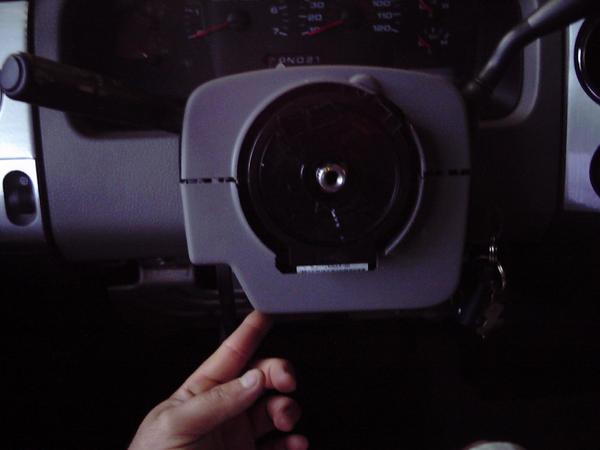
when that is off slowly pop loose the lower portion from the upper shroud. they simply snap together, and if you gently push the upper section in and pull the lower section down it should come right off. You may want to also pull your tilt lever all the way down so the plastic comes right off
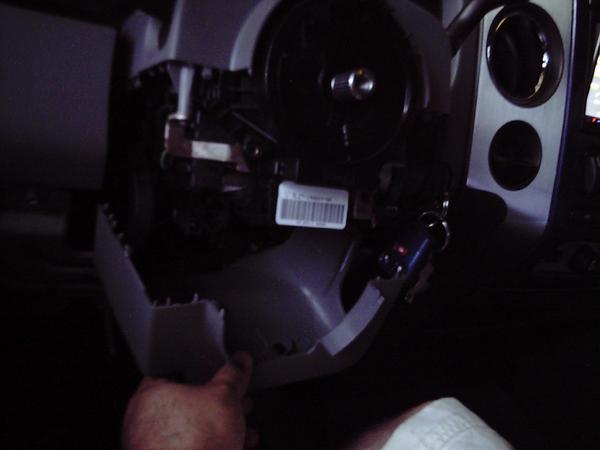
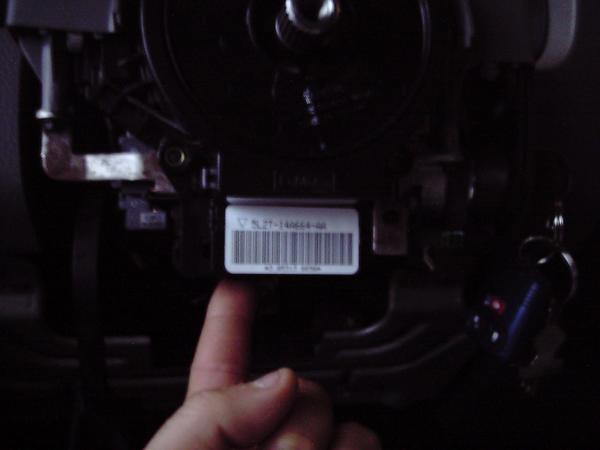
under the clockspring (the big white label area) there are TWO connectors where my fingers are
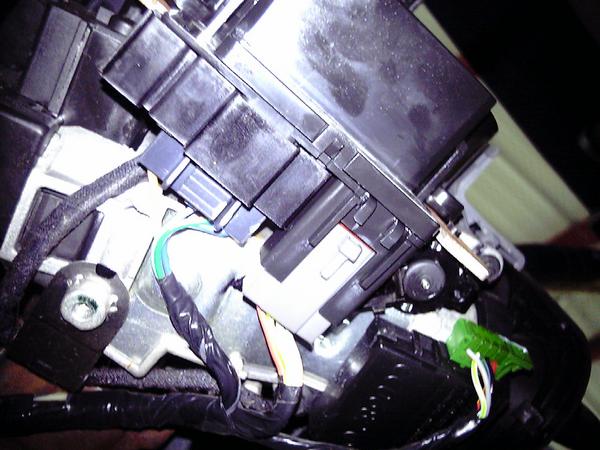
heres a shot from underneath. The one on the right side (grey longer one) is the airbag connector. leave that in place but disconnect the short wider black one (the steering wheel controls plug)
The addition of Lariat buttons on an XLT truck is 100% possible
If you have an aftermarket HU that uses the SWIX then you can program all the buttons including the temp. if you are simply wanting to add the buttons to your stock radio only the volume and the mem buttons will work.
Ok here it is. brace yourselves as there is a lot of pics.
i followed Dukes old thread on wheel removal.
https://www.f150online.com/forums/sh...=226510&page=2
midway down Quintin gives a great how to on wheel and button removal.
After the wheel is out (i had already previously installed my new lariat wheel controls) you have to get the wheel column shroud off.
near my finger a bit to the right is a small set screw used to hold the bottom peice up. I used a 5.5mm
when that is off slowly pop loose the lower portion from the upper shroud. they simply snap together, and if you gently push the upper section in and pull the lower section down it should come right off. You may want to also pull your tilt lever all the way down so the plastic comes right off
under the clockspring (the big white label area) there are TWO connectors where my fingers are
heres a shot from underneath. The one on the right side (grey longer one) is the airbag connector. leave that in place but disconnect the short wider black one (the steering wheel controls plug)
Last edited by Fabian06SC; Dec 30, 2006 at 07:25 PM.
Thread Starter
|
Technical Article Contributor
Joined: Mar 2006
Posts: 1,460
Likes: 1
From: Near Houston
heres the plug, the two open spaces there are for the two missing wires. the #2 space is the HVAC control wire and the #3 is the audio control wire.
heres the connector
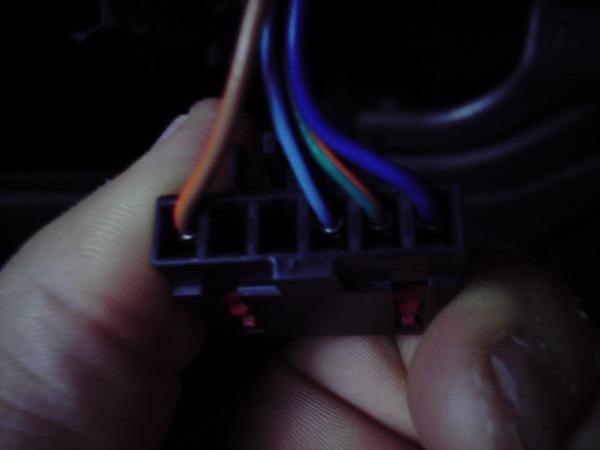 and the pin ID

If you want to use all of your new buttons on your XLT (and not a lariat ofcourse) then plug a wire into both of those pins, and tie it into a single wire (this will be your new SWC Audio wire)
NOTE
this will only work if you have an aftermarket stereo and you are using the SWIX to control it. If you want the buttons and have a stock unit you should only wire in the AUDIO wire pin number 3 and you will only have use of vol and mem
It took me a good while to figure out how to get use of all buttons. heres my wheel on for diagnostics of the swix and buttons. you can see my new SWC purple wire dangling from the clockspring between the wheel.
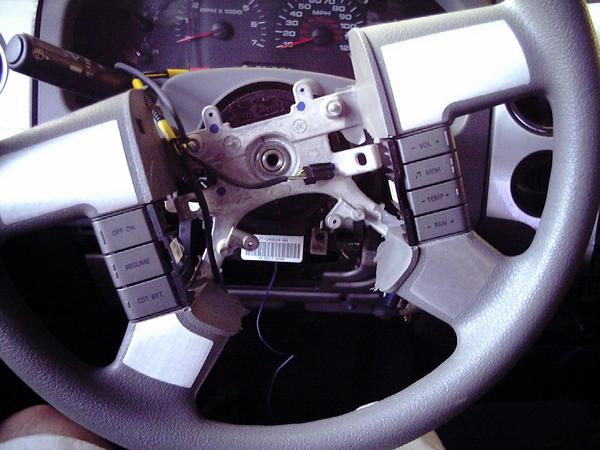
I carefully ran my new wire along the factory harness.
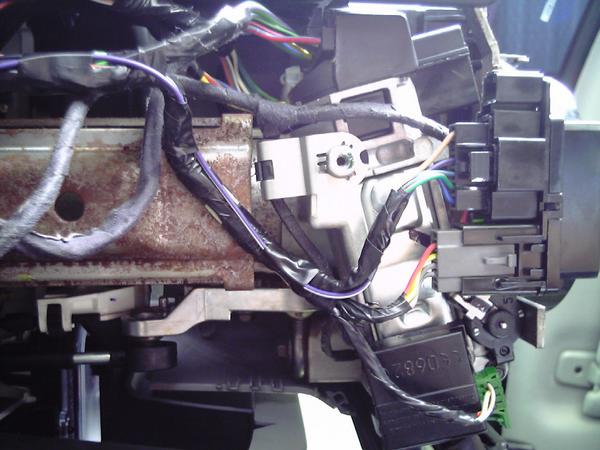
i kept routing it till i got to the radio plug.
heres the connector
and the pin ID If you want to use all of your new buttons on your XLT (and not a lariat ofcourse) then plug a wire into both of those pins, and tie it into a single wire (this will be your new SWC Audio wire)
NOTE
this will only work if you have an aftermarket stereo and you are using the SWIX to control it. If you want the buttons and have a stock unit you should only wire in the AUDIO wire pin number 3 and you will only have use of vol and mem
It took me a good while to figure out how to get use of all buttons. heres my wheel on for diagnostics of the swix and buttons. you can see my new SWC purple wire dangling from the clockspring between the wheel.
I carefully ran my new wire along the factory harness.
i kept routing it till i got to the radio plug.
Last edited by Fabian06SC; Dec 30, 2006 at 07:30 PM.
Trending Topics
Thread Starter
|
Technical Article Contributor
Joined: Mar 2006
Posts: 1,460
Likes: 1
From: Near Houston
i could have wired it to the plug itself but lazyness prevented me from it, since i will be tapping the swix to it right there anyway.

at this point my wheel area is done. so i snapped the lower cover on. dont forget to slip your key/gear selector rubber cover on.
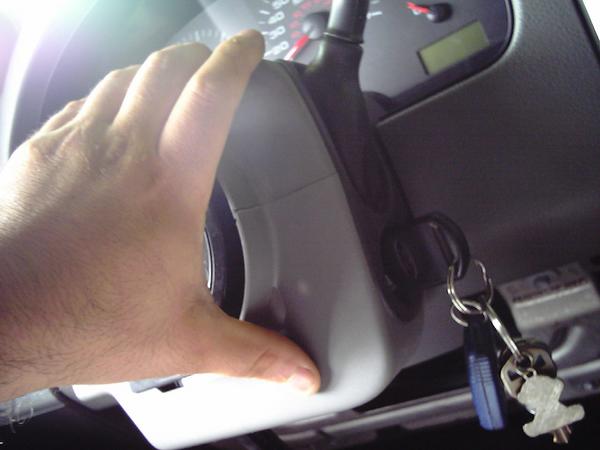
i then replaced everything on the wheel and got ready to do the swix wiring.
LARIAT owners start reading here for Swix hookup
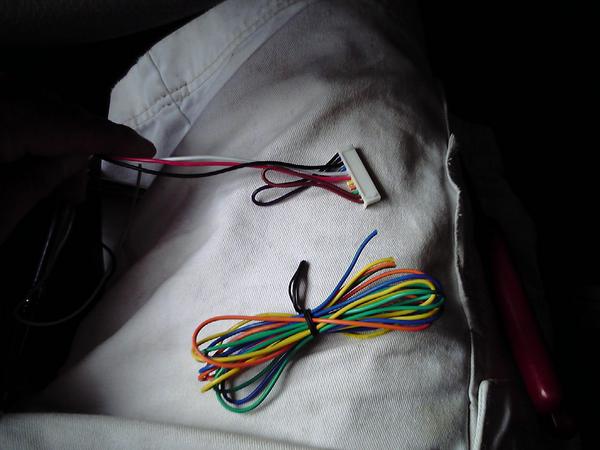
heres the swix harness. Our fords only require the positive (red) ground (black) and the white wire to read the SEC signals.
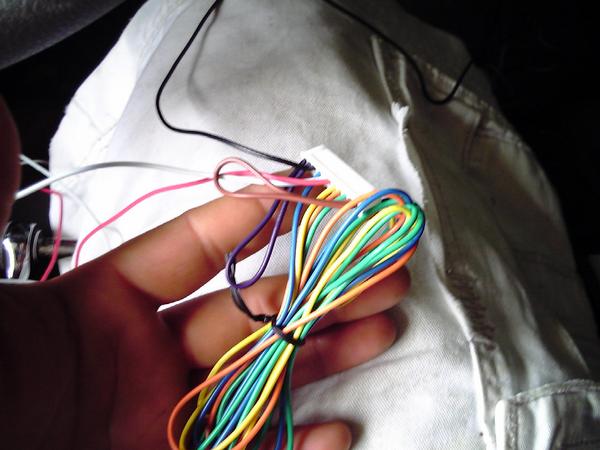
since we dont need the rest, i trimmed them to make a cleaner install.
at this point my wheel area is done. so i snapped the lower cover on. dont forget to slip your key/gear selector rubber cover on.
i then replaced everything on the wheel and got ready to do the swix wiring.
LARIAT owners start reading here for Swix hookup
heres the swix harness. Our fords only require the positive (red) ground (black) and the white wire to read the SEC signals.
since we dont need the rest, i trimmed them to make a cleaner install.
Last edited by Fabian06SC; Dec 30, 2006 at 07:33 PM.
Thread Starter
|
Technical Article Contributor
Joined: Mar 2006
Posts: 1,460
Likes: 1
From: Near Houston
that leaves us with three wires. the black red and white.
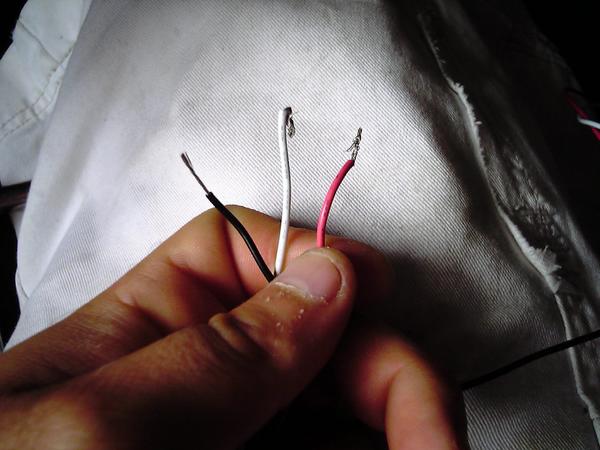
the red will go to switched power. (i tied into the radio switched power as the swix uses very LITTLE current)
the black to ground.
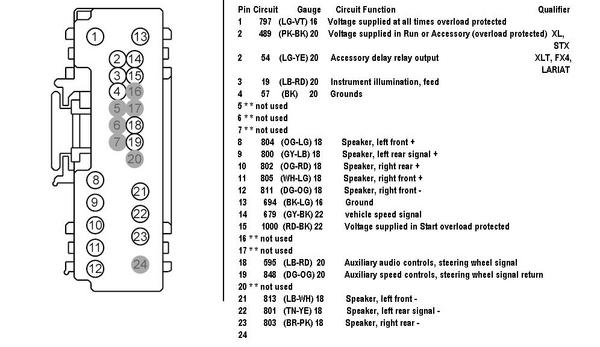
and the white to your swc wire (either the one you ran like mine or if you have a LARIAT with the controls already its pin 18 a light blue and red wire)
leave this wire simply tied together as it will need to be disconnected later during programming. (hvac button use only)
Once you complete the wiring go ahead and follow the instructions on programming the mode for the truck.
If you have a lariat, program it EXACTLY as the provided SWIX instructions tell you.
If you have an XLT and you are going to use (and already wired the hvac buttons) then follow the following directions.
The following will be specific to aftermarket units only utilizing the SWIX and ALL of teh wheel control buttons.
To program the Swix to read ALL the buttons on the wheel is a bit tricky.
familiarize yourself with the original prog instructions before you proceed.
for some reason (im guessing the ohm difference in the audio and hvac buttons) when you first start to program the unit it senses a signal from the wheel even though you arent pushing any buttons yet. you have a span of 7 seconds to press a wheel button and an indefinant time for the remote so take your time here....
when you start the prog mode, it should light up the wheel button light and go straight to remote. if it goes directly to the remote light then Swix instructions say you have a wiring issue. Thats not the case here, let the swix go to the remote light. These instructions may get tricky so pay attention.
right now your swix should be on the remote light waiting a command to learn from the remote. anticipate your next WHEEL button. put your finger on it, and press any key on your REMOTE (preferably a rarely used one).
as soon as the remote light goes out press the button on the wheel. when you release it it should go back to REMOTE.. take your time, and anticipate once again your next wheel button BEFORE you press your desired REMOTE button.
keep repeating these steps until you get to your last WHEEL button. when you depress your last WHEEL button and the swix is ready to learn the REMOTE button, disconnect your white wire from the SWC wire you ran.
this prevents the unit from "reading" another button since it picks up teh difference in the audio and hvac buttons. once this is done, go ahead and set your last REMOTE button.
now the unit will go back to wheel button, but since its not plugged in it will not read anything. let the unit time out and save the memory. after the unit saves, go ahead and plug your swc wire to the white wire.
turn the vehicle on acc and try it out. the unit should NOT output anything. (even though it "learned" a button when no buttons where pressed)
try your volume mem temp and fan buttons. they all should work fine. check to see if the right led is lighting up each time you press a wheel button.
if it lights up when your NOT pressing a button then you should try to reprogram it.
that should do it. hope this helps everyone out there get creative with their wheel buttons!
the red will go to switched power. (i tied into the radio switched power as the swix uses very LITTLE current)
the black to ground.
and the white to your swc wire (either the one you ran like mine or if you have a LARIAT with the controls already its pin 18 a light blue and red wire)
leave this wire simply tied together as it will need to be disconnected later during programming. (hvac button use only)
Once you complete the wiring go ahead and follow the instructions on programming the mode for the truck.
If you have a lariat, program it EXACTLY as the provided SWIX instructions tell you.
If you have an XLT and you are going to use (and already wired the hvac buttons) then follow the following directions.
The following will be specific to aftermarket units only utilizing the SWIX and ALL of teh wheel control buttons.
To program the Swix to read ALL the buttons on the wheel is a bit tricky.
familiarize yourself with the original prog instructions before you proceed.
for some reason (im guessing the ohm difference in the audio and hvac buttons) when you first start to program the unit it senses a signal from the wheel even though you arent pushing any buttons yet. you have a span of 7 seconds to press a wheel button and an indefinant time for the remote so take your time here....
when you start the prog mode, it should light up the wheel button light and go straight to remote. if it goes directly to the remote light then Swix instructions say you have a wiring issue. Thats not the case here, let the swix go to the remote light. These instructions may get tricky so pay attention.
right now your swix should be on the remote light waiting a command to learn from the remote. anticipate your next WHEEL button. put your finger on it, and press any key on your REMOTE (preferably a rarely used one).
as soon as the remote light goes out press the button on the wheel. when you release it it should go back to REMOTE.. take your time, and anticipate once again your next wheel button BEFORE you press your desired REMOTE button.
keep repeating these steps until you get to your last WHEEL button. when you depress your last WHEEL button and the swix is ready to learn the REMOTE button, disconnect your white wire from the SWC wire you ran.
this prevents the unit from "reading" another button since it picks up teh difference in the audio and hvac buttons. once this is done, go ahead and set your last REMOTE button.
now the unit will go back to wheel button, but since its not plugged in it will not read anything. let the unit time out and save the memory. after the unit saves, go ahead and plug your swc wire to the white wire.
turn the vehicle on acc and try it out. the unit should NOT output anything. (even though it "learned" a button when no buttons where pressed)
try your volume mem temp and fan buttons. they all should work fine. check to see if the right led is lighting up each time you press a wheel button.
if it lights up when your NOT pressing a button then you should try to reprogram it.
that should do it. hope this helps everyone out there get creative with their wheel buttons!
Thread Starter
|
Technical Article Contributor
Joined: Mar 2006
Posts: 1,460
Likes: 1
From: Near Houston
for thosewho asked where my IR went, i put it right in the radio surround on the lower right corner near the IR reciever.
It was more of a personal choice since my headunit is always angled in. it works great there and is pretty inconspicuous.
i carefully drilled out the hole
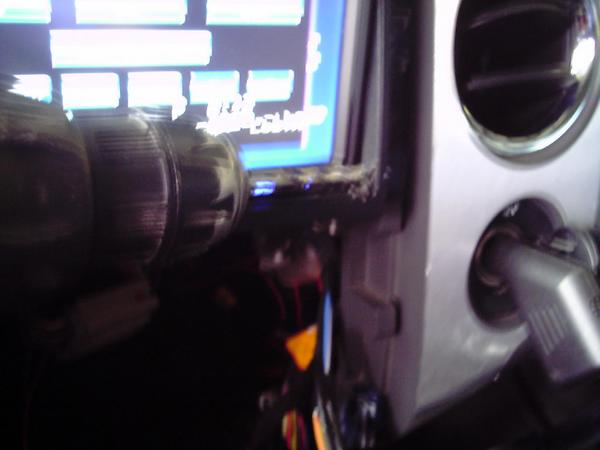

then i put the small bezel in and slid the IR from the outside in.
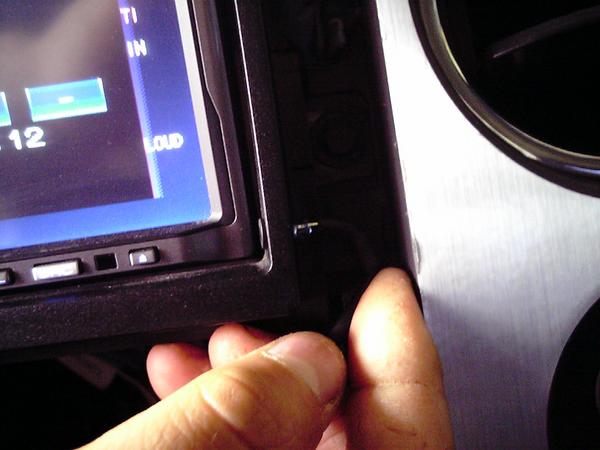
It was more of a personal choice since my headunit is always angled in. it works great there and is pretty inconspicuous.
i carefully drilled out the hole
then i put the small bezel in and slid the IR from the outside in.
Thread Starter
|
Technical Article Contributor
Joined: Mar 2006
Posts: 1,460
Likes: 1
From: Near Houston
heres a few detail shots
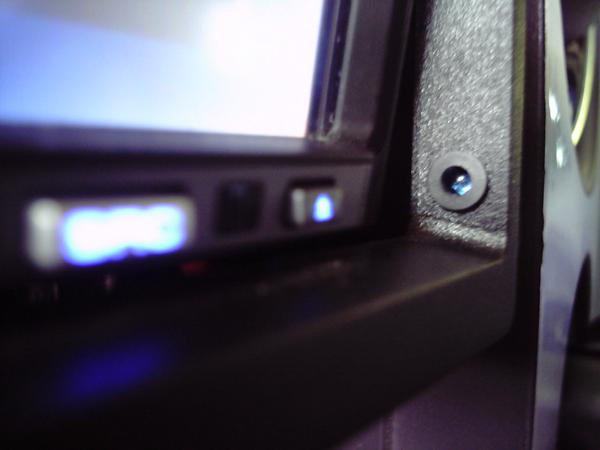
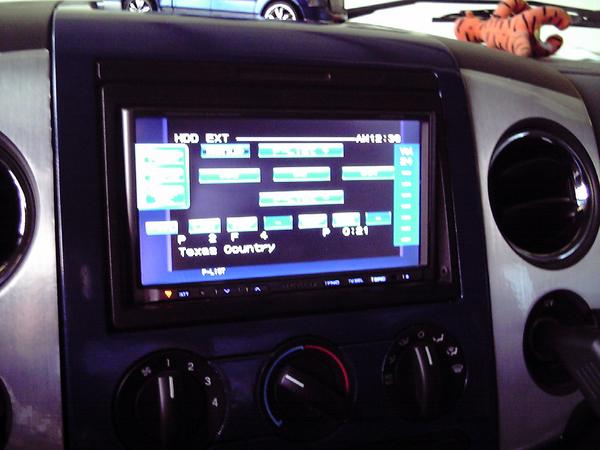
as you can see, (or not see) its not very visable.
the buttons have about a half second lag. but overall work really well.
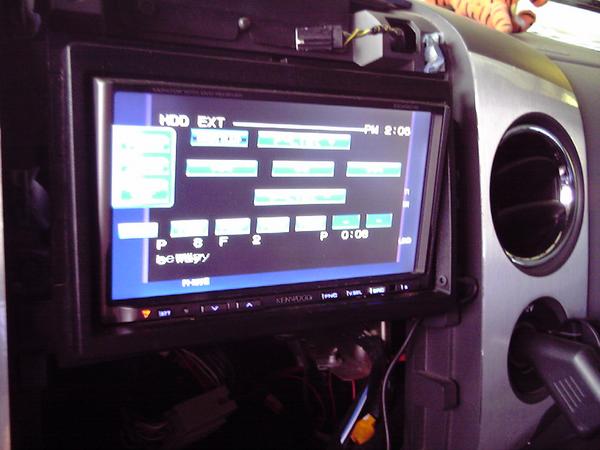
heres a pic of me turning the vol up, you can see in the kenwood screen that the volume is increasing.
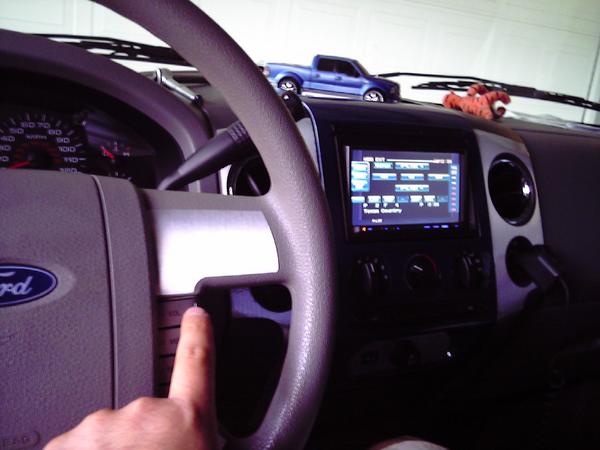
as you can see, (or not see) its not very visable.
the buttons have about a half second lag. but overall work really well.
heres a pic of me turning the vol up, you can see in the kenwood screen that the volume is increasing.
Last edited by Fabian06SC; Dec 30, 2006 at 08:00 PM.


 Harness access without removing steering wheel?
Thread Starter
|
Technical Article Contributor
Joined: Mar 2006
Posts: 1,460
Likes: 1
From: Near Houston
Geo
it is possible to add the buttons without removing the wheel.
Thats what i did when i first installed the buttons. It is a PITA though.
You do need to take the wheel off to run the wiring. The lower shroud has a lip that sits inside the back wheel cover. its near impossible to get it out without removing the wheel.
And trust me everything has to come off the wheel to get to the buttons, all thats left is the torx in the middle. It is WAY more convinient to pull the wheel.
Sean,
thanks for the compliment.
it is possible to add the buttons without removing the wheel.
Thats what i did when i first installed the buttons. It is a PITA though.
You do need to take the wheel off to run the wiring. The lower shroud has a lip that sits inside the back wheel cover. its near impossible to get it out without removing the wheel.
And trust me everything has to come off the wheel to get to the buttons, all thats left is the torx in the middle. It is WAY more convinient to pull the wheel.
Sean,
thanks for the compliment.
